
1. Product Overview
The Angrox Universal Remote Control (Model: BN59-01199F) is designed to be a direct replacement and compatible solution for a wide range of Samsung LCD, LED, HDTV, and 3D Smart TVs. It offers a seamless user experience without the need for complex programming or setup, functioning immediately upon battery insertion.

Figure 1: Front, side, and back views of the Angrox Universal Remote Control.
This remote is engineered for broad compatibility with numerous Samsung remote models, ensuring that it can replace your original remote if it is lost or damaged. Its compact size and ergonomic design make it comfortable to hold and easy to operate.

Figure 2: Compatibility chart showing the remote works with various Samsung TV types.
Compatible Samsung remote models include, but are not limited to: BN59-01175N, BN59-01199F, AA59-00741A, AA59-00786A, AA59-00602A, BN59-01247A, AA59-00743A, BN59-01175B, AA59-00818A, AA59-00603A, BN59-01199G, AA59-00622A, AA59-00496A, AA59-01180A, BN59-01268D, AA59-0066A, AA59-01289A, AA59-00600A.
2. Setup
2.1 Battery Installation
The remote control requires two (2) AAA batteries (not included) for operation. Follow these steps to install the batteries:
- Remove the battery cover from the back of the remote control by sliding it downwards.
- Insert two AAA batteries, ensuring the positive (+) and negative (-) terminals align correctly with the indicators inside the battery compartment.
- Slide the battery cover back into place until it clicks securely.

Figure 3: Step-by-step guide for installing AAA batteries into the remote control.
2.2 Initial Use
This universal remote control is designed for immediate use with compatible Samsung TVs. No programming or complex setup is required. Once batteries are installed, point the remote towards your TV and begin using it.
3. Operating Instructions
3.1 Button Functions
Familiarize yourself with the functions of each button on your remote control:

Figure 4: Detailed diagram of remote control buttons and their functions.
- Power (Red Button): Turns the TV on and off.
- Number Buttons (0-9): For direct channel input or numerical selections.
- SOURCE: Displays and selects available video sources (e.g., HDMI, AV).
- TTX-MIX: Activates Teletext display, mixing teletext information with the normal broadcast.
- PRE-CH: Returns to the previously viewed channel.
- Volume (+/-): Adjusts the volume level.
- Channel (Up/Down Arrows): Changes channels.
- MUTE: Cuts off the sound temporarily.
- CH LIST: Displays the channel list on the screen.
- SMART HUB: Brings up Smart Hub applications for accessing streaming services and apps.
- MENU: Displays the main on-screen menu.
- TOOLS: Quickly selects frequently used functions or settings.
- GUIDE: Accesses the electronic program guide (EPG).
- INFO: Displays information about the current program or TV screen.
- RETURN: Returns to the previous menu or screen.
- EXIT: Exits the current menu or application.
- Color Buttons (A, B, C, D - Red, Green, Yellow, Blue): Shortcut keys for interactive functions, often context-sensitive.
- SPORTS: Directly accesses sports-related content or modes.
- E-MANUAL: Accesses the electronic manual (if supported by TV).
- AD/SUBT: Toggles audio description or subtitles.
- Navigation Pad (Up, Down, Left, Right, OK): Navigates through menus and confirms selections.
- Playback Controls (Rewind, Play/Pause, Fast Forward, Stop): Controls media playback.
3.2 General Operation
The remote control features sensitive buttons and stable performance, ensuring a reliable connection with your TV. Its design allows for effective control from multiple angles and offers a farther transmitting distance.

Figure 5: The remote control offers sensitive buttons and stable performance for reliable use.
With its intuitive layout, you can easily find your favorite content faster, explore TV shows, movies, music, and more across multiple applications. The remote is designed for ease of use, making your TV viewing experience more convenient.
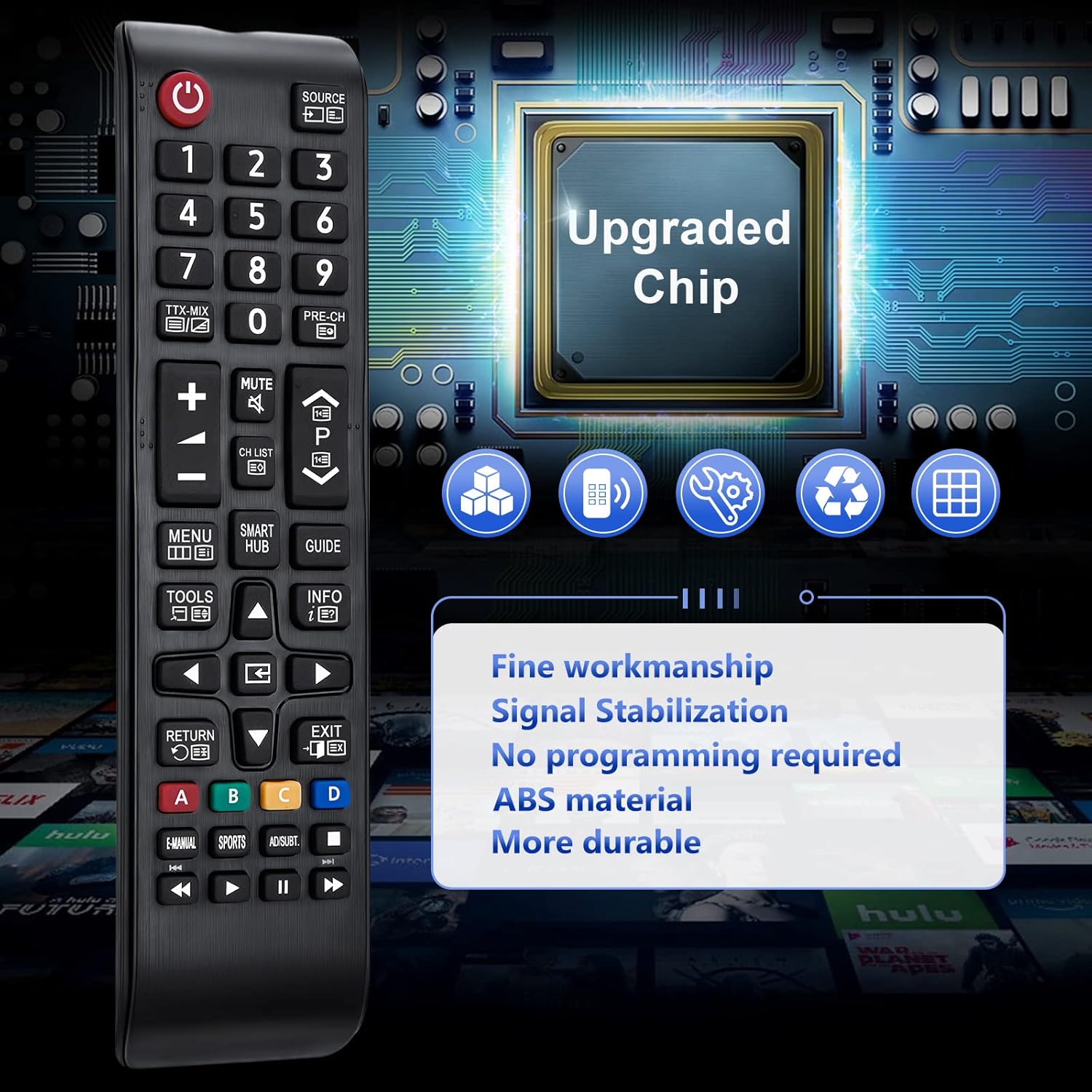
Figure 6: The remote's easy-to-use design allows quick access to content and apps.
4. Maintenance
4.1 Cleaning
To clean your remote control, gently wipe it with a soft, dry cloth. For stubborn dirt, slightly dampen the cloth with water or a mild, non-abrasive cleaner. Avoid using harsh chemicals or abrasive materials, as these can damage the remote's surface or internal components.
4.2 Battery Replacement
Replace the AAA batteries when the remote's responsiveness decreases or it stops functioning. Always replace both batteries at the same time with new ones. Dispose of used batteries according to local regulations.
5. Troubleshooting
If you experience issues with your Angrox Universal Remote Control, refer to the following common problems and solutions:
- Remote not responding:
- Ensure batteries are correctly installed with proper polarity.
- Replace old batteries with new ones.
- Check for any obstructions between the remote and the TV's infrared receiver.
- Short transmission distance:
- Ensure batteries are fresh.
- Point the remote directly at the TV's IR sensor.
- Minimize strong light sources (e.g., direct sunlight) that might interfere with the IR signal.
- Specific buttons not working:
- Clean the remote's surface and buttons to ensure no debris is preventing proper contact.
- This remote is designed to cover all functions of the original remote. If a specific function is not working, ensure your TV model supports that function with a standard IR remote.
The remote features an upgraded chip for enhanced signal stabilization and durability, which helps prevent many common issues.

Figure 7: The remote's upgraded chip ensures fine workmanship, signal stabilization, and durability.
6. Specifications
| Feature | Detail |
|---|---|
| Brand | Angrox |
| Model Name | Universal Remote Control |
| Model Number | BN59-01199F |
| Compatible Devices | Samsung LCD LED HDTV 3D Smart TV (various models) |
| Connectivity Technology | Infrared (IR) |
| Maximum Range | 10 Metres (approx. 33 feet) |
| Batteries Required | 2 x AAA (not included) |
| Battery Cell Composition | Alkaline |
| Product Dimensions | 9 x 5 x 1.5 cm |
| Item Weight | 60 g |
| Color | Black |
7. Warranty and Support
7.1 Warranty Information
This Angrox Universal Remote Control comes with a 60-day warranty from the date of purchase. This warranty covers manufacturing defects and ensures the product functions as described. Please retain your proof of purchase for warranty claims.
7.2 Customer Support
For any questions, issues, or support needs regarding your remote control, please contact Angrox customer service. We are committed to providing excellent after-sales service and resolving any problems you may encounter.

Figure 8: Dedicated after-sales service is available for customer inquiries and support.
Please note that batteries and instructions are not included in the product packaging, as stated in the product description. This manual serves as your comprehensive guide.

