
AlveyTech HC-2802HL-PR3
AlveyTech Heat & Massage Hand Control for Pride Lift Chairs
Model: HC-2802HL-PR3
Brand: AlveyTech
Introduction
This manual provides essential information for the proper installation, operation, and maintenance of your AlveyTech Heat & Massage Hand Control (Model: HC-2802HL-PR3) for Pride Mobility lift chairs. Please read this manual thoroughly before use to ensure safe and effective operation.
The HC-2802HL-PR3 Tranquil Ease Heat and Massage hand control is manufactured by Raffel Systems, a recognized leader in electronic controls for the health and wellness industry. This control unit is designed to manage the chair's movement (raising and lowering) and activate heat and massage functions. Its intuitive design features symbols instead of text on control buttons for universal understanding.
Product Features
- Controls chair movement: raises and lowers the chair to and from standing and recline positions.
- Integrated heat and massage settings with interactive LED indicators.
- User-friendly interface with easily understood symbols on control buttons.
- Direct replacement for older Raffel Systems 2802-FR3 model.
Compatibility
This hand control is compatible with numerous Pride Mobility lift chair models. Verify your chair's model number against the list below to ensure compatibility:
- Pride Lift Chairs Classic LC-215 (CL-15/LC-15)
- Pride Lift Chairs Classic LC-250 (CL-30/LC-30)
- Pride Lift Chairs Elegance LC-421 (LC-550)
- Pride Lift Chairs Elegance LC-450 (LL-450)
- Pride Lift Chairs Elegance LC-470 (LC-570/LL-570)
- Pride Lift Chairs Elegance LC-485 (LC-585)
- Pride Lift Chairs Elegance LC-510 (LL-510)
- Pride Lift Chairs Elegance LC-560 (LC-575)
- Pride Lift Chairs Essential LC-110 (CL-10/LC-10)
- Pride Lift Chairs Heritage GL-58
- Pride Lift Chairs Heritage LC-358 (GL-358)
Note: This hand control replaces Pride Mobility part number ELEASMB5578 and Raffel Systems part number 2802-FR3.
Setup and Installation
Installation of the hand control is generally straightforward. Always ensure the lift chair is unplugged from the power outlet before attempting any installation or maintenance.
- Disconnect Power: Unplug the lift chair from the wall outlet to prevent electrical hazards.
- Locate Existing Control Connection: Identify where the current hand control connects to the chair's motor or control box. This is typically a D-sub (VGA-style) connector.
- Remove Old Control (if applicable): Carefully disconnect the old hand control by pulling the connector straight out. Do not twist or force it.
- Connect New Control: Align the new AlveyTech hand control's D-sub connector with the port on the chair's control box. Gently push the connector in until it is firmly seated. Ensure the screws on the connector are tightened if available to secure the connection.
- Route Cable: Route the coiled cable in a way that it does not interfere with the chair's moving parts or pose a tripping hazard.
- Restore Power: Once the new hand control is securely connected, plug the lift chair back into the power outlet.
- Test Functionality: Test all functions of the hand control (chair movement, heat, massage) to ensure proper operation.
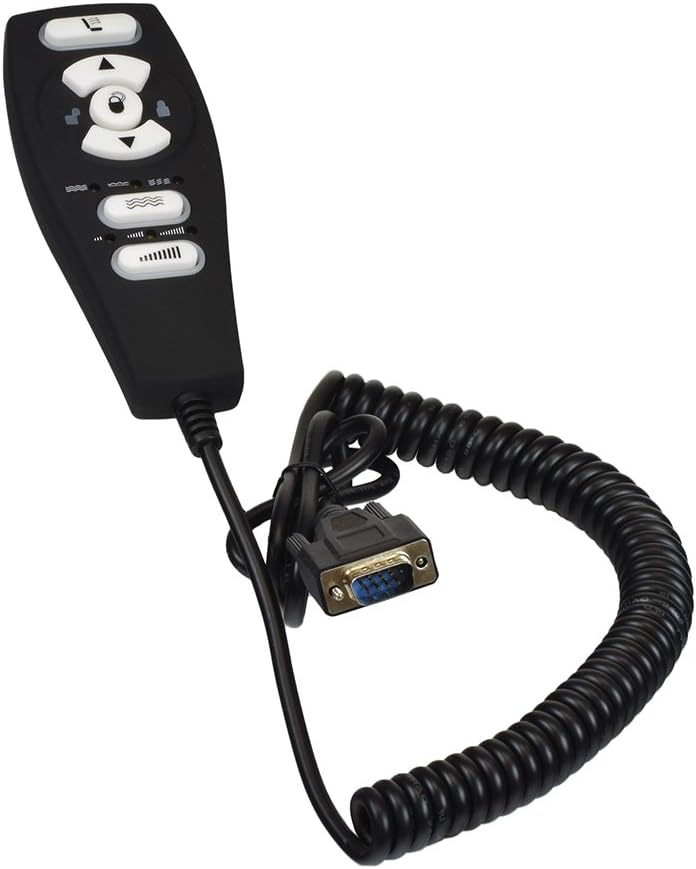
Image: The AlveyTech Heat & Massage Hand Control, showing the ergonomic design and the coiled cable terminating in a D-sub connector, ready for installation.

Image: A detailed view of the D-sub connector, highlighting its pin configuration and the robust coiled cable. This is the connection point to the lift chair's control system.
Operating Instructions
The hand control features intuitive symbols for easy operation of your lift chair's functions.

Image: Front view of the hand control, displaying the various buttons with their symbolic representations for chair movement, heat, and massage functions.
- Chair Movement: Use the directional arrow buttons (up/down) to raise or lower the chair. The top button typically moves the chair to a standing position, and the bottom button reclines it.
- Heat Function: Press the button with the wavy lines symbol (often with a single wave) to activate or deactivate the heat function. LEDs will illuminate to indicate activation.
- Massage Function: Press the button with multiple wavy lines (often with three waves) to cycle through massage modes or intensity levels. LEDs will indicate the selected massage setting.
- Lock Function: Some models may feature a lock button (padlock symbol) to prevent accidental operation. Consult your chair's manual for specific lock functionality.
Always ensure you are in a safe position before operating the chair's movement functions. Avoid placing objects under or around the chair that could obstruct its movement.
Maintenance
The AlveyTech hand control requires minimal maintenance to ensure long-lasting performance.
- Cleaning: Wipe the surface of the hand control with a soft, damp cloth. Do not use abrasive cleaners or solvents. Ensure no liquid enters the control unit.
- Cable Inspection: Periodically inspect the coiled cable for any signs of wear, fraying, or damage. A damaged cable should be replaced immediately to prevent electrical hazards.
- Connection Check: Ensure the D-sub connector remains firmly seated in its port. A loose connection can lead to intermittent functionality.
- Storage: When not in use, store the hand control in a safe place where it will not be crushed or damaged.

Image: The reverse side of the hand control, displaying the manufacturer's label with model number (HC-2802HL-PR3) and other regulatory information.
Troubleshooting
If you experience issues with your hand control, try the following troubleshooting steps:
| Problem | Possible Cause | Solution |
|---|---|---|
| Hand control is unresponsive. | No power to chair; loose connection; faulty control. |
|
| Chair moves intermittently. | Loose connection; damaged cable. |
|
| Heat/Massage not working. | Control issue; chair's internal system issue. |
|
If troubleshooting steps do not resolve the issue, contact AlveyTech customer support or a qualified technician.
Specifications
| Attribute | Detail |
|---|---|
| Brand | AlveyTech |
| Model Number | HC-2802HL-PR3 |
| Replaces Part Numbers | Pride Mobility: ELEASMB5578, Raffel Systems: 2802-FR3 |
| Product Dimensions | 6"D x 9"W x 2"H (approximate, for control unit) |
| Item Weight | 8 ounces |
| Connector Type | D-sub (VGA-style) |
| Included Components | Remote Control |
| Indoor/Outdoor Usage | Indoor |
Warranty and Support
For information regarding product warranty, returns, or technical support, please contact AlveyTech customer service directly. Refer to your purchase documentation for specific warranty terms and contact details.
AlveyTech Customer Service: Please visit the official AlveyTech website or refer to the contact information provided with your product packaging.
Important: Please follow included assembly instructions and guidelines for safe use.
Ask a question about this manual
Ask about setup, troubleshooting, compatibility, parts, safety, or missing instructions. Manuals+ will review the question and use this page’s manual context to help answer it.