
1. Introduction
The VidPro VB-H Top Hand Grip is designed to enhance the stability and versatility of your DSLR, camera, or camcorder. This lightweight and durable aluminum handle provides a secure and comfortable grip, facilitating smoother video recording and offering multiple mounting points for various accessories.
This manual provides essential information for the proper setup, operation, and maintenance of your VidPro VB-H Top Hand Grip.
2. Package Contents
- 1x VidPro VB-H Top Hand Grip
- (Additional items may vary based on specific retail packaging)
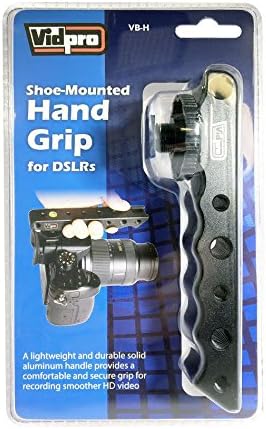
Image 1: The VidPro VB-H Top Hand Grip as it appears in its retail packaging. The packaging displays the product name, model number, and key features.
3. Setup
- Identify Hot-Shoe Mount: Locate the standard hot-shoe mount on your camera or camcorder. This is typically found on the top of the device.
- Attach the Grip: Align the base of the VidPro VB-H Top Hand Grip with your camera's hot-shoe mount. Slide the grip onto the hot-shoe until it is fully seated.
- Secure the Grip: Tighten the locking wheel or screw on the grip's base to firmly secure it to your camera's hot-shoe. Ensure the grip is stable and does not wobble.

Image 2: The VidPro VB-H Top Hand Grip securely attached to a DSLR camera, demonstrating its intended use for improved handling.
4. Operating Instructions
4.1 Using the Hand Grip
Once attached, hold the VidPro VB-H Top Hand Grip to stabilize your camera during video recording or photography. The ergonomic design provides a comfortable and secure hold, reducing camera shake and improving shot quality.
4.2 Accessory Mounting
The grip features multiple ¼” and ⅜” threads, as well as a cold shoe mount. These allow for the attachment of various accessories such as external microphones, LED lights, field monitors, and other compatible equipment.
- ¼” and ⅜” Threads: Use these threaded holes to mount accessories with corresponding screw mounts.
- Cold Shoe Mount: Attach accessories designed for cold shoe compatibility, such as small lights or microphones.
4.3 Built-in Bubble Level
Utilize the integrated bubble level on the grip to ensure your camera is perfectly horizontal, aiding in capturing level shots and maintaining proper framing.

Image 3: A detailed view of the VidPro VB-H Top Hand Grip, highlighting the multiple ¼” and ⅜” threads, the cold shoe mount, and the integrated bubble level.
5. Maintenance
- Cleaning: Wipe the grip with a soft, dry cloth to remove dust and fingerprints. Avoid using harsh chemicals or abrasive materials.
- Storage: Store the grip in a cool, dry place away from direct sunlight and extreme temperatures when not in use.
- Inspection: Periodically check all screws and connections to ensure they are secure.
6. Troubleshooting
6.1 Grip is Loose on Camera
- Solution: Ensure the grip is fully seated in the camera's hot-shoe mount. Tighten the locking wheel or screw on the grip's base firmly.
6.2 Accessories Not Attaching Securely
- Solution: Verify that the accessory's mounting screw or cold shoe base matches the grip's ¼”, ⅜” threads, or cold shoe mount. Ensure screws are tightened appropriately.
7. Specifications
| Brand | VidPro |
| Model Number | ES70-VB-H |
| Product Dimensions | 2 x 0.62 x 2 inches |
| Item Weight | 0.01 ounces |
| Color | Black |
| Compatible Devices | Camcorder, Camera, Monitor (via accessories) |
| Mounting Points | Standard Hot-Shoe, Multiple ¼” and ⅜” threads, Cold Shoe Mount |
| Special Features | Built-in Bubble Level |
8. Warranty and Support
For warranty information or technical support, please refer to the official VidPro website or contact their customer service directly. Keep your purchase receipt for warranty claims.
VidPro Official Website: Visit the VidPro Store on Amazon (Link provided for general brand information, specific support contact may be on their dedicated website).