
AlveyTech ZK2430-D-FS-ROHS
AlveyTech ZK2430-D-FS-ROHS 24 Volt Motor Speed Control Module
For Razor MX350 Dirt Rocket Bike (Versions 33-36)
Introduction
This manual provides essential information for the installation and use of the AlveyTech ZK2430-D-FS-ROHS 24 Volt Motor Speed Control Module. This component is designed as a direct replacement for the Razor MX350 Dirt Rocket electric bike, specifically for versions 33-36. The control module is a critical electrical component that manages the bike's motor speed and overall electrical functions. Proper installation and understanding of its operation are vital for restoring your bike's performance.
Compatibility
This AlveyTech ZK2430-D-FS-ROHS control module is specifically designed for the Razor MX350 Dirt Rocket electric bike, Versions 33-36 only.
Important: This ZK2430-D-FS-ROHS model is NOT interchangeable with models ZK2430-D-LD and ZK2430-D2-FS-ROHS.
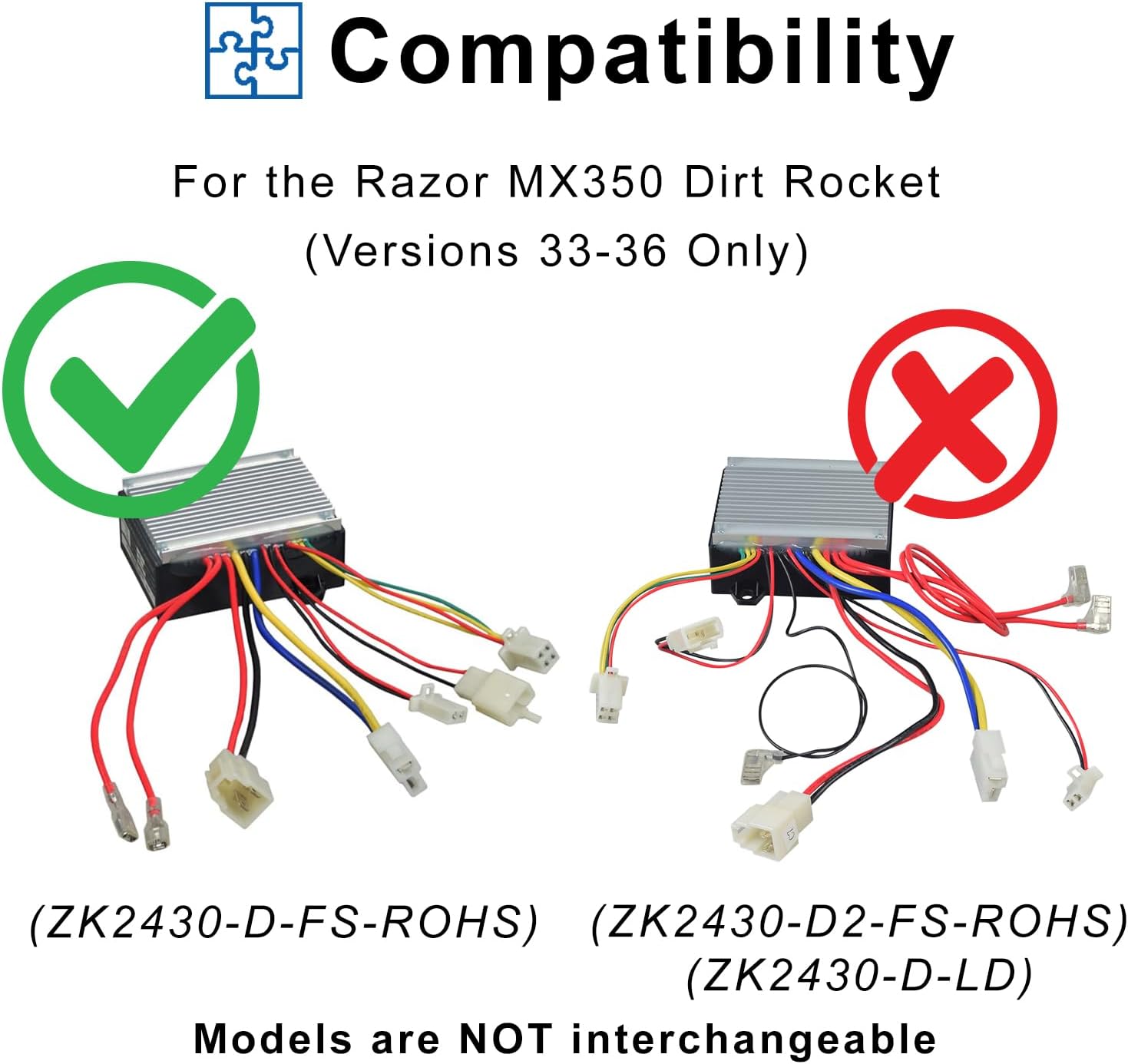
Image: Compatibility chart for the control module, highlighting the correct model (ZK2430-D-FS-ROHS) for Razor MX350 Dirt Rocket Versions 33-36 and incompatible models.
Verifying Your Model Version Number
To ensure correct compatibility, it is crucial to verify your Razor product's model version. The product ID code contains this information.
- The product ID code can be found on the battery cover, on the bottom of the frame, and/or on the original battery charger that came with the vehicle.
- The 7th and 8th numbers in your product ID code represent the version number of your Razor product (e.g., "01" = Version 1, "02" = Version 2, "09" = Version 9, etc.).
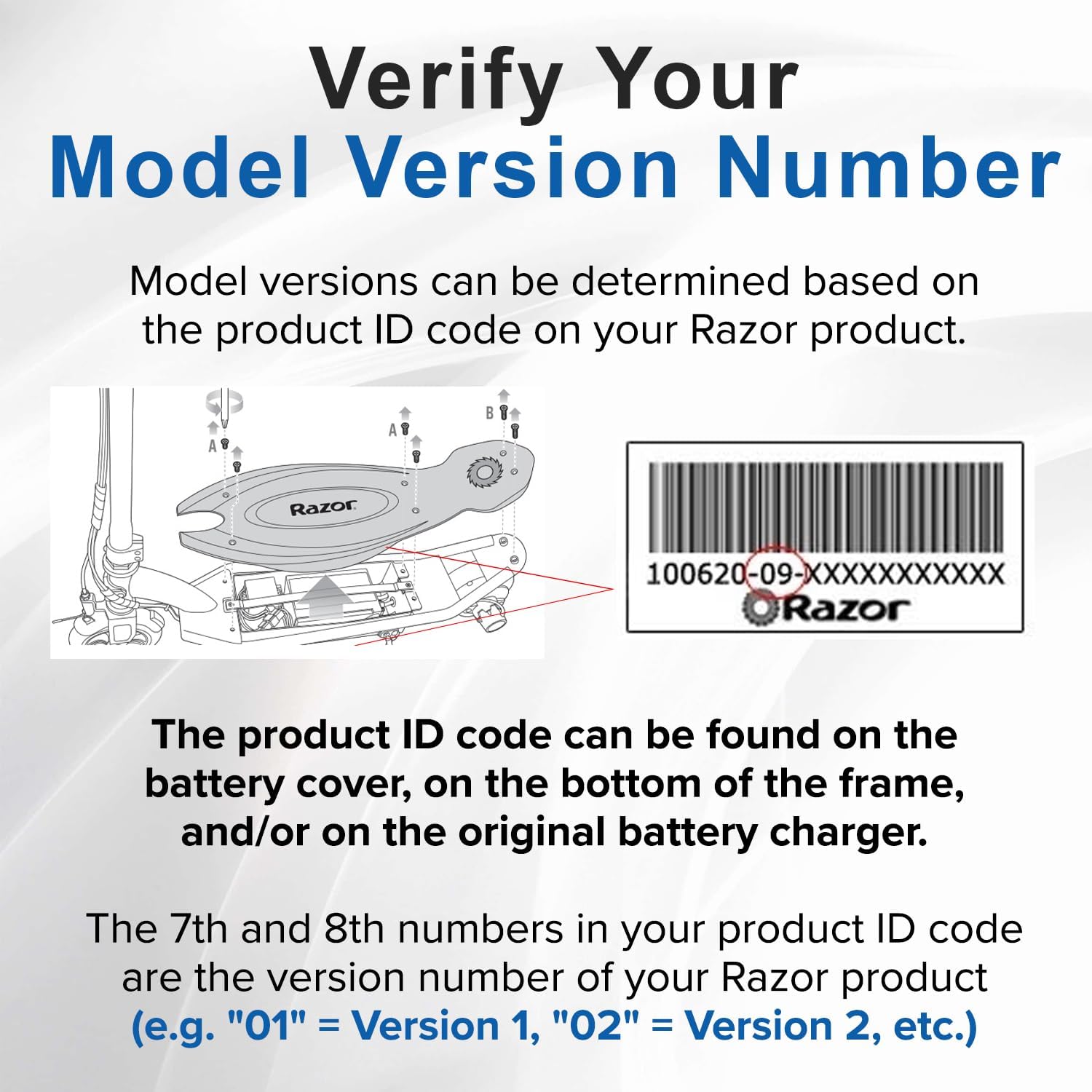
Image: Illustration demonstrating where to locate the product ID code on a Razor product and how to interpret the 7th and 8th digits for the version number.
Note on Versions:
- Versions 1-32: Original controller no longer available. Requires a retrofit combo.
- Versions 33-36: Use ZK2430-D-FS-ROHS (this product).
- Versions 37-40: Use ZK2430-D2-FS-ROHS (ZK2430-D-LD).
- Versions 41+: Version 42 (Black & Teal Only) uses B-ZK2430-D3-M.

Image: A Razor MX350 Dirt Rocket bike, confirming its compatibility with the specified control module for versions 33-36.

Image: A visual comparison of Razor dirt bike models, indicating that only the MX350 is compatible with this control module, while MX125, MX400, and MX500 are not.
Safety Information
- Adult Supervision: Adult supervision is required during installation.
- Electrical Safety: This product involves electrical components. Always disconnect the battery from the electric bike before attempting any installation or maintenance.
- Intended Use: For outdoor use only.
- Age Restriction: Not suitable for children under 13 years of age.
Installation Instructions
Follow these steps to replace the motor speed control module. Ensure the bike's power is off and the battery is disconnected before starting.
- Prepare the Bike: Ensure the Razor MX350 Dirt Rocket is turned off. Locate the battery compartment and disconnect the battery to prevent accidental power-on during installation.
- Locate the Old Controller: Identify the existing control module on your bike. It is typically housed in a protective casing.
- Disconnect Wires: Carefully disconnect all wires from the old control module. Note the position and color of each connector if necessary, though the unique shapes of the connectors are designed to prevent incorrect reattachment.
- Remove Old Controller: Unmount the old control module from its position.
- Install New Controller: Position the new AlveyTech ZK2430-D-FS-ROHS control module in the same location.
- Connect Wires: Connect the wires to the new control module. Each connector has a unique shape and size, making installation straightforward. Simply match and plug in each connector. Ensure the 4-wire throttle connector is correctly attached.
- Secure Controller: Secure the new control module in place.
- Reconnect Battery: Reconnect the battery to the bike.
- Test Functionality: Turn on the bike and test its functionality to ensure the new control module is working correctly.

Image: Detailed views of the control module's connectors, illustrating their distinct shapes for easy and correct connection.
Operation
The AlveyTech ZK2430-D-FS-ROHS control module acts as the central processing unit for your electric dirt bike's power system. It receives input from the throttle and other sensors, then regulates the power delivered to the motor to control speed and acceleration. Once properly installed, the module operates automatically in conjunction with the bike's existing electrical components to provide smooth and responsive control.
Maintenance
The control module itself requires minimal maintenance. To ensure its longevity and proper function:
- Keep the module clean and free from dirt, dust, and moisture.
- Regularly inspect all wire connections to ensure they are secure and free from corrosion.
- Avoid exposing the control module to extreme temperatures or direct water spray.
Troubleshooting
If your Razor MX350 Dirt Rocket is not functioning correctly after installing the new control module, consider the following common issues:
- Faulty Batteries: Ensure your bike's batteries are fully charged and in good working condition. Worn-out or damaged batteries are a common cause of performance issues.
- Throttle Malfunction: A faulty throttle can prevent the control module from receiving proper input. Check the throttle for any damage or loose connections.
- Incorrect Controller Version: Double-check that you have installed the correct control module version (ZK2430-D-FS-ROHS) for your Razor MX350 Dirt Rocket (Versions 33-36). Refer to the "Compatibility" section.
- Loose Connections: Verify that all connectors are securely plugged into the control module and other components.

Image: The data plate of the control module, reiterating that common issues may stem from faulty batteries, throttle, or the controller itself.
Specifications
| Feature | Detail |
|---|---|
| Model Number | ZK2430-D-FS-ROHS |
| Brand | AlveyTech |
| Voltage | 24 Volts |
| Product Dimensions (L x W x H) | 2.75" x 5.75" x 6" |
| Material | Aluminum |
| Included Components | Throttle Control Module |
| Number of Connectors | 7 (including 4-wire throttle connector) |
| Manufacturer Part Number | W13113601015 |

Image: The AlveyTech ZK2430-D-FS-ROHS control module, illustrating its key features and connector configuration.
Support and Contact
For further assistance, technical support, or inquiries regarding this product, please visit the official AlveyTech store or contact their customer service.
AlveyTech Store: Visit AlveyTech on Amazon
Ask a question about this manual
Ask about setup, troubleshooting, compatibility, parts, safety, or missing instructions. Manuals+ will review the question and use this page’s manual context to help answer it.