
1. Important Safety Information
Please read all safety instructions before installing or using this product. Failure to follow these instructions may result in electric shock, fire, or other hazards.
- WARNING: Turn off power at the circuit breaker or fuse box before installation or servicing.
- Do not use with dimmers not specifically designed for LED bulbs, unless specified.
- Ensure the bulb is suitable for the fixture's voltage (120 Volts).
- Do not disassemble or modify the bulb.
- Avoid direct exposure to water or excessive moisture unless the fixture is rated for wet locations.
- This bulb is designed for indoor use only.
2. Product Overview
The Utilitech PRO G8 2W LED bulb is an energy-efficient replacement for traditional G8 halogen bulbs. It provides warm white light and is designed for 120-volt applications. Its compact size makes it suitable for various fixtures, including under-cabinet lighting and decorative luminaires.
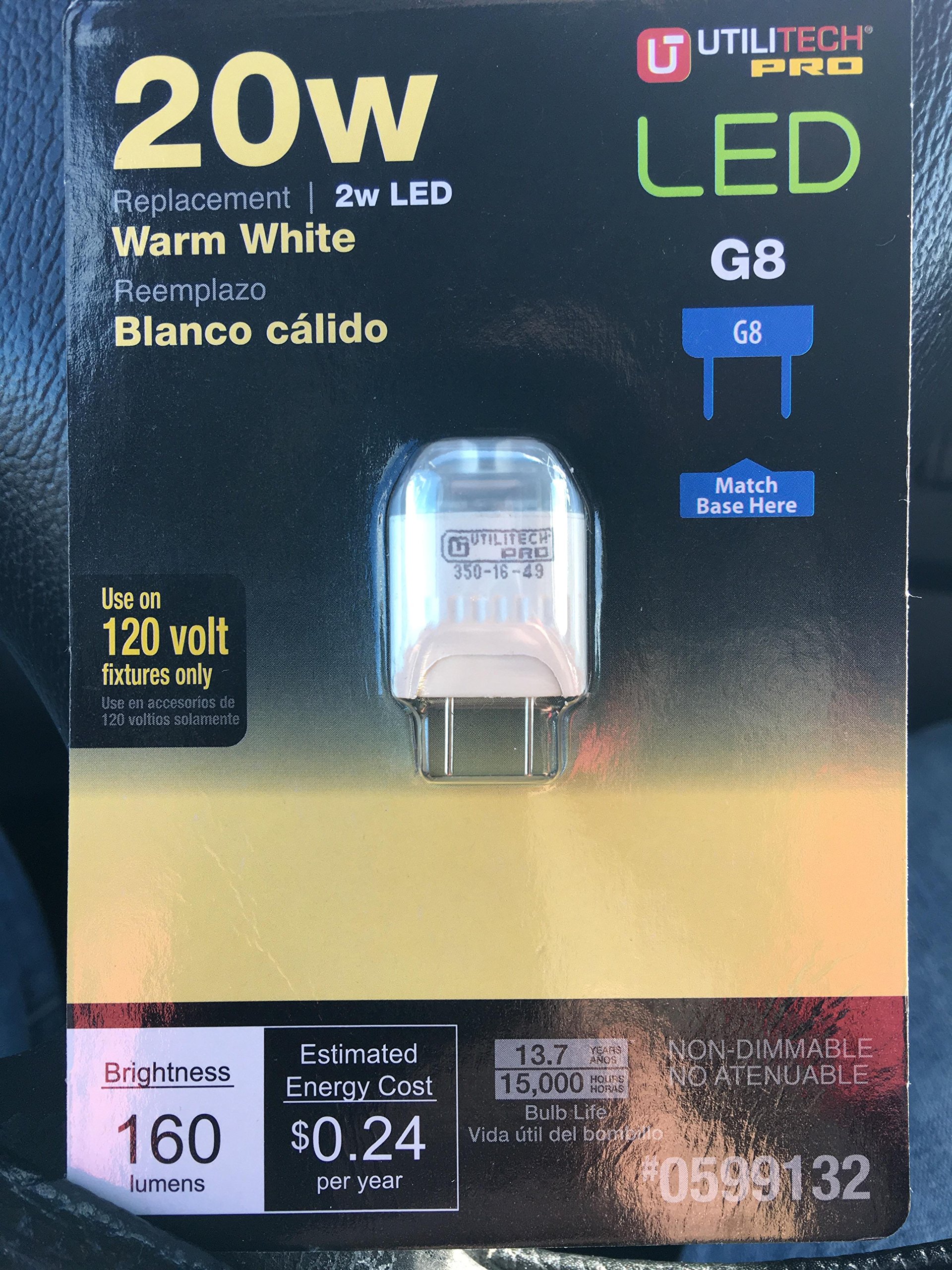
An image showing the Utilitech PRO G8 2W LED 120 Volt bulb, highlighting its compact G8 base and LED components.
3. Setup and Installation
Follow these steps to safely install your Utilitech PRO G8 LED bulb:
- Ensure Power is OFF: Before beginning installation, turn off the power to the light fixture at the circuit breaker or fuse box. Confirm the power is off by attempting to turn on the light switch.
- Remove Old Bulb: Carefully remove the existing G8 bulb from the fixture. Allow it to cool if it was recently in use.
- Insert New LED Bulb: Align the two pins of the Utilitech PRO G8 LED bulb with the sockets in the fixture. Gently push the bulb into place until it is securely seated. Do not force the bulb.
- Restore Power: Once the bulb is securely installed, restore power at the circuit breaker or fuse box.
- Test: Turn on the light switch to confirm the bulb is functioning correctly.
Note: If the bulb does not light up, ensure it is properly seated and that power has been restored.
4. Operating Instructions
The Utilitech PRO G8 LED bulb operates like a standard light bulb once installed.
- Turning On/Off: Use the wall switch or fixture switch to turn the light on or off.
- Dimmable Feature: This bulb is dimmable. For optimal performance and to avoid flickering, use with LED-compatible dimmers. Consult your dimmer's instructions for compatibility.
5. Maintenance
The Utilitech PRO G8 LED bulb requires minimal maintenance.
- Cleaning: Ensure power is off before cleaning. Use a soft, dry cloth to wipe the bulb if necessary. Do not use liquid cleaners or abrasive materials.
- Replacement: LED bulbs have a long lifespan. When replacement is eventually needed, follow the installation steps outlined in Section 3. Dispose of old bulbs according to local regulations.
6. Troubleshooting
If you encounter issues with your Utilitech PRO G8 LED bulb, refer to the following common solutions:
| Problem | Possible Cause | Solution |
|---|---|---|
| Bulb does not light up. | No power to the fixture, bulb not seated correctly, or bulb is faulty. | Check circuit breaker. Ensure bulb is fully inserted. Test with another known working bulb. |
| Bulb flickers. | Incompatible dimmer switch, loose connection, or power fluctuations. | Ensure dimmer is LED-compatible. Check bulb seating. Consult an electrician if power fluctuations are suspected. |
| Light output is too low or too high. | Dimmer setting, or incorrect bulb wattage for desired brightness. | Adjust dimmer. Verify the bulb's wattage (2W) meets your brightness requirements. |
7. Specifications
| Feature | Detail |
|---|---|
| Brand | Utilitech |
| Model Number | 0599132 |
| Light Type | LED |
| Bulb Base | G8 |
| Wattage | 2 Watts |
| Incandescent Equivalent | 15 Watts |
| Voltage | 120 Volts |
| Light Color | Warm White |
| Special Feature | Dimmable |
| Color Rendering Index (CRI) | 80 |
| Indoor/Outdoor Usage | Indoor |
| Material | Copper |
| Item Weight | 0.64 ounces |
| UPC | 017801992854 |
8. Warranty and Support
For warranty information and customer support, please refer to the documentation provided at the point of purchase or contact Utilitech directly. Keep your purchase receipt as proof of purchase.
For further assistance, you may visit the Utilitech website or contact their customer service department. Specific contact details are typically found on the product packaging or the manufacturer's official website.


