
1. Introduction
This manual provides comprehensive instructions for the assembly, operation, maintenance, and troubleshooting of your Vive Mobility Rollator Walker. Designed for superior support and stability, this folding 4-wheel medical rolling walker features a comfortable seat and a convenient storage bag, making it an ideal mobility aid for adults, seniors, and individuals requiring assistance.
Key features include a durable, corrosion-resistant aluminum frame supporting up to 300 pounds, large 8-inch sport wheels for various surfaces, adjustable handle height for personalized fit, a compact foldable design for easy transport, dual braking system for safety, and integrated storage options.

Figure 1: The Vive Mobility Rollator Walker, showcasing its ruby red frame and gray storage bag.
2. Setup
Your Vive Mobility Rollator Walker comes largely pre-assembled. Follow these steps to prepare it for use:
- Unfolding the Walker: Carefully remove the walker from its packaging. Stand the walker upright. Pull the seat upwards by the center strap until the frame locks into place. Ensure all locking mechanisms are securely engaged before use.
- Attaching Front Wheels: The front wheels are designed for easy attachment. Align the wheel posts with the designated holes on the front legs of the walker. Press the push-button on the wheel post and insert it into the leg until the button snaps into place, securing the wheel. Repeat for the other front wheel.
- Attaching Storage Bag: The detachable storage bag can be attached to the front of the walker frame using its integrated straps.
- Adjusting Handle Height: Locate the adjustment pins on the handle posts. Press the pin and slide the handle up or down to your desired height. Ensure the handles are at a height that allows you to walk upright with a slight bend in your elbows. Release the pin to lock the handle in place. Ensure both handles are set to the same height.

Figure 2: The rollator's pre-assembled frame, ready for quick setup by attaching the front wheels.
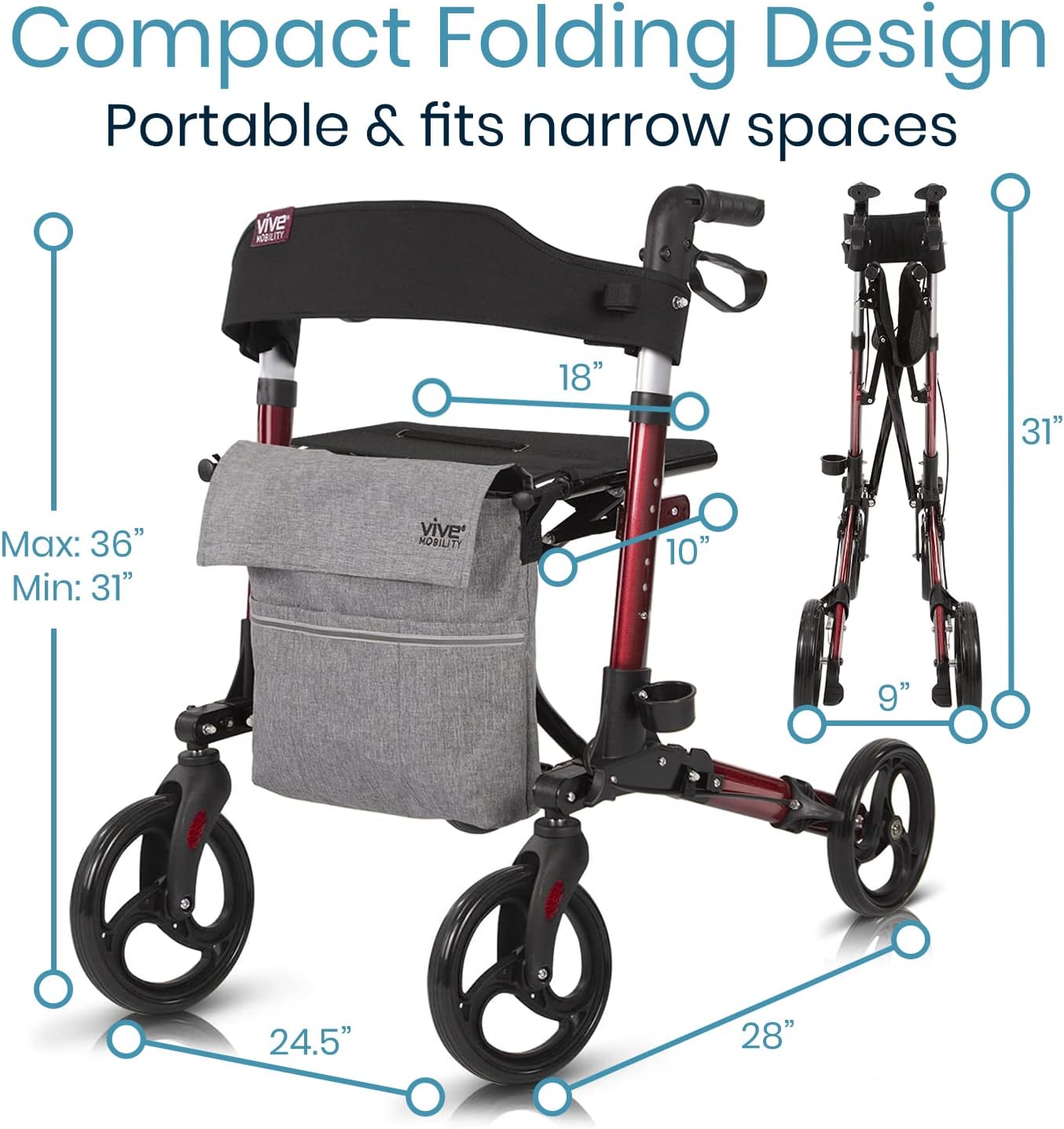
Figure 3: Illustration of the fully adjustable handles, allowing users to set the height for optimal posture.
3. Operating Instructions
3.1 Walking with the Rollator
To walk, push the rollator slightly ahead of you. Maintain an upright posture, keeping your back straight and shoulders relaxed. The large 8-inch sport wheels are designed to maneuver smoothly over various surfaces.
3.2 Using the Brakes
The rollator is equipped with a dual braking system for safety and control:
- To Slow Down or Stop: Squeeze the hand brake levers towards the handles.
- To Lock the Brakes: Push the hand brake levers down until they click into the locked position. This will prevent the rollator from moving, providing stability when sitting or standing.
- To Unlock the Brakes: Pull the hand brake levers back up until they release from the locked position.
3.3 Using the Seat and Backrest
The rollator features a comfortable mesh seat and a padded backrest for resting. To use the seat, ensure the brakes are locked to prevent movement. Sit down slowly and carefully. The backrest provides support while seated.

Figure 4: A user demonstrating the comfort features, including the padded backrest and removable storage bag.
3.4 Folding for Storage and Transport
The rollator features a compact folding design for easy storage and transport:
- Standard Fold: Pull up on the center strap located under the seat. The rollator will fold inward.
- More Compact Fold (for smaller spaces):
- After the standard fold, the rear wheels can be hinged to fold up against the frame by pressing the push-button on the wheel axle.
- The front wheels are removable with a simple push-button release on the wheel post, allowing for an even more compact profile.

Figure 5: The rollator demonstrating its compact folding design, suitable for narrow spaces and transport.
3.5 Cane Holder
An integrated cane holder is located on the side of the rollator. Use the hook and loop strap to secure your cane in place.
3.6 Product Overview Video
Video 1: "Meet the Vive Rollator Walker with Seat" - This video provides a visual guide to the rollator's features, including its modern design, detachable bag, cane holder, soft backrest, dual locking brakes, and compact folding capabilities. It demonstrates how to remove the bag, secure a cane, and fold the unit for travel.
4. Maintenance
Regular maintenance ensures the longevity and safe operation of your rollator:
- Cleaning: Wipe down the frame and components with a damp cloth and mild soap. Avoid abrasive cleaners. The aluminum frame is corrosion-resistant.
- Wheel Inspection: Periodically check the wheels for wear and tear. Ensure they rotate freely and are free of debris.
- Brake Check: Regularly test the dual braking system to ensure it engages and locks properly. If brakes feel loose or ineffective, refer to the troubleshooting section or consult a professional.
- Fastener Check: Ensure all screws, bolts, and locking mechanisms are tight and secure. Do not overtighten.
- Lubrication: If folding mechanisms or wheel axles become stiff, a silicone-based lubricant can be applied sparingly to improve movement.
5. Troubleshooting
| Problem | Possible Cause | Solution |
|---|---|---|
| Rollator difficult to fold or unfold. | Mechanism stiffness or debris. | Ensure no obstructions. Apply a small amount of silicone lubricant to hinges and locking points. |
| Brakes not engaging or locking properly. | Brake cable tension or worn brake pads. | Check brake cable tension. Adjust if necessary (consult a professional if unsure). Inspect brake pads for wear and replace if needed. |
| Wheels not rolling smoothly. | Debris in wheel bearings or worn wheels. | Clean any debris from around the wheel axles. If wheels are significantly worn, replacement may be necessary. |
| Rollator feels unstable. | Loose fasteners or improper setup. | Ensure all locking mechanisms are fully engaged and all fasteners are tight. Verify handle height is correctly set and even on both sides. |
6. Specifications
- Model Number: MOB1010RED
- Product Dimensions: 28"D x 24.5"W x 36"H
- Item Weight: 19 Pounds
- Weight Capacity: Up to 300 Pounds
- Material: Aluminum
- Color: Ruby Red (with Gray Bag)
- Wheel Size: 8-inch Sport Wheels
- Adjustable Handle Height: Fits users 4'11" - 6'2" (6 levels of adjustment)

Figure 6: Detailed specifications including weight capacity and key dimensions of the rollator.
7. Warranty and Support
Your Vive Mobility Rollator Walker is backed by a Vive 1-Year Guarantee. For warranty claims, product support, or any inquiries, please contact Vive Mobility customer service. Refer to your product packaging or the official Vive Mobility website for the most current contact information.
This product is eligible for purchase with Health Savings Account (HSA) or Flexible Spending Account (FSA) funds.


