
Angrox RM-ED047
Angrox Universal Remote Control User Manual
Model: RM-ED047
1. Introduction
This manual provides essential information for the proper use and maintenance of your Angrox Universal Remote Control. Designed for seamless compatibility with a wide range of Sony Bravia TVs, this remote offers a reliable and straightforward replacement for your original or damaged remote.
The Angrox remote control is engineered for ease of use, requiring no complex programming or setup. Simply insert batteries, and it's ready to operate your Sony TV.
2. Product Overview
The Angrox Universal Remote Control is a high-quality, compact, and non-slip device designed for comfortable handling and stable performance. It features a larger transmission range compared to many standard remotes, ensuring reliable operation from a distance.

Image 2.1: Front and back view of the Angrox Universal Remote Control, showcasing its ergonomic design and button layout.

Image 2.2: Multiple views of the remote control, highlighting its slim profile and textured back for a secure grip.
Key Features:
- Universal Compatibility: 100% compatible with all Sony TV and Sony Bravia remotes.
- No Programming Required: Ready to use right out of the box after battery insertion.
- Ergonomic Design: Small size and compact, with a non-slip surface for practical handling.
- Stable Performance: Offers a larger transmission range for reliable control.
- Durable Construction: Made from ABS material for enhanced safety and durability.

Image 2.3: Close-up view emphasizing the remote's safety features, durable construction, and use of ABS material.
Compatible Sony TV Models:
This remote is compatible with a wide range of Sony TV models, including but not limited to:
- KDL-40BX420, KDL-40BX421, KDL-22BX320, KDL-22BX321, KDL-32R300B, KDL-32BX320, KDL-32BX321, KDL-32BX420, KDL-32BX421, KDL-40BX421, KDL-40BXB, KDL-421, KDL-46BX420, KDL-46BX421, KDL-55BX520
- KDL-65X830B, KDL-70W830B, KDL-70W840B, KDL-70W850B, KDL-70XX70XX, XBR-40B, 9X850B, XBR-55X850B, XBR-55X900B, XBR-65X850B, XBR-65X900B, XBR-65X950B, XBR-70X850B, XBR-79X900B, XBR-800B, 5X950B
- KDL-19MB4000, KDL-19M4000, KDL-22L4000, KDL-32L4000, KDL-37L4000, KDL-40S4100

Image 2.4: The remote control positioned next to a modern Sony TV, visually confirming its compatibility with Sony LED and LCD televisions.
3. Setup
The Angrox Universal Remote Control is designed for immediate use with compatible Sony TVs. No complex programming or pairing procedures are required.
Inserting Batteries:
- Locate the battery compartment on the back of the remote control.
- Slide the battery cover downwards or in the direction indicated by an arrow to open it.
- Insert two (2) AAA batteries (not included), ensuring the positive (+) and negative (-) terminals align correctly with the markings inside the compartment.
- Close the battery cover by sliding it back into place until it clicks securely.
Once batteries are inserted, the remote control is ready to operate your Sony TV. It is recommended to use new, high-quality alkaline batteries for optimal performance and longevity.

Image 3.1: Detailed view of the remote's battery compartment, illustrating the correct orientation for inserting two AAA batteries.
4. Operating Instructions
The Angrox Universal Remote Control functions identically to the original Sony TV remote. All buttons are pre-programmed to perform their standard functions.
Basic Operation:
- Power Button: Press to turn your TV on or off.
- Number Buttons (0-9): Use to directly enter channel numbers.
- Channel Up/Down (CH +/-): Navigate through channels sequentially.
- Volume Up/Down (VOL +/-): Adjust the TV's volume level.
- Mute Button: Mute or unmute the TV's audio.
- Navigation Pad (Arrow Buttons & Enter): Use to navigate menus and select options.
- Home Button: Access the TV's main menu or smart TV interface.
- Input/Source Button: Switch between different input sources (HDMI, AV, etc.).
- Playback Controls: Buttons for Play, Pause, Stop, Fast Forward, Rewind, etc., for media playback.
Ensure there is a clear line of sight between the remote control and your TV's infrared receiver for optimal signal transmission. The remote offers a stable signal and sensitive buttons for a responsive user experience.

Image 4.1: A hand demonstrating the use of the remote control, highlighting its long-distance capability, fine workmanship, signal stabilization, and sensitive buttons.
5. Maintenance
Proper maintenance will ensure the longevity and optimal performance of your Angrox Universal Remote Control.
Cleaning:
- Wipe the remote control regularly with a soft, dry cloth.
- For stubborn dirt, slightly dampen the cloth with water or a mild, non-abrasive cleaner. Do not spray cleaner directly onto the remote.
- Avoid using harsh chemicals, solvents, or abrasive cleaning pads, as these can damage the remote's surface or internal components.
Battery Replacement:
Replace batteries when the remote's responsiveness decreases or it stops functioning. Always replace both batteries at the same time with new ones of the same type (AAA). Refer to Section 3 for battery insertion instructions.
Storage:
Store the remote control in a cool, dry place away from direct sunlight, extreme temperatures, and high humidity. If the remote will not be used for an extended period, it is advisable to remove the batteries to prevent leakage.
6. Troubleshooting
If you encounter issues with your Angrox Universal Remote Control, please refer to the following common problems and solutions:
| Problem | Possible Cause | Solution |
|---|---|---|
| Remote not responding. | Dead or incorrectly inserted batteries. | Check battery orientation. Replace with new AAA batteries. |
| Remote has limited range or intermittent response. | Weak batteries, obstruction, or remote too far from TV. | Replace batteries. Ensure clear line of sight to TV's IR receiver. Move closer to the TV. |
| Certain buttons do not work. | Dirt or debris under the button, or internal malfunction. | Clean the remote surface. If problem persists, contact support. |
| Remote does not control TV. | Incompatible TV model. | Verify your TV model is listed in the compatible models section (Section 2). |
7. Specifications
| Feature | Detail |
|---|---|
| Model Name | RM-ED047 |
| Brand | Angrox |
| Compatible Devices | Sony Televisions (various models, see Section 2) |
| Connectivity Technology | Infrared (IR) |
| Maximum Range | 10 Meters |
| Number of Buttons | 50 |
| Controller Type | Remote Control |
| Batteries Required | 2 x AAA (not included) |
| Product Dimensions (L x W x H) | 19.99 x 4.78 x 1.98 cm |
| Item Weight | 82 g |
| Special Features | Universal, Non-slip design |
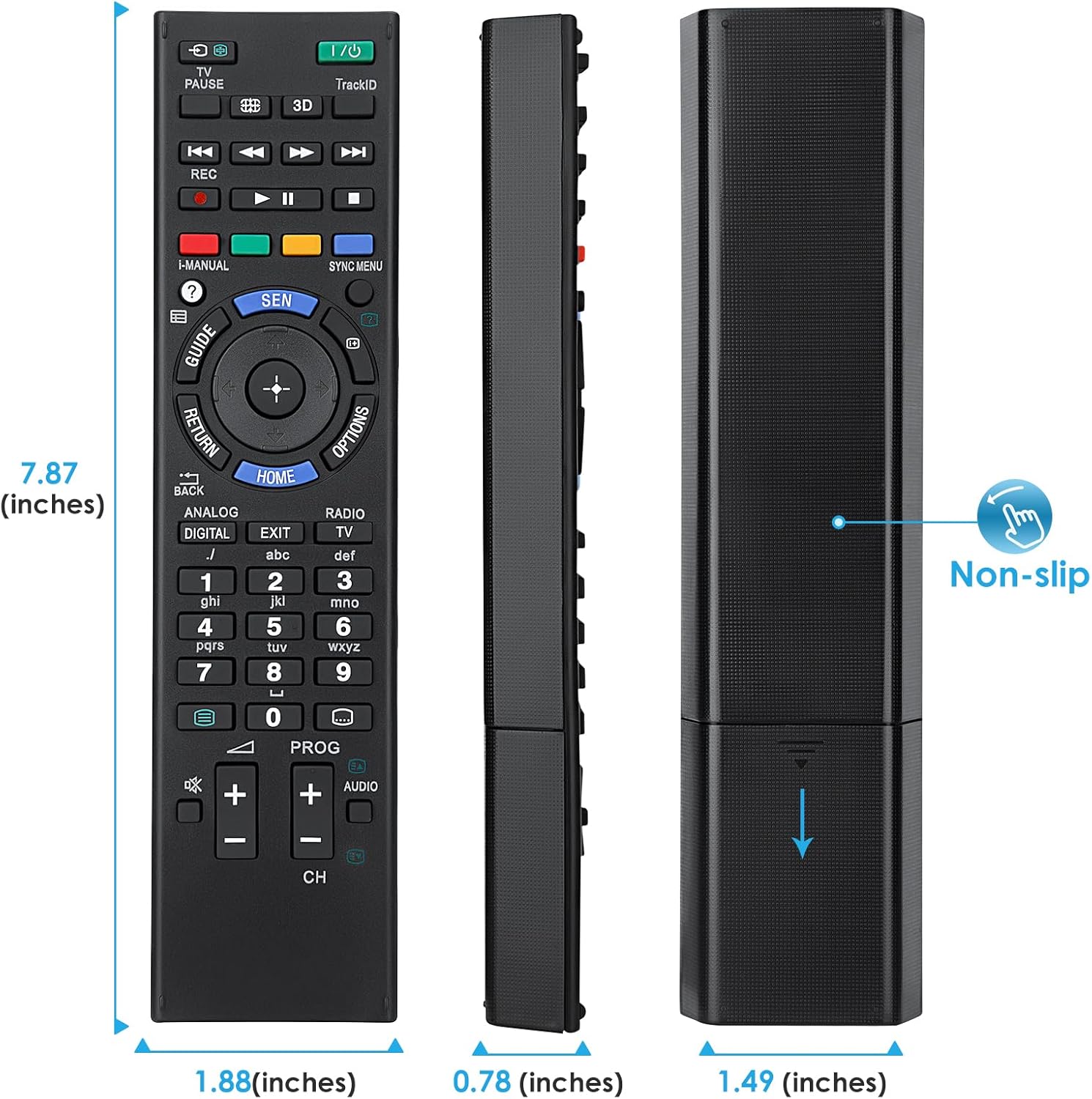
Image 7.1: Visual representation of the remote control's dimensions (length, width, thickness), providing precise measurements for reference.
8. Warranty and Support
Warranty Information:
This Angrox Universal Remote Control comes with a 60-day warranty from the date of purchase. This warranty covers manufacturing defects and ensures the product functions as described under normal use. Please retain your proof of purchase for warranty claims.
Customer Support:
For any questions, concerns, or technical assistance not covered in this manual, please contact the retailer or the manufacturer's customer support. Provide your product model number (RM-ED047) and a detailed description of the issue to facilitate faster service.
Related documentsRM-ED047


Ask a question about this manual
Ask about setup, troubleshooting, compatibility, parts, safety, or missing instructions. Manuals+ will review the question and use this page’s manual context to help answer it.