
Jetson JADV11-BLW
Jetson Adventure Electric Bike User Manual
Model: JADV11-BLW
1. Introduction
The Jetson Adventure Electric Bike is designed to enhance your cycling experience, allowing you to travel further and faster with integrated electric assistance. This manual provides essential information for the safe operation, assembly, maintenance, and troubleshooting of your new electric bike.

Figure 1.1: The Jetson Adventure Electric Bike, showcasing its sleek design and integrated components.
Featuring the appearance of a traditional bicycle, the Jetson Adventure incorporates a hub motor that provides assistance as you pedal. Built-in sensors detect your pedaling effort and adjust motor power accordingly. A rechargeable lithium-ion battery powers the motor and the integrated headlight system. Despite its electric capabilities, it remains one of the lightest e-bikes on the market, ensuring ease of riding even without motor assistance. For a comfortable ride on various terrains, the bike is equipped with front shock suspension, a shock-absorbing seat post, and disc brakes.
2. Safety Information
Always prioritize safety when operating your electric bike. Read and understand all instructions before your first ride. Failure to follow safety guidelines can result in serious injury or damage to the bike.
- Wear a Helmet: Always wear an approved bicycle helmet that fits properly.
- Pre-Ride Check: Before each ride, inspect tires, brakes, and battery charge. Ensure all components are securely fastened.
- Braking: The bike is equipped with front and rear disc brakes for superior stopping power. Familiarize yourself with their operation in a safe area before riding in traffic.
- Visibility: Utilize the bright LED headlight and taillight, especially during low-light conditions or at night, to increase your visibility to others.
- Traffic Laws: Obey all local traffic laws and regulations.
- Weather Conditions: Exercise caution when riding in wet or slippery conditions, as braking distance may increase.
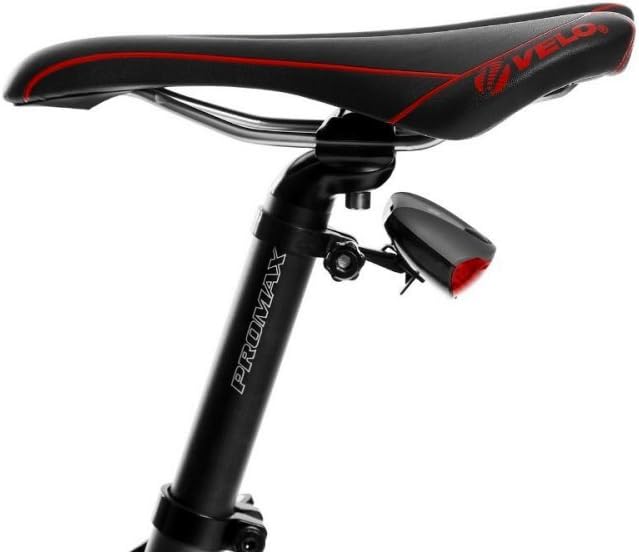
Figure 2.1: Rear view of the seat and integrated LED taillight, crucial for rider visibility.
3. Package Contents
Upon unboxing your Jetson Adventure Electric Bike, please ensure all the following components are present:
- Jetson Adventure Electric Bicycle
- Battery Charger
- User Manual (this document)
4. Setup and Assembly
The Jetson Adventure Electric Bike requires partial assembly. Follow these steps carefully to ensure proper setup:
- Unpack Components: Carefully remove all parts from the packaging.
- Attach Handlebar: Securely attach the handlebar to the bike's stem. Ensure it is centered and tightened to the manufacturer's specifications.
- Install Front Wheel: Mount the front wheel, ensuring the disc brake rotor aligns correctly with the caliper. Tighten the quick-release skewer or axle nuts firmly.
- Attach Pedals: Identify the left (L) and right (R) pedals. Thread them into the corresponding crank arms. Remember that the left pedal threads counter-clockwise. Tighten securely with a wrench.
- Insert Seat Post: Insert the seat post into the frame's seat tube. Adjust the seat height for comfortable pedaling, ensuring the minimum insertion mark is not visible. Tighten the seat post clamp.
- Charge Battery: Before your first ride, fully charge the lithium-ion battery using the provided charger. Refer to the charging instructions in the Operating section.

Figure 4.1: Front view of the bike, showing the handlebar and front wheel assembly points.

Figure 4.2: Rear view of the bike, illustrating the seat post and rear wheel area.
5. Operating Instructions
5.1 Powering On/Off
To power on the bike's electrical system, press and hold the power button on the LCD display. Repeat to power off.
5.2 Pedal Assist System (PAS)
The Jetson Adventure features a 250-watt hub motor with 9 levels of pedal assist. The system automatically detects your pedaling effort and provides motor assistance. Use the controls on the handlebar to adjust the assist level (1-9) to match your desired effort and speed.
5.3 LCD Display
The integrated LCD display provides crucial ride information at a glance. It shows:
- Current Speed (MPH)
- Battery Life/Energy Bar
- Pedal Assist Level (PAS)
- Distance Traveled (ODO/Mile)

Figure 5.1: The LCD display showing speed, battery, pedal assist level, and odometer.
5.4 Headlight and Taillight
The bike is equipped with a bright LED headlight and taillight for increased visibility. These lights are powered by the main battery. Consult the display controls for activating and deactivating the lights.
5.5 Charging the Battery
To charge the lithium-ion battery, connect the provided charger to the bike's charging port and then to a standard electrical outlet. The charging indicator on the charger will show the charging status. A full charge can power the bike for up to 30 miles, depending on terrain, assist level, and rider weight.
6. Maintenance
Regular maintenance is crucial for the longevity and safe operation of your electric bike. Perform these checks periodically:
- Tire Pressure: Check tire pressure before each ride. Maintain the recommended PSI (pounds per square inch) indicated on the tire sidewall.
- Brakes: Regularly inspect brake pads for wear and ensure disc brakes are clean and free of contaminants. Adjust brake levers for proper tension and responsiveness.
- Chain Lubrication: Keep the chain clean and lubricated to ensure smooth gear changes and prevent rust.
- Fasteners: Periodically check all bolts, nuts, and quick-release levers to ensure they are securely tightened.
- Battery Care: Store the battery in a cool, dry place. Avoid fully discharging the battery for extended periods. Charge it regularly, even if the bike is not in use.
- Cleaning: Clean the bike with a damp cloth. Avoid using high-pressure washers directly on electrical components.
7. Troubleshooting
This section addresses common issues you might encounter with your Jetson Adventure Electric Bike. For problems not listed here, please contact customer support.
| Problem | Possible Cause | Solution |
|---|---|---|
| Bike does not power on. | Battery is not charged or not properly connected. | Ensure battery is fully charged and securely seated in its compartment. Check all electrical connections. |
| Motor not assisting. | Pedal assist level is set to 0 or battery is low. | Increase the pedal assist level on the LCD display. Check battery charge and recharge if necessary. Ensure you are pedaling. |
| Brakes feel spongy or ineffective. | Brake pads worn, cable tension loose, or air in hydraulic system (if applicable). | Inspect brake pads for wear and replace if needed. Adjust brake cable tension. If hydraulic, professional service may be required. |
| Unusual noises during operation. | Loose components, dry chain, or debris in drivetrain. | Check all fasteners. Lubricate the chain. Inspect drivetrain for foreign objects. |
8. Specifications
Detailed specifications for the Jetson Adventure Electric Bike:
| Feature | Detail |
|---|---|
| Bike Type | Cross Country Bike |
| Age Range (Description) | Adult |
| Brand | Jetson |
| Color | Blue/White |
| Wheel Size | 26 Inches |
| Frame Material | Aluminum |
| Suspension Type | Front, Rear |
| Special Feature | Rechargeable |
| Included Components | BICYCLE, CHARGER, MANUAL |
| Size | 32 inch / One Size |
| Brake Style | Disc |
| Specific Uses For Product | all mountain |
| Item Weight | 42 Pounds |
| Model Name | Jetson Adventure Electric Bicycle |
| Power Source | rechargeable-battery |
| Lithium Battery Energy Content | 1 Kilowatt Hours |
| UPC | 851231007180 |
| Manufacturer | Jetson Electric Bike |
| Item Package Dimensions L x W x H | 57.01 x 32.01 x 10.98 inches |
| Package Weight | 23.68 Kilograms |
| Warranty Description | 1-Year |
| Part Number | JADV11-BLW |
9. Warranty and Support
Your Jetson Adventure Electric Bike comes with a 1-Year Warranty from the date of purchase, covering manufacturing defects. Please retain your proof of purchase for warranty claims.
For any questions, issues, or technical support, please contact our responsive customer service team. They are ready to help you with any concerns regarding your product.
You can find contact information on the official Jetson website or through your purchase platform.
Related documentsJADV11-BLW


Ask a question about this manual
Ask about setup, troubleshooting, compatibility, parts, safety, or missing instructions. Manuals+ will review the question and use this page’s manual context to help answer it.