
Introduction
Thank you for choosing the Remax RB-T8 Bluetooth Headset. This headset is designed to provide clear, low-noise sound for your communication and audio needs. It is portable, easy to operate, and features Bluetooth 4.1 connectivity with noise-cancelling microphone for HD voice calls.
Key features include:
- Bluetooth 4.1 for stable and efficient wireless connection.
- Integrated Noise Cancelling Mic for clear conversations.
- Portable and user-friendly design.

Image: Front and back view of the Remax RB-T8 Bluetooth Headset, showcasing its sleek design in black and gold/silver finishes.
Setup Guide
1. Charging the Headset
Before first use, fully charge the headset. The Remax RB-T8 uses a Micro USB input for charging.
- Connect the Micro USB cable to the headset's charging port.
- Connect the other end of the cable to a USB power source (e.g., computer, wall adapter).
- A full charge typically takes about 2 hours.
- The indicator light will change to indicate charging status (refer to specific light behavior in your product's quick start guide if available).
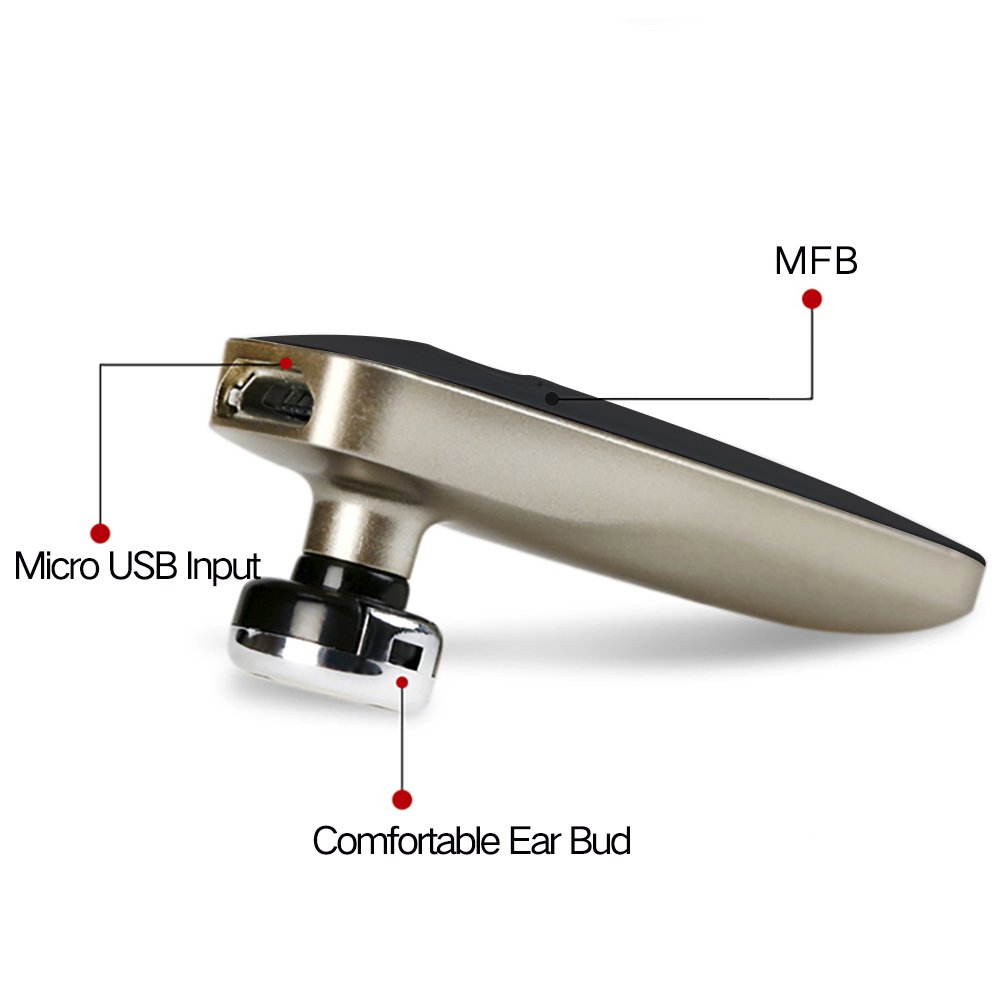
Image: Detailed view of the Remax RB-T8 headset highlighting the Micro USB Input for charging, the Multi-Function Button (MFB), and the comfortable ear bud.

Image: Infographic detailing the battery performance of the Remax RB-T8 headset, showing approximately 2 hours charge time, over 55 hours standby time, about 4 hours talk time, and about 4 hours music playing time.
2. Pairing with a Device
The headset uses Bluetooth 4.1 for wireless connection.
- Ensure the headset is charged and turned off.
- Press and hold the Multi-Function Button (MFB) on the headset until the indicator light flashes red and blue alternately, indicating it is in pairing mode.
- On your smartphone or Bluetooth-enabled device, go to Bluetooth settings and turn Bluetooth on.
- Search for available devices. You should see "RB-T8" or a similar name appear in the list.
- Select "RB-T8" to connect. If prompted for a password, enter "0000" (four zeros).
- Once successfully paired, the indicator light will typically flash blue slowly or turn off, and you may hear a confirmation tone.
The headset is capable of connecting to two devices simultaneously.

Image: Illustration demonstrating the Remax RB-T8 headset's ability to connect to two different smartphones at the same time, indicated by wireless signal icons.
Operating Instructions
Power On/Off
- Power On: Press and hold the MFB for approximately 3 seconds until the blue indicator light flashes.
- Power Off: Press and hold the MFB for approximately 5 seconds until the red indicator light flashes and then turns off.
Call Management
- Answer Call: Short press the MFB when a call comes in.
- End Call: Short press the MFB during a call.
- Reject Call: Press and hold the MFB for 2 seconds when a call comes in.
- Redial Last Number: Double-press the MFB when the headset is idle.
Music Playback
- Play/Pause: Short press the MFB during music playback.
- Next Track: (Functionality may vary, typically a long press on volume up or specific button if available. The RB-T8 has a single MFB, so this might be controlled via the connected device.)
- Previous Track: (Functionality may vary, typically a long press on volume down or specific button if available.)
Volume Control
Volume is primarily controlled via the connected device. The RB-T8 headset itself does not have dedicated volume buttons, relying on the connected smartphone's volume controls.
Battery Capacity Display on iPhone
For iPhone users, the headset supports displaying its battery capacity directly on the iPhone's screen, usually next to the Bluetooth icon in the status bar or within the Bluetooth settings menu.

Image: An iPhone screen displaying the Bluetooth settings, with a battery icon indicating the charge level of the connected Remax RB-T8 headset.
Maintenance
- Cleaning: Use a soft, dry cloth to wipe the headset. Do not use harsh chemicals or abrasive cleaners.
- Storage: Store the headset in a cool, dry place away from direct sunlight and extreme temperatures.
- Battery Care: To prolong battery life, avoid fully discharging the battery frequently. Charge the headset regularly, even if not in use for extended periods.
- Ear Cushions: The headset comes with ear cushions. Ensure they are clean and properly fitted for optimal comfort and sound quality.
Troubleshooting
Cannot Pair the Headset
- Ensure the headset is in pairing mode (red and blue lights flashing alternately).
- Make sure Bluetooth is enabled on your device and it is within range (typically 10 meters).
- Turn off and on both the headset and your device, then try pairing again.
- If previously paired, try "forgetting" or "unpairing" the headset from your device's Bluetooth list and then re-pair.
- Ensure the headset is charged.
No Sound or Low Volume
- Check the volume level on both the headset (if applicable, though RB-T8 relies on device volume) and your connected device.
- Ensure the headset is properly connected to your device.
- Try playing audio from a different application or source.
- Re-pair the headset with your device.
Charging Issues
- Ensure the charging cable is securely connected to both the headset and the power source.
- Try a different USB port or power adapter.
- Verify the charging cable is not damaged.
Technical Specifications
| Brand | REMAX |
| Model | RB-T8 (T8-Black) |
| Connectivity Technology | Bluetooth 4.1 |
| Special Feature | Noise Cancellation |
| Control Type | Voice Control, Touch (MFB) |
| Compatible Devices | iPhone (and other Bluetooth-enabled smartphones) |
| Material | Plastic |
| Item Weight | 100 g (0.1 Kilograms) |
| Product Dimensions | 18 x 8 x 4 cm |
| Included Components | Ear Cushions |
| Manufacturer | REMAX |
Warranty Information
This Remax RB-T8 Bluetooth Headset typically comes with a 6-month warranty from the date of purchase. Please retain your purchase receipt as proof of purchase for any warranty claims.
The warranty covers manufacturing defects. It does not cover damage caused by misuse, accidents, unauthorized modifications, or normal wear and tear.
Support
For further assistance, technical support, or warranty claims, please contact your retailer or visit the official REMAX store online:
Visit the REMAX Store on Amazon
Please have your product model number (RB-T8) and purchase details ready when contacting support.