
1. Introduction
Thank you for choosing the Cecotec Extreme Track Folding Electric Treadmill. This manual provides essential information for the safe and efficient operation, assembly, maintenance, and troubleshooting of your new fitness equipment. Please read this manual thoroughly before using the treadmill and retain it for future reference.
2. Important Safety Instructions
To reduce the risk of serious injury, read all instructions before using this treadmill. The manufacturer is not responsible for personal injury or property damage sustained by or through the use of this product.
- Always consult with a physician before starting any exercise program.
- Keep children and pets away from the treadmill during operation.
- Place the treadmill on a solid, level surface with at least 2 meters of clear space behind it and 0.6 meters on each side.
- Wear appropriate exercise clothing and athletic shoes. Avoid loose clothing that could get caught.
- Use the magnetic safety key at all times. Attach the clip to your clothing. If the key is removed, the treadmill will stop.
- Do not operate the treadmill if it has a damaged cord or plug, if it is not working properly, or if it has been dropped or damaged.
- Do not attempt to service the treadmill yourself. Contact qualified service personnel.
- Maximum user weight for this treadmill is 120 kg.
- Ensure the power cord is not pinched or damaged during setup or use.
- Do not use outdoors or in areas of high humidity.
- Always hold the foam grip arms when starting or stopping the treadmill, or when adjusting speed/incline.
3. Package Contents
Carefully unpack the box and verify that all the following items are present:
- Cecotec Extreme Track Folding Electric Treadmill (main unit)
- User Manual
- Power Cable
- Bottle Holder
- Armrests with Foam Grips (pre-attached or separate)
- LCD Screen (control panel)
- USB Connector (integrated)
- MP3 Connector (integrated)
- iPad Holder (integrated or attachable)
- Warranty Documentation
- Assembly Tools (Allen keys, screwdriver - if not already included in the blister pack)
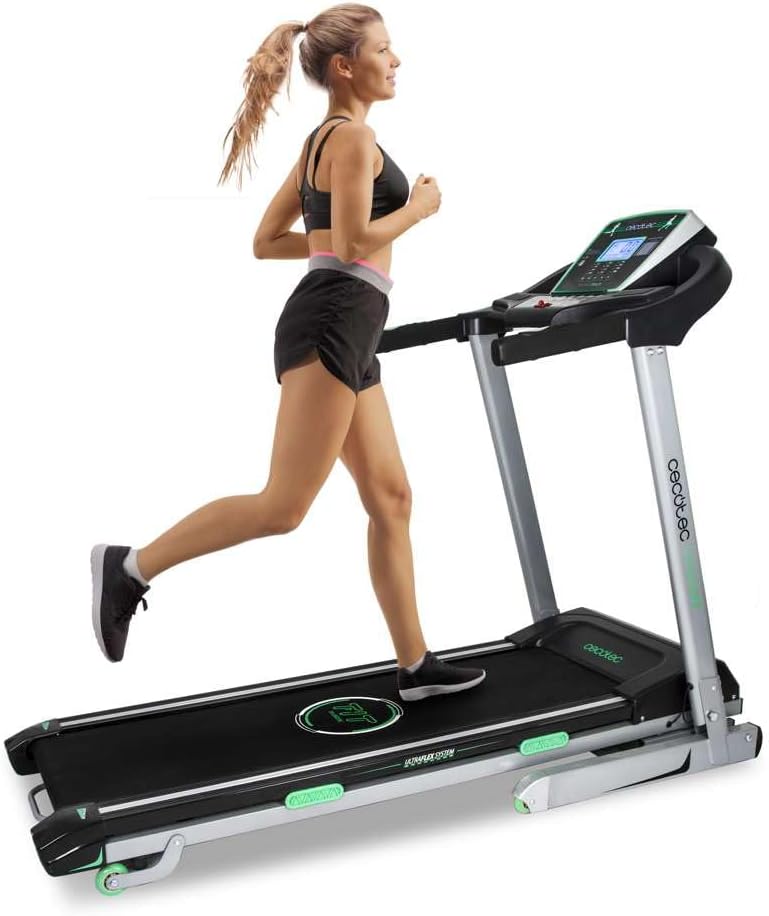
Image 1: Cecotec Extreme Track Folding Electric Treadmill. This image shows the treadmill in its unfolded, operational state with a user running on it, highlighting its design and functionality.
4. Assembly and Setup
The Cecotec Extreme Track treadmill comes largely pre-assembled. However, some final assembly steps are required before first use. Due to its weight (62 kg) and dimensions, it is recommended that two people perform the assembly.
4.1 Unfolding the Treadmill
- Place the treadmill on a flat, stable surface.
- Locate the hydraulic folding system mechanism.
- Carefully lower the running deck until it is fully flat on the floor. Ensure it locks securely into place.
4.2 Attaching the Console and Uprights (if separate)
Follow the detailed instructions in the included user manual for attaching the console and securing the uprights. This typically involves aligning the uprights, securing them with bolts, and connecting any necessary cables to the LCD console.
4.3 Power Connection
- Ensure the treadmill's power switch is in the OFF position.
- Plug the power cable into the treadmill's power input.
- Plug the other end of the power cable into a grounded electrical outlet.
5. Operating Instructions
5.1 Control Panel Overview
The LCD control panel displays key workout metrics and allows you to control the treadmill's functions. It typically shows:
- Speed: Current running speed (1-18 km/h).
- Time: Duration of your workout.
- Distance: Total distance covered.
- Calories: Estimated calories burned.
- Heart Rate: Measured via hand pulse sensors on the grip arms.
- Scan Function: Cycles through display metrics automatically.
5.2 Starting a Workout
- Ensure the treadmill is plugged in and the power switch is ON.
- Attach the magnetic safety key to the designated spot on the console and clip the other end to your clothing.
- Step onto the side rails of the treadmill.
- Press the START button on the console. The belt will begin to move at a low speed.
- Carefully step onto the running belt and begin walking.
- Adjust the speed using the SPEED +/- buttons or quick-speed buttons on the console or grip arms.
- Adjust the incline using the INCLINE +/- buttons or quick-incline buttons on the console.
5.3 Using Predefined Programs
The treadmill features 12 predefined training programs and 4 preset speed/inclination modes. Consult your specific user manual for detailed instructions on how to select and customize these programs. Generally, you will use a PROGRAM button to cycle through options and MODE button to select.
5.4 Stopping a Workout
- Press the STOP button on the console. The belt will gradually slow down and stop.
- Alternatively, pull the magnetic safety key from the console to initiate an emergency stop.
- Once the belt has completely stopped, step off the treadmill.
5.5 Media Connectivity
- USB Connector: Use the integrated USB port to charge your mobile device or tablet.
- MP3 Connector: Connect your MP3 player or smartphone via the MP3 input to play audio through the treadmill's speakers.
- iPad Holder: Place your tablet or smartphone in the integrated holder for entertainment during your workout.
6. Maintenance
Regular maintenance ensures the longevity and optimal performance of your treadmill.
6.1 Cleaning
- Always unplug the treadmill before cleaning.
- Wipe down the console and other surfaces with a soft, damp cloth. Avoid abrasive cleaners or solvents.
- Periodically vacuum underneath the treadmill to prevent dust and debris buildup.
6.2 Running Belt Lubrication
Proper lubrication of the running belt is crucial for smooth operation and to prevent wear. While the provided manual may lack specific details, general guidelines for treadmill lubrication are:
- Frequency: Lubricate every 3-6 months, or after approximately 100-150 hours of use, depending on usage intensity.
- Procedure:
- Unplug the treadmill.
- Loosen the rear roller bolts slightly to lift the belt.
- Apply a thin line of 100% silicone lubricant (specifically designed for treadmills) evenly under the center of the running belt.
- Tighten the rear roller bolts to their original tension.
- Plug in the treadmill and run it at a slow speed (e.g., 3 km/h) for 5 minutes to distribute the lubricant.
- Refer to the specific instructions provided with your treadmill lubricant for best results.
6.3 Belt Tension and Alignment
If the running belt feels loose or drifts to one side, it may need adjustment. Consult the detailed instructions in your user manual for proper belt tensioning and alignment procedures. Incorrect adjustment can damage the belt or motor.
7. Troubleshooting
This section addresses common issues you might encounter with your treadmill. If the problem persists, contact customer support.
| Problem | Possible Cause | Solution |
|---|---|---|
| Treadmill does not start. | Power cord unplugged, safety key not in place, power switch off. | Ensure power cord is securely plugged in, safety key is correctly placed, and power switch is ON. |
| Running belt slips or hesitates. | Belt tension too loose, belt needs lubrication. | Adjust belt tension (refer to manual), lubricate the running belt as per maintenance instructions. |
| Unusual noise during operation. | Loose components, lack of lubrication, belt rubbing. | Check and tighten all visible bolts and screws. Lubricate the belt. Ensure the belt is centered. |
| Incline not adjusting. | Motor issue, cable disconnected. | Check connections. If problem persists, contact customer support. |
| Heart rate monitor inaccurate. | Hands not firmly on sensors, dry hands. | Ensure firm, consistent contact with both sensors. Lightly moisten hands if they are too dry. |
8. Product Specifications
- Model: Extreme Track (07011)
- Motor Power: 3 CV (Continuous Horsepower)
- Speed Range: 1 - 18 km/h
- Incline System: Automatic Motorized Tilt
- Cushioning System: UltraFlex System (8 elastomers)
- Running Surface: 130 x 42 cm
- Programs: 12 Predefined Training Programs, 4 Preset Speed/Incline Modes
- Display: LCD Screen (Speed, Time, Distance, Calories, Heart Rate, Scan Function)
- Connectivity: USB port (charging), MP3 input, iPad/Tablet holder
- Folding System: AutoFold Tech (Hydraulic)
- Safety: Magnetic Safety System
- Maximum User Weight: 120 kg
- Product Dimensions (Unfolded): 173 cm (Length) x 78 cm (Width) x 29.5 cm (Height)
- Product Weight: 62 kg
- Material: Steel Alloy
- Color: Green (as per product details, though main image shows black/grey/green)
9. Warranty and Customer Support
Your Cecotec Extreme Track Treadmill comes with a manufacturer's warranty. Please refer to the included Warranty Documentation for specific terms, conditions, and duration of the warranty.
For technical assistance, spare parts, or any questions regarding your product, please contact Cecotec customer support. Contact information can typically be found on the warranty documentation or the official Cecotec website.
When contacting support, please have your product model number (07011) and purchase information readily available.