
KORG MONOLOGUE-SV
Korg Monologue-SV Monophonic Analog Synthesizer
User Manual
Introduction
The Korg Monologue-SV is a fully programmable monophonic analog synthesizer featuring 25 slim keys with velocity sensitivity. Building upon the design principles of the minilogue, the Monologue-SV incorporates unique sound engine components, including all-new filters, modulation capabilities, drive circuits, and an LFO, specifically optimized for powerful monophonic sound generation. It is capable of producing robust bass lines and sharp lead tones. The integrated 16-step sequencer has been enhanced for intuitive and complex editing, supporting motion sequences for up to four parameters. An organic EL display with an oscilloscope function provides visual feedback of waveforms, aiding in sound design and understanding.
Safety Precautions
- Power Supply: Use only the specified AC adapter (KA350, sold separately) or 6 AA alkaline or NiMH batteries. Ensure correct polarity when inserting batteries.
- Location: Avoid exposing the unit to direct sunlight, high temperatures, humidity, or excessive dust. Do not place near heat sources or in unstable locations.
- Handling: Do not drop or subject the unit to strong impacts. Do not open the casing or attempt to modify the internal components. Refer all servicing to qualified personnel.
- Cleaning: Use a soft, dry cloth for cleaning. Do not use liquid cleaners or solvents.
- Interference: Keep the unit away from devices that may cause electrical interference.
Package Contents
Verify that all items listed below are included in your package:
- Korg Monologue-SV Monophonic Analog Synthesizer Unit
- 6 x AA Alkaline Batteries (for initial operation confirmation)
- USB Cable
Note: The AC adapter (KA-350) is sold separately.
Setup
1. Powering the Unit
The Monologue-SV can be powered by either AA batteries or an optional AC adapter.
Battery Installation
- Ensure the unit is powered off.
- Locate the battery compartment on the underside of the unit.
- Open the battery compartment cover.
- Insert 6 AA alkaline or NiMH batteries, observing the correct polarity markings inside the compartment.
- Close the battery compartment cover securely.
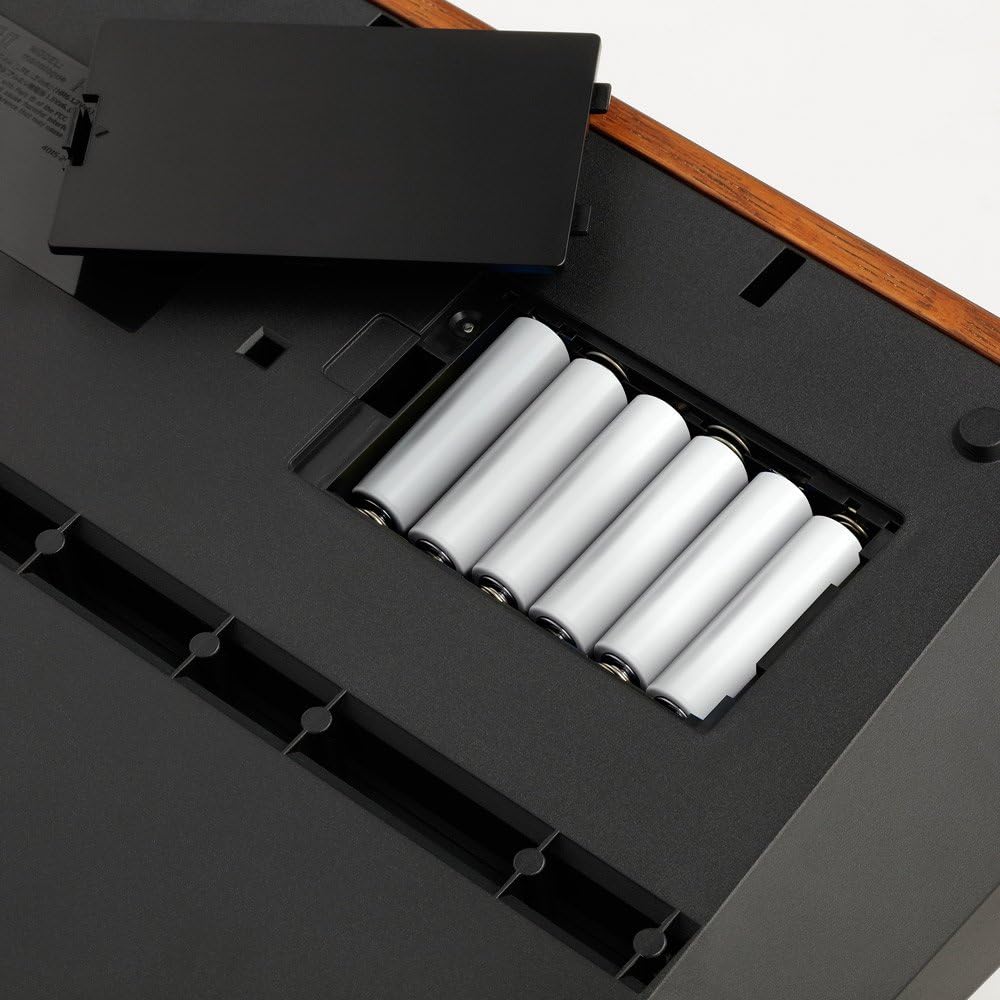
Figure 1: Battery compartment with 6 AA batteries installed. Ensure correct polarity.
AC Adapter Connection (Sold Separately)
- Ensure the unit is powered off.
- Connect the optional Korg KA-350 AC adapter to the DC 9V input jack on the rear panel of the Monologue-SV.
- Plug the AC adapter into a suitable power outlet.
2. Connecting Audio and MIDI
The Monologue-SV offers various input and output options for integration into your setup.
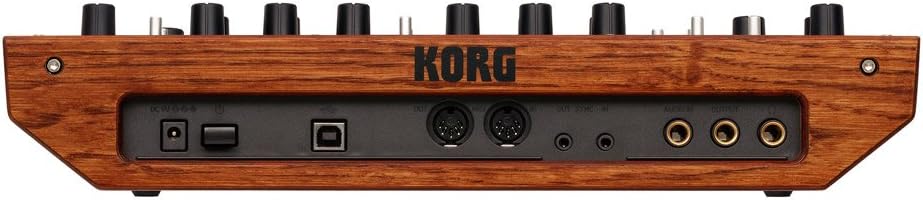
Figure 2: Rear panel showing power input, USB, MIDI, Sync, Audio In, and Audio Out connections.
- OUTPUT Terminal: Connect a mono phone jack cable from this terminal to your mixer, audio interface, or amplifier.
- Headphone Terminal: Connect stereo headphones to this jack for private monitoring.
- AUDIO IN Terminal: Connect an external audio source (e.g., another synthesizer, drum machine) using a mono phone jack cable.
- SYNC IN/OUT Terminals: Use 3.5mm mini jack cables to synchronize the Monologue-SV with other Korg groove machines or compatible devices.
- MIDI IN/OUT Terminals: Connect standard MIDI cables for MIDI control and data exchange with other MIDI devices.
- USB B Terminal: Connect a USB cable to your computer for MIDI communication and data management.
Operating Instructions
This section provides an overview of the Monologue-SV's main controls and functions.

Figure 3: Front panel layout with various sound shaping controls, keyboard, and sequencer section.
1. Power On/Off
To power on the unit, press the power button located on the rear panel (if using AC adapter) or on the top panel (if using batteries). To power off, press and hold the power button until the display shuts down.
2. Sound Generation Sections
The Monologue-SV features a classic analog signal path:
- VCO 1 & VCO 2 (Voltage Controlled Oscillators): These generate the primary waveforms. Use the WAVE and SHAPE controls to select and modify the waveform. The PITCH and OCTAVE controls adjust the frequency. VCO 2 also includes RING modulation and SYNC options.
- MIXER: Balances the levels of VCO 1, VCO 2, and the AUDIO IN signal.
- FILTER: Shapes the timbre of the sound. Use CUTOFF to set the filter's frequency, RESONANCE to emphasize the cutoff point, and TYPE to select different filter characteristics.
- EG (Envelope Generator): Controls the amplitude (volume) over time. Adjust ATTACK, DECAY, and RELEASE to shape the sound's dynamics.
- LFO (Low Frequency Oscillator): Provides periodic modulation to various parameters. Controls include RATE, INT (intensity), and TARGET (destination).
- DRIVE: Adds harmonic richness and distortion to the sound.
3. Program Management
The Monologue-SV can store 100 programs (80 preset, 20 user). Use the PROGRAM/VALUE knob to select programs. Refer to the full manual for details on saving user programs and micro tuning settings.
4. Sequencer
The 16-step monophonic sequencer allows you to record and playback musical phrases. It supports motion sequences, enabling the recording of knob movements for up to four parameters per step, adding dynamic changes to your sequences.
- REC: Enters record mode for the sequencer.
- PLAY: Starts playback of the current sequence.
- EDIT MODE: Allows editing of sequence steps and motion data.
- TEMPO: Adjusts the playback speed of the sequencer.
5. Oscilloscope Function
The organic EL display features an oscilloscope that visually represents the waveform of the sound being produced. This is a valuable tool for understanding how your sound design choices affect the audio signal in real-time.
Maintenance
- Cleaning: Wipe the unit with a soft, dry cloth. For stubborn dirt, use a slightly damp cloth and then wipe dry. Avoid abrasive cleaners or solvents.
- Storage: When not in use for extended periods, store the Monologue-SV in a cool, dry place, away from direct sunlight and extreme temperatures. If storing for a long time, remove the batteries to prevent leakage.
- Key Care: Keep the keyboard free from dust and debris. Avoid spilling liquids on the keys or controls.
Troubleshooting
If you encounter issues with your Monologue-SV, refer to the following common solutions:
| Problem | Possible Cause / Solution |
|---|---|
| No power |
|
| No sound output |
|
| Sequencer not playing |
|
If the problem persists, please contact Korg customer support.
Specifications
| Keyboard | 25 keys (slim keyboard, velocity compatible) |
| Sound Source | Analog sound source |
| Programs | 100 (80 preset, 20 user programs at factory settings). Each program includes micro tuning and sequence data settings. |
| Sequencer | 16-step monophonic sequencer, up to 4 parameters can be motion sequenced. |
| Display | Organic EL display with oscilloscope function. |
| Input/Output Terminals |
|
| Power Supply | 6 x AA batteries (alkaline or NiMH) or AC adapter (DC 9V) KA350 (sold separately). |
| Dimensions (L x W x H) | 10.87 x 2.99 x 13.78 inches (27.6 x 7.6 x 35 cm) |
| Weight | 3.74 pounds (1.7 kg) |
| Body Material | Bass Wood |
Warranty and Support
For warranty information and technical support, please refer to the warranty card included with your product or visit the official Korg website. Keep your proof of purchase for warranty claims.
Korg Official Website: www.korg.com
Related documentsMONOLOGUE-SV


Ask a question about this manual
Ask about setup, troubleshooting, compatibility, parts, safety, or missing instructions. Manuals+ will review the question and use this page’s manual context to help answer it.