
Introduction
This manual provides instructions for the ZdalaMit AH59-02131F Replacement Remote Control, designed for various Samsung Home Theater Systems. This remote control is a direct replacement and requires no programming or pairing. Simply install the batteries, and it is ready for immediate use.
Setup
Battery Installation
The remote control operates on two (2) AAA alkaline batteries. Follow these steps to install them:
- Locate the battery compartment cover on the back of the remote control.
- Press down on the tab and slide the cover downwards to open the compartment.
- Insert two AAA batteries, ensuring the positive (+) and negative (-) terminals align correctly with the markings inside the compartment.
- Slide the battery compartment cover back into place until it clicks securely.
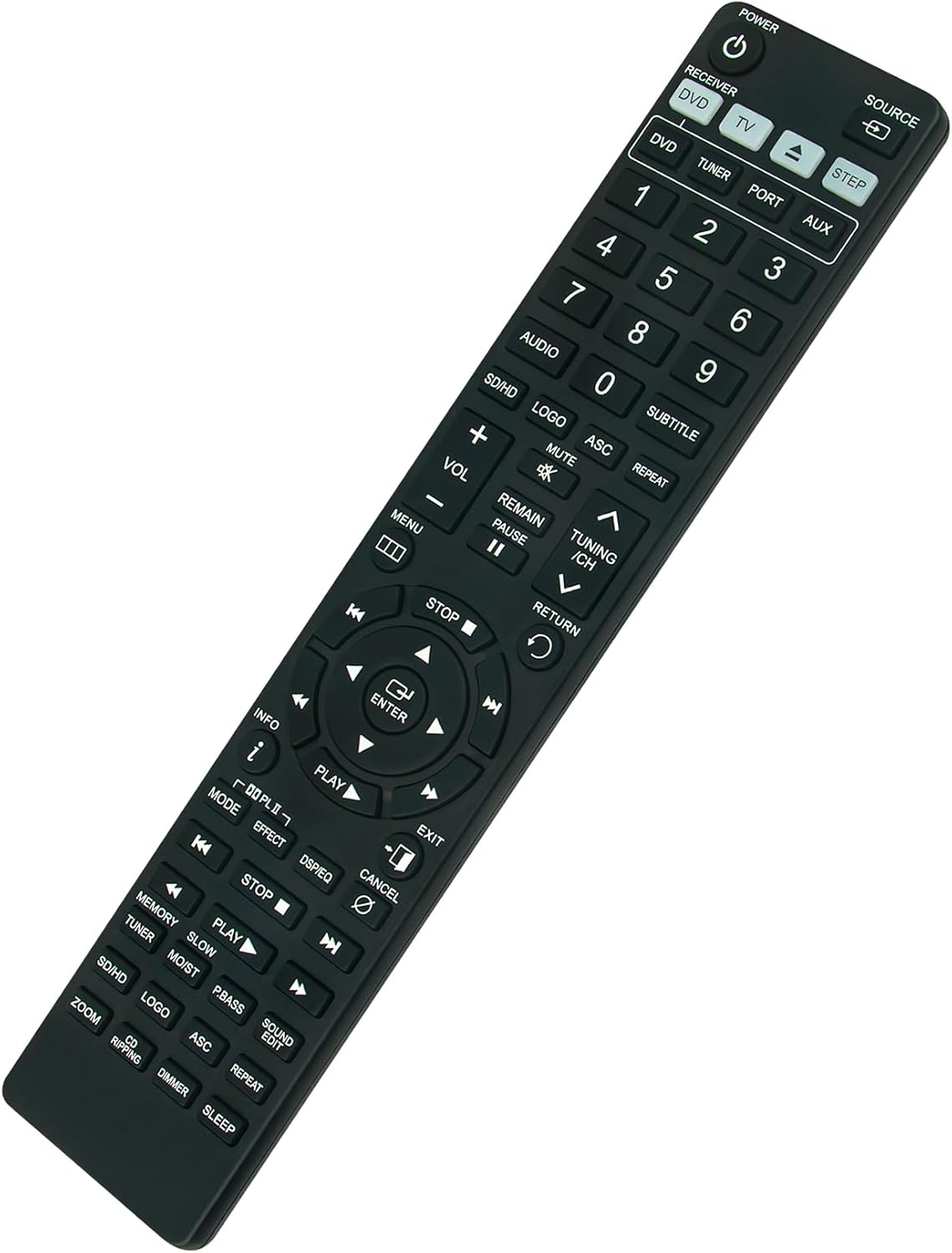
Image: Back view of the remote control, illustrating the battery compartment.
Compatibility
This replacement remote control is compatible with the following Samsung Home Theater System models:
- HTTZ322, HTTZ322T, HTTZ322T/XAA, HTTZ322T/XAC
- HTTZ325, HTTZ325T/XAC, HTTZ325T/XSA
- HTTZ422, HTTZ422T/XAA, HTTZ422T/XAC
- HTTZ425, HTTZ425T/XAC, HTTZ425T/XSA
- HTZ320, HTZ320T/XAA, HTZ320T/XAC, HTZ320T/XSA
- HTZ420, HTZ420T, HTZ420T/XAA, HTZ420T/XAC, HTZ420T/XSA
- AH5902131F, HT-Z320, HT-TZ322, HT-TZ325, HT-Z420, HT-Z420T, HT-TZ422, HT-TZ425, HT-Z320T, HT-Z420T/XAA, HT-Z320T/XAA
Operating Instructions
The ZdalaMit AH59-02131F remote control provides full functionality for your compatible Samsung Home Theater System. Below is an overview of the main button functions:

Image: Front view of the remote control, displaying the layout of all buttons.
- POWER: Turns the home theater system on or off.
- SOURCE: Cycles through available input sources (e.g., DVD, TV, AUX).
- RECEIVER/DVD/TV/TUNER/PORT/AUX: Dedicated buttons for direct selection of input modes.
- Numeric Keypad (0-9): Used for direct track selection, channel input, or other numerical entries.
- AUDIO: Selects audio tracks or modes.
- SUBTITLE: Toggles or selects subtitle options.
- SD/HD: Switches between standard definition and high definition modes.
- LOGO: Specific function button, refer to your system's manual.
- ASC: Specific function button, refer to your system's manual.
- REPEAT: Controls playback repeat modes.
- MUTE: Mutes or unmutes the audio output.
- VOL +/-: Adjusts the volume level.
- REMAIN/PAUSE: Pauses playback or displays remaining time.
- TUNING/CH ^/v: Navigates through radio stations or channels.
- MENU: Accesses the system's main menu.
- RETURN: Goes back to the previous screen or menu.
- Navigation Buttons (Up, Down, Left, Right) & ENTER: Used to navigate menus and confirm selections.
- STOP: Stops playback.
- PLAY: Starts or resumes playback.
- INFO: Displays information about the current content.
- EXIT: Exits the current menu or function.
- MODE: Cycles through various sound modes.
- EFFECT: Activates or adjusts sound effects.
- DSP/EQ: Controls Digital Signal Processing or Equalizer settings.
- CANCEL: Cancels the current operation.
- SKIP (<< / >>): Skips to the previous or next track/chapter.
- FAST FORWARD/REWIND (< / >): Fast forwards or rewinds playback.
- MEMORY: Stores settings or presets.
- SLOW: Activates slow-motion playback.
- MO/ST: Specific function button, refer to your system's manual.
- P.BASS: Enhances bass output.
- SOUND EDIT: Accesses sound editing features.
- ZOOM: Zooms in on the picture.
- CD RIPPING: Initiates CD ripping function.
- DIMMER: Adjusts display brightness.
- SLEEP: Sets a sleep timer for the system.
Maintenance
To ensure the longevity and optimal performance of your remote control, follow these maintenance guidelines:
- Cleaning: Wipe the remote control regularly with a soft, dry cloth. For stubborn dirt, slightly dampen the cloth with water or a mild, non-abrasive cleaner. Avoid using harsh chemicals or abrasive materials.
- Battery Replacement: Replace batteries when the remote's response becomes sluggish or inconsistent. Always replace both batteries at the same time with new AAA alkaline batteries. Do not mix old and new batteries, or different types of batteries.
- Storage: If the remote control will not be used for an extended period, remove the batteries to prevent leakage, which can damage the remote. Store it in a cool, dry place away from direct sunlight and extreme temperatures.
- Handling: Avoid dropping the remote control or exposing it to excessive moisture or liquids.
Troubleshooting
If you experience issues with your ZdalaMit AH59-02131F remote control, refer to the following common problems and solutions:
| Problem | Possible Cause | Solution |
|---|---|---|
| Remote not responding | Dead or incorrectly installed batteries. Obstruction between remote and system. Remote out of range. | Replace batteries with new AAA alkaline batteries, ensuring correct polarity. Remove any objects blocking the line of sight to the home theater system. Move closer to the system. |
| Some buttons not working | Dirty contacts under buttons. Specific function not applicable to your system model. | Clean the remote control. Verify if the function is supported by your specific Samsung Home Theater System model. |
| System responds intermittently | Low battery power. Infrared sensor on system is dirty or obstructed. | Replace batteries. Clean the infrared sensor on your home theater system. |
Specifications
| Feature | Detail |
|---|---|
| Model Number | AH59-02131F |
| Product Dimensions | 5 x 1 x 0.6 inches |
| Item Weight | 3 ounces |
| Batteries Required | 2 AAA batteries (not included) |
| Compatible Devices | Samsung Home Theater Systems (specific models listed in Compatibility section) |
| Color | Black |
| Special Feature | Pre Programmed |

Image: Remote control with indicated dimensions.
Support
For any queries or assistance regarding your ZdalaMit AH59-02131F Replacement Remote Control, please feel free to contact the seller or manufacturer directly. Refer to your purchase documentation for contact information.