
Introduction
This manual provides instructions for the Smartby Universal Remote Control, designed for use with a wide range of LG and Zenith televisions. This remote is a direct replacement for models such as MKJ61841701 and AKB33871403. It requires no programming and operates immediately upon battery installation.
Setup
Battery Installation
- Locate the battery compartment on the back of the remote control.
- Slide the battery compartment cover downwards to open it.
- Insert two AAA batteries (not included), ensuring the positive (+) and negative (-) terminals align correctly with the markings inside the compartment.
- Slide the battery compartment cover back into place until it clicks securely.
Note: This remote control does not require any programming. It is ready for use with compatible LG and Zenith televisions immediately after battery installation.
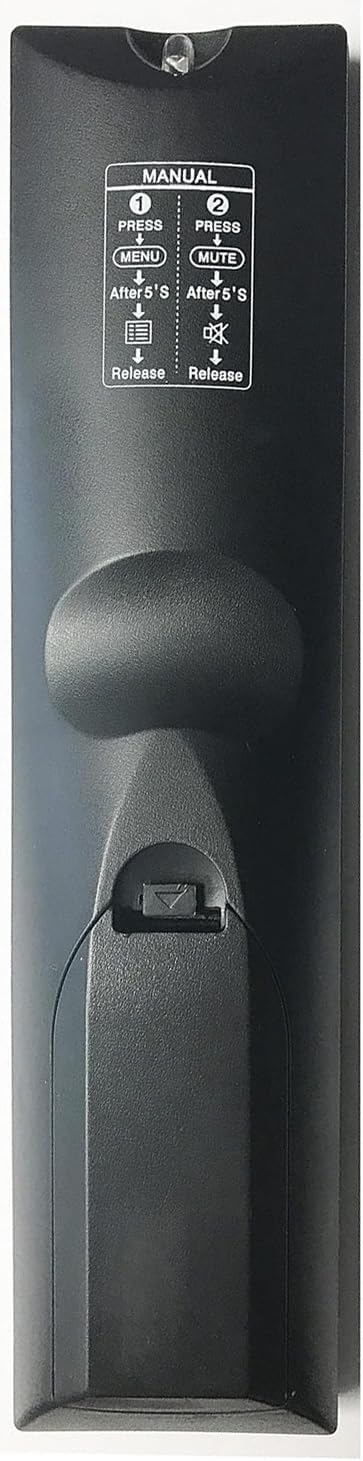
Image: Back view of the remote control, illustrating the battery compartment location and basic instructions for manual mode.
Operating Instructions
The Smartby Universal Remote Control features a standard layout for easy navigation and control of your television. Below is a guide to the primary functions:
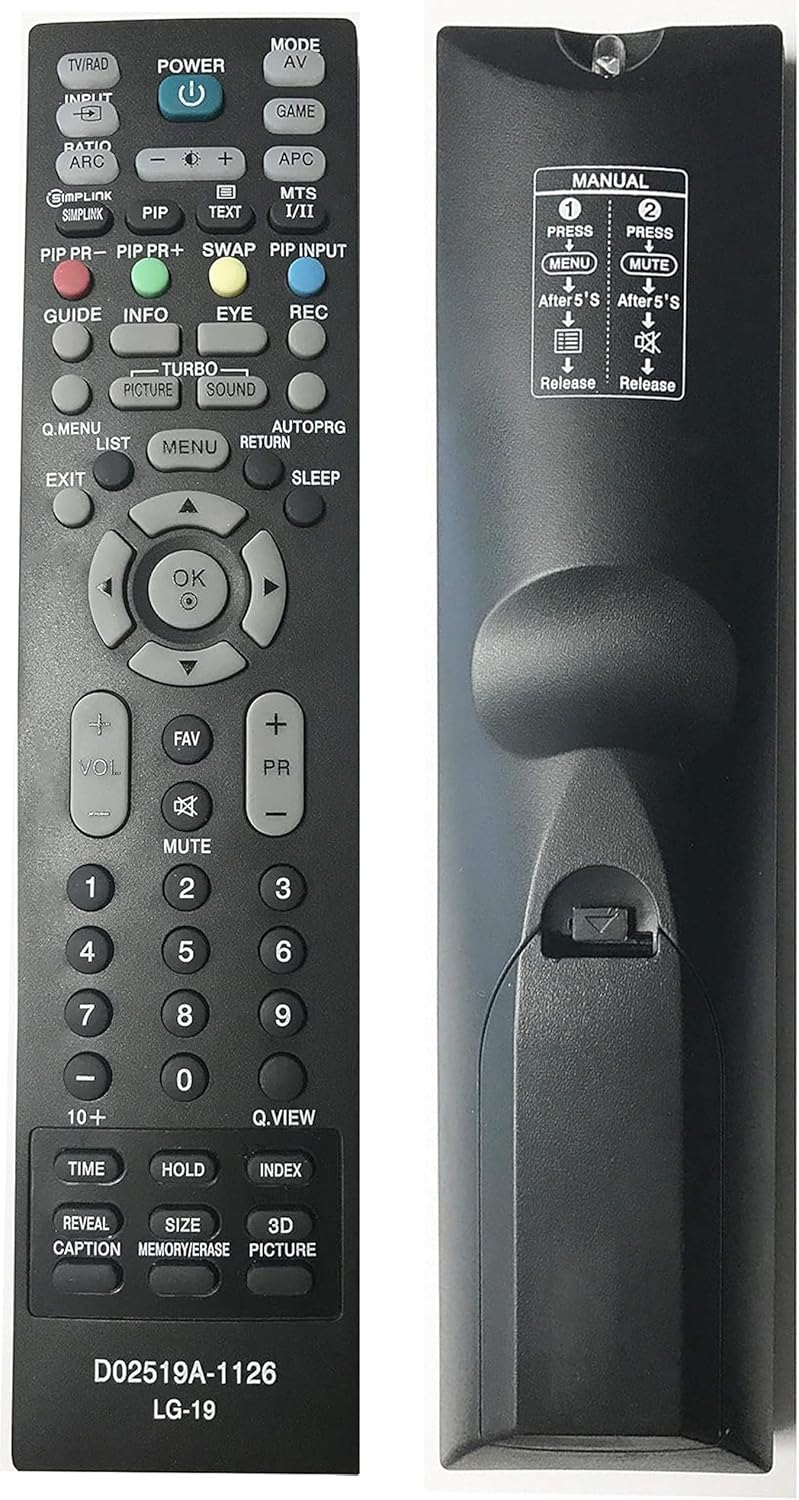
Image: Full front view of the Smartby Universal Remote Control.
Top Section Buttons

Image: Close-up of the top buttons, including Power, Input, Mode, and Picture-in-Picture (PIP) controls.
- POWER (⏻): Turns the television on or off.
- TV/RAD: Switches between TV and Radio modes.
- INPUT: Selects video input sources (e.g., HDMI, AV).
- MODE AV: Cycles through available AV modes.
- GAME: Activates game mode (if supported by TV).
- RATIO/ARC: Adjusts screen aspect ratio.
- SIMPLINK: Activates LG's SIMPLINK (HDMI-CEC) function.
- PIP: Activates Picture-in-Picture.
- PIP PR- / PIP PR+: Navigates channels within PIP.
- SWAP: Swaps main and PIP screens.
- PIP INPUT: Changes input source for PIP.
- MTS I/II: Selects Multi-channel Television Sound (MTS) options.
- TEXT: Displays teletext (if available).
- APC: Automatic Picture Control.
Middle Section Buttons

Image: Close-up of the central navigation, OK, volume, and channel control buttons.
- GUIDE: Displays the electronic program guide.
- INFO: Shows information about the current program.
- EYE: Activates eye comfort mode.
- REC: Records current program (if TV supports it).
- Q.MENU: Accesses the Quick Menu.
- LIST: Displays channel list.
- MENU: Opens the main TV menu.
- RETURN: Returns to the previous screen or menu.
- EXIT: Exits the current menu or function.
- SLEEP: Sets the sleep timer.
- Navigation Arrows (▲ ▼ ◀ ▶): Navigates through menus and options.
- OK: Confirms selections.
- VOL +/-: Adjusts volume up or down.
- MUTE: Mutes or unmutes the sound.
- PR +/-: Changes channels up or down.
- FAV: Accesses favorite channels.
Bottom Section Buttons

Image: Close-up of the number pad and special function buttons at the bottom of the remote.
- Number Pad (0-9): Directly enters channel numbers.
- 10+: For entering channel numbers 100 or greater (e.g., press 10+ then 01 for channel 101).
- Q.VIEW: Quickly switches to the previously viewed channel.
- TIME: Displays current time or timer settings.
- HOLD: Holds teletext page.
- INDEX: Displays teletext index.
- REVEAL: Reveals hidden teletext information.
- CAPTION: Toggles closed captions.
- SIZE: Adjusts teletext display size.
- MEMORY/ERASE: Used for memory functions or erasing teletext.
- 3D PICTURE: Activates 3D picture mode (if TV supports it).
Maintenance
Battery Replacement
Replace batteries when the remote's response becomes sluggish or stops working. Always replace both batteries simultaneously with new AAA batteries. Do not mix old and new batteries, or different types of batteries.
Cleaning
To clean the remote control, use a soft, dry cloth. For stubborn dirt, slightly dampen the cloth with water or a mild cleaning solution, then wipe dry immediately. Avoid using harsh chemicals or abrasive cleaners, as these can damage the remote's surface or internal components.
Storage
Store the remote control in a dry place away from direct sunlight and extreme temperatures. If the remote will not be used for an extended period, remove the batteries to prevent leakage and potential damage.
Troubleshooting
- Remote not responding:
- Ensure batteries are inserted correctly with the correct polarity.
- Replace old batteries with new ones.
- Check for any obstructions between the remote and the TV's infrared sensor.
- Ensure you are within the effective range and pointing the remote directly at the TV.
- Certain functions not working:
- While this is a universal remote, some advanced or proprietary functions of specific TV models may not be fully supported.
- Refer to your television's original manual for specific feature compatibility.
Specifications
| Feature | Detail |
|---|---|
| Model Number | D02519A-1126 LG-19 (Product Identifier: LYSB01NCPRSQR-ELECTRNCS) |
| Brand | Smartby |
| Compatible Devices | LG and Zenith Televisions (including models MKJ61841701, AKB33871403) |
| Connectivity Technology | Infrared (IR) |
| Max Number of Supported Devices | 1 (Television) |
| Product Dimensions | 9 x 2.8 x 1.4 inches (approximately) |
| Item Weight | 3.2 ounces (approximately) |
| Batteries Required | 2 x AAA (not included) |
Warranty and Support
Specific warranty information for this product is not available in the provided data. For support or warranty inquiries, please refer to the retailer or manufacturer's contact information provided at the point of purchase.