
1. Introduction
Thank you for purchasing the Auna Dr. Bang LED Portable Boombox. This device is designed to provide a versatile audio experience with its 2.1 channel sound, Bluetooth connectivity, multiple playback options (USB, SD, AUX, MP3), integrated LED light effects, and FM radio. It also features two microphone inputs for karaoke functions. Please read this manual carefully to ensure proper use and to maximize the performance of your device.
2. Safety Instructions
Please observe the following safety precautions to prevent damage to the device or injury to yourself:
- Do not expose the device to rain or moisture.
- Do not disassemble the unit. Refer all servicing to qualified personnel.
- Keep the device away from direct sunlight, heat sources, and open flames.
- Ensure proper ventilation around the unit.
- Use only the specified power adapter for charging.
- Do not insert objects into the device openings.
- Avoid listening at high volume levels for extended periods to prevent hearing damage.
3. Package Contents
Carefully unpack your Auna Dr. Bang LED Portable Boombox and ensure all items are present and in good condition. The package should contain:
- Auna Dr. Bang LED Portable Boombox
- USB Charging Cable
- AUX Cable (3.5mm jack)
- User Manual (this document)
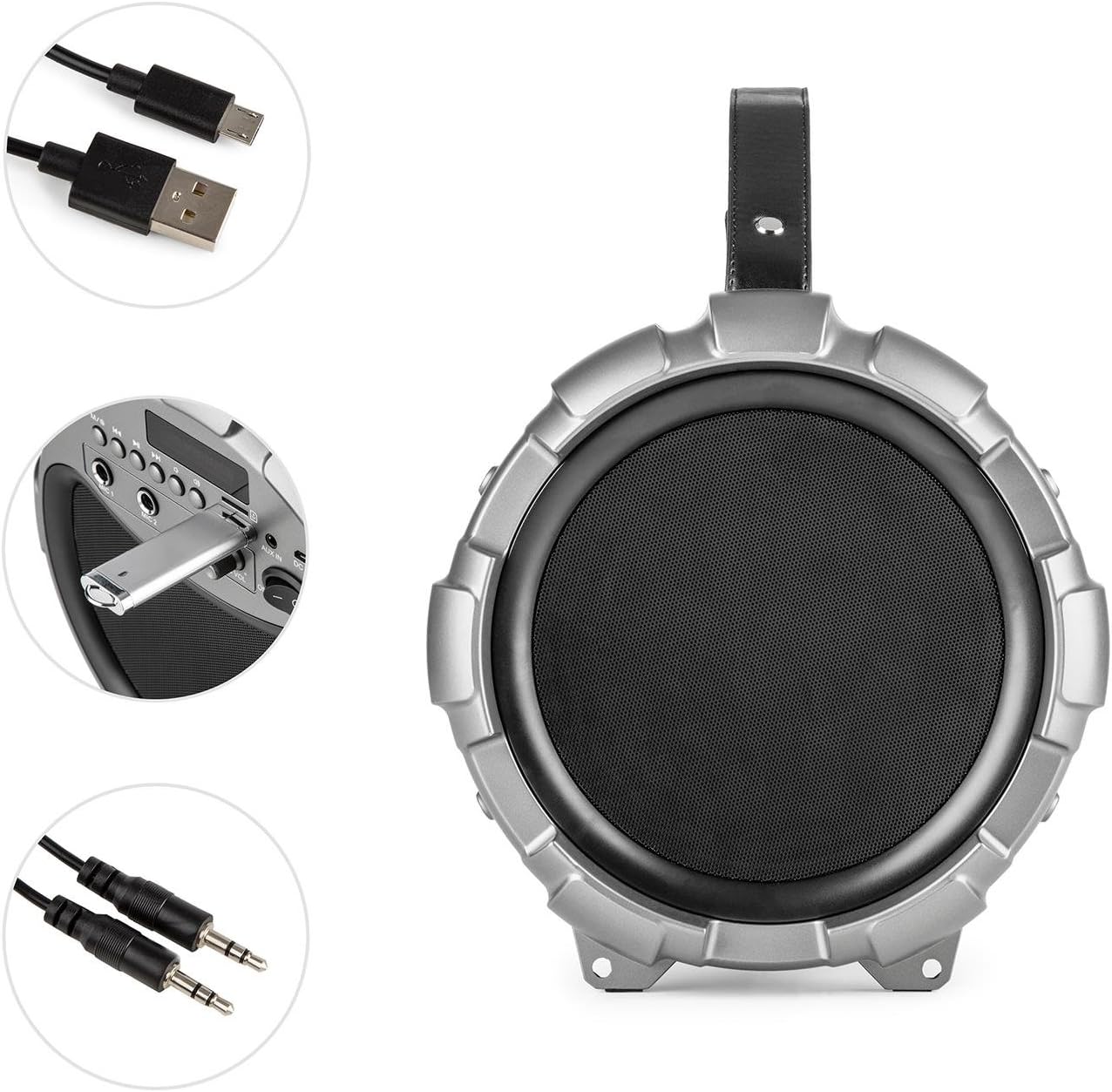
Image: The Auna Dr. Bang LED boombox shown with its included USB charging cable and 3.5mm AUX cable.
4. Product Overview
Familiarize yourself with the various parts and controls of your boombox.
4.1 Front View

Image: Front view of the Auna Dr. Bang LED boombox, highlighting the speaker grille and integrated LED lighting effects.
- LED Light Panel: Displays dynamic light effects during playback.
- Speaker Grille: Protects the internal speakers.
4.2 Control Panel

Image: Close-up of the control panel on the Auna Dr. Bang LED boombox, showing various buttons, ports, and the display.
- M/Mode Button: Switches between input modes (Bluetooth, USB, SD, AUX, FM Radio).
- Previous Track/Rewind Button: Short press for previous track, long press to rewind.
- Play/Pause Button: Plays or pauses current audio.
- Next Track/Fast Forward Button: Short press for next track, long press to fast forward.
- LED Button: Toggles LED light effects.
- Display Screen: Shows current mode, track information, or FM frequency.
- USB Port: For USB flash drive playback.
- SD Card Slot: For SD card playback.
- AUX IN: 3.5mm audio input for external devices.
- DC 5V: Power input for charging.
- MIC 1 Input: 6.3mm microphone input 1.
- MIC 2 Input: 6.3mm microphone input 2.
- MIC ECHO Knob: Adjusts microphone echo effect.
- MIC VOL Knob: Adjusts microphone volume.
- ON/OFF Switch: Powers the unit on or off.
- Volume Knob: Adjusts the main playback volume.
5. Setup
5.1 Charging the Battery
The Auna Dr. Bang LED boombox is equipped with a built-in Lithium-Ion battery for portable use. Before first use, it is recommended to fully charge the battery.
- Connect the supplied USB charging cable to the DC 5V port on the boombox.
- Connect the other end of the USB cable to a compatible USB power adapter (not included) or a computer's USB port.
- The charging indicator light (if present, usually near the DC 5V port or on the display) will illuminate to indicate charging.
- Once fully charged, the indicator light may change color or turn off. Disconnect the charging cable.
Note: The boombox can be operated while charging, but charging time may be longer.
5.2 Initial Power On
To power on the device, slide the ON/OFF Switch to the "ON" position. The display will light up, and the unit will enter the default mode (usually Bluetooth).
6. Operating Instructions
6.1 Mode Selection
Press the M/Mode Button repeatedly to cycle through the available input modes: Bluetooth, USB, SD, AUX, and FM Radio. The current mode will be shown on the display.
6.2 Bluetooth Pairing
- Turn on the boombox and select Bluetooth mode using the M/Mode Button. The display will show "BLUE" and a blinking Bluetooth icon, indicating it's ready for pairing.
- Enable Bluetooth on your mobile device (smartphone, tablet, etc.) and search for available devices.
- Select "Auna Dr. Bang LED" from the list of devices.
- Once paired, the boombox will emit a confirmation sound, and the Bluetooth icon on the display will stop blinking.
- You can now play audio from your device through the boombox.
Note: The boombox will automatically attempt to reconnect to the last paired device when in Bluetooth mode.
6.3 USB/SD Playback
- Insert a USB flash drive into the USB Port or an SD card into the SD Card Slot. Ensure the media contains compatible audio files (e.g., MP3).
- The boombox should automatically switch to USB or SD mode and begin playback. If not, press the M/Mode Button to select the correct mode.
- Use the Previous Track/Rewind, Play/Pause, and Next Track/Fast Forward buttons to control playback.
6.4 AUX Input
- Connect one end of the 3.5mm AUX cable to the AUX IN port on the boombox.
- Connect the other end to the headphone jack or audio output of your external audio device.
- Press the M/Mode Button to select AUX mode.
- Control playback from your external device. The boombox's volume knob will control the output volume.
6.5 FM Radio
- Press the M/Mode Button to select FM Radio mode. The display will show the current frequency.
- To auto-scan and save available stations, long press the Play/Pause Button. The boombox will scan and store stations automatically.
- To manually tune or select saved stations, use the Previous Track/Rewind and Next Track/Fast Forward buttons.
Tip: For better FM reception, try repositioning the boombox or extending any external antenna if available (not explicitly mentioned but common for boomboxes).
6.6 Microphone Usage (Karaoke)
- Connect one or two microphones (not included) to the MIC 1 Input and/or MIC 2 Input.
- Adjust the microphone volume using the MIC VOL Knob.
- Adjust the echo effect for the microphones using the MIC ECHO Knob.
- You can sing along to music playing from any source (Bluetooth, USB, SD, AUX).
6.7 LED Light Effects
Press the LED Button to toggle the integrated LED light effects on or off. The lights will synchronize with the music playback.

Image: An angled view of the Auna Dr. Bang LED boombox, showcasing its dynamic red and green LED light effects.
7. Maintenance
7.1 Cleaning
- Always power off the device and disconnect it from any power source before cleaning.
- Use a soft, dry cloth to wipe the exterior surfaces.
- Do not use abrasive cleaners, waxes, or solvents as they may damage the finish.
- Keep the ports and openings free of dust and debris.
7.2 Storage
- When not in use for extended periods, store the boombox in a cool, dry place, away from direct sunlight and extreme temperatures.
- It is recommended to charge the battery periodically (e.g., every 3-6 months) to maintain its lifespan.
8. Troubleshooting
If you encounter any issues with your Auna Dr. Bang LED boombox, please refer to the following common problems and solutions:
| Problem | Possible Cause | Solution |
|---|---|---|
| No power / Unit does not turn on. | Battery is depleted. Power switch is off. | Charge the battery. Ensure the ON/OFF switch is in the "ON" position. |
| No sound. | Volume is too low. Incorrect mode selected. Device not properly connected (AUX/Bluetooth). | Increase the volume on the boombox and your source device. Select the correct input mode. Re-pair Bluetooth or re-connect AUX cable. |
| Bluetooth pairing fails. | Boombox not in pairing mode. Device too far. Bluetooth disabled on source. | Ensure boombox is in Bluetooth mode and "BLUE" is blinking. Move source device closer. Enable Bluetooth on your source device. |
| USB/SD playback not working. | Incorrect mode. Incompatible file format. Corrupted media. | Select USB or SD mode. Ensure files are MP3 format. Try a different USB drive or SD card. |
| Poor FM radio reception. | Weak signal. Interference. | Reposition the boombox. Try auto-scanning again. Avoid placing near other electronic devices. |
| Microphone not working. | Microphone not connected. MIC VOL knob too low. | Ensure microphone is securely plugged into MIC 1 or MIC 2. Increase the MIC VOL knob. |
9. Specifications
| Model: | BTS16-Dr. Bang LED |
| Brand: | AUNA |
| Dimensions (W x H x D): | 22 x 31.5 x 22 cm (approximately 8.7 x 12.4 x 8.7 inches) |
| Weight: | 2.8 kg (approximately 6.2 lbs) |
| Speaker Output Power: | 40 Watts (RMS) |
| Speaker Configuration: | 2.1 Channel |
| Connectivity: | Bluetooth, USB, SD, AUX (3.5mm) |
| Microphone Inputs: | 2 x 6.3mm Jack |
| Power Source: | AC (via adapter, not included) & Battery |
| Battery Type: | Lithium-Ion |
| Battery Capacity: | 2600 mAh (nominal) |
| Compatible Devices: | Personal computer, Smartphone |
| Mounting Compatibility: | Tabletop |
10. Warranty and Support
AUNA products are covered by a manufacturer's warranty. For specific warranty terms and conditions, please refer to the documentation provided at the time of purchase or contact your local retailer. For technical support, troubleshooting assistance beyond this manual, or spare parts, please visit the official AUNA website or contact their customer service department.
You can find more information and support at the AUNA Brand Store.