
1. Introduction
This instruction manual provides essential information for the safe and correct installation, operation, and maintenance of the FAGOR Electronic Hob Module, part number AS0022589. This module is a replacement component designed for specific FAGOR induction hob models. Please read this guide thoroughly before attempting any installation or repair.
Important: Installation and replacement of this electronic module should only be performed by a qualified technician to ensure safety and proper functionality.
2. Compatible Models
This electronic module (AS0022589) is compatible with the following FAGOR hob models:
- FAGOR IF4AX
- FAGOR IF4S
- FAGOR IF4BS
Always verify the compatibility with your specific appliance model before proceeding with installation.
3. Safety Information
- Electrical Hazard: Always disconnect the appliance from the main power supply before beginning any installation, repair, or maintenance work. Failure to do so can result in electric shock, injury, or death.
- Professional Installation: This component is an internal part of an electrical appliance. Installation must be carried out by a certified and experienced technician.
- Static Discharge: Electronic components are sensitive to electrostatic discharge (ESD). Handle the module by its edges and avoid touching the circuit board or connectors directly. Use anti-static precautions if available.
- Original Parts: Use only genuine or approved replacement parts to ensure the safety and proper functioning of your appliance.
4. Setup and Installation
This section outlines the general steps for replacing the electronic hob module. Refer to your specific FAGOR hob's service manual for detailed, model-specific instructions.
- Disconnect Power: Ensure the hob is completely disconnected from the electrical supply at the circuit breaker.
- Access the Module: Depending on your hob model, you may need to remove the hob from its counter cutout or access it from underneath. Carefully remove any screws or clips securing the hob's casing or control panel.
- Locate the Old Module: Identify the existing electronic module. Note the orientation and connection points of all cables. It is recommended to take photos before disconnecting anything.
- Disconnect Cables: Carefully disconnect all ribbon cables and power connectors from the old module. Be gentle to avoid damaging the connectors or the cables.
- Remove Old Module: Unscrew or unclip the old module from its mounting points.
- Install New Module: Position the new FAGOR Electronic Hob Module (AS0022589) in the same location and secure it with the original screws or clips.
- Connect Cables: Reconnect all ribbon cables and power connectors to the new module, ensuring they are correctly seated and oriented as noted in step 3.
- Reassemble: Carefully reassemble the hob's casing or control panel.
- Test Functionality: Reconnect the hob to the main power supply. Perform a functional test to ensure all hob zones and controls operate correctly.

Image 1: Front view of the FAGOR Electronic Hob Module (AS0022589). This image shows the component side with display segments and ribbon cable connector.
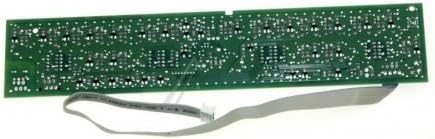
Image 2: Back view of the FAGOR Electronic Hob Module (AS0022589). This image displays the solder side of the circuit board with a ribbon cable attached.
5. Operating Principles
The electronic hob module (AS0022589) is a control unit responsible for managing the functions of your FAGOR induction hob. It processes user input from the control panel, regulates power to the induction coils, and manages safety features. Once correctly installed, the module enables the hob to operate as designed by the manufacturer. There are no direct operating controls on the module itself; its function is integrated into the hob's overall system.
6. Maintenance
The FAGOR Electronic Hob Module is a sealed electronic component and requires no routine user maintenance. To ensure its longevity and proper function:
- Keep Dry: Prevent any liquids from coming into contact with the hob's internal components, including the electronic module.
- Cleanliness: Ensure the area around the hob is kept clean and free from debris that could obstruct ventilation (if applicable to the hob design).
- Avoid Impact: Protect the hob from physical impact that could damage internal electronics.
7. Troubleshooting
If your FAGOR hob experiences issues after module replacement, consider the following common troubleshooting steps. Always ensure the power is disconnected before inspecting internal components.
- No Power/Display:
- Check the main power supply and circuit breaker.
- Verify all power cables to the module are securely connected.
- Ensure ribbon cables are correctly seated and not damaged.
- Hob Zones Not Heating:
- Confirm the hob is receiving power and the control panel is responsive.
- Check connections between the module and the induction coils.
- Ensure appropriate cookware is being used for induction hobs.
- Error Codes on Display:
- Refer to your FAGOR hob's user manual for specific error code interpretations.
- Error codes often indicate specific component failures or connection issues.
- Intermittent Operation:
- Inspect all cable connections for looseness or corrosion.
- Ensure the module is securely mounted and not subject to vibration.
If issues persist after basic troubleshooting, it is recommended to contact a qualified appliance repair technician or the supplier for further assistance.
8. Specifications
| Part Number | AS0022589 |
| Product Type | Electronic Hob Module |
| Brand Compatibility | FAGOR |
| Model Compatibility | IF4AX, IF4S, IF4BS |
| Supplier | Recamania |
9. Warranty and Support
For warranty information, technical support, or to inquire about specific issues, please contact the supplier, Recamania. They can provide assistance regarding product compatibility and troubleshooting.
- Contact Supplier: If you are unsure about compatibility or require technical assistance, Recamania's technicians can provide guidance.
- Proof of Purchase: Keep your proof of purchase for any warranty claims.
Note: Improper installation or handling by unqualified personnel may void the product warranty.