1. Introduction
The Sony PXW-FS7M2 XDCAM Super 35 Camera System Professional Camcorder is designed for professional videography, offering advanced features and versatility. This manual provides essential information for setting up, operating, and maintaining your camcorder.

Figure 1.1: Front view of the Sony PXW-FS7M2 Camcorder.
2. Setup
2.1 Attaching the Handle and Viewfinder
The PXW-FS7M2 features a detachable handle and viewfinder for ergonomic flexibility. To attach the handle, align it with the mounting points on the camera body and secure it using the provided screws or locking mechanism. The viewfinder can be attached to the top handle or directly to the camera body, allowing for comfortable viewing during operation.
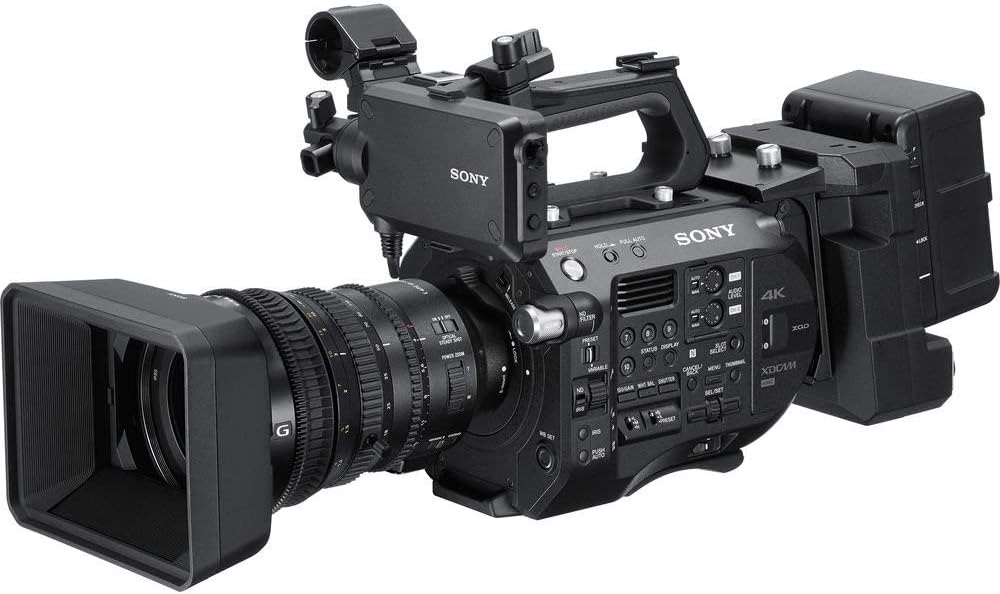
Figure 2.1: Sony PXW-FS7M2 with handle and viewfinder attached.

Figure 2.2: Side view showing the viewfinder and lens attachment.
2.2 Inserting Media Cards
The camcorder supports XQD and SDXC memory cards. Locate the media card slots on the side of the camera. Insert the XQD cards into their designated slots until they click into place. An SDXC card can be used for loading LUTS or other data. Ensure cards are inserted correctly to avoid damage.

Figure 2.3: Side view showing the open XQD card slot.
3. Operating the Camcorder
3.1 Control Panel Overview
The main control panel on the side of the camcorder provides access to various settings and functions. Familiarize yourself with the layout for efficient operation.

Figure 3.1: Detailed view of the camcorder's control panel.
3.2 Exposure Controls
- ND Filters: The camcorder features built-in electronic variable ND filters with linear 1/4 to 1/128 and auto ND settings. Use the ND filter dial to adjust light intensity, especially in bright conditions.
- ISO/Gain: Adjust the ISO/Gain settings to control the camera's sensitivity to light. Options typically include low, medium, and high gain settings.
- White Balance: Set the white balance to ensure accurate color reproduction under different lighting conditions. Presets for sunlight, tungsten, and custom settings are available.
- Shutter: Control the shutter speed to manage motion blur and exposure.
- Iris: Adjust the iris (aperture) to control the depth of field and light entering the lens.
3.3 Focus and Zoom
The camcorder offers both auto and manual focus options. Use the focus controls to achieve sharp imagery. The detachable handle often includes zoom controls for convenient operation.
3.4 Audio Levels
Dedicated controls for audio input levels (CH-1, CH-2) are available, allowing for manual or automatic adjustment. The camcorder supports XLR inputs for professional microphones, including phantom power (+48V).
3.5 Recording
Press the REC START/STOP button to begin and end recording. Ensure sufficient media card space and battery life before starting a recording session.
4. Key Features
- 4K Super 35 Exmor sensor with 11.6 million total pixels and 8.8 million effective pixels
- Lever lock type E-mount
- 180fps continuous HFR in Full HD
- Built-in electronic Variable ND Filters with linear 1/4 to 1/128 and auto ND
- RAW recording, Apple ProRes 422 and multi-cam with Sony's extension unit XDCA-FS7
- Max focal length: 135mm
- Video capture resolution: 1080p
5. Specifications
Product Dimensions: 15.81 x 13.13 x 12.56 inches
Item Weight: 12.1 pounds
ASIN: B01NAZJPDT
Item model number: PXWFS7M2
Batteries: 1 Lithium Ion batteries required.
Is Discontinued By Manufacturer: No
Date First Available: January 23, 2017
Manufacturer: Sony
Brand: Sony
Photo Sensor Technology: CMOS
Video Capture Resolution: 1080p
Maximum Focal Length: 135 Millimeters
Maximum Aperture: 2.8 Millimeters
Flash Memory Type: SDXC
Video Capture Format: 4K
Supported Audio Format: AAC, Linear PCM, WAV
Screen Size: 3.5 Inches
Connectivity Technology: HDMI, BNC
6. What's in the Box
- Camcorder
7. Maintenance
To ensure the longevity and optimal performance of your Sony PXW-FS7M2 camcorder, regular maintenance is recommended. Keep the camera body and lens clean using a soft, dry cloth. Avoid exposing the camcorder to extreme temperatures, humidity, or dust. Periodically check all connections and ensure they are secure. Refer to the official Sony support website for detailed cleaning instructions and recommended maintenance schedules.
8. Troubleshooting
If you encounter any issues with your camcorder, first check the power supply and battery charge. Ensure all cables are properly connected and media cards are correctly inserted. If problems persist, consult the comprehensive troubleshooting guide available on the official Sony support website. For complex issues, professional service may be required.
9. Warranty and Support
The Sony PXW-FS7M2 camcorder is covered by Sony's standard warranty. For detailed warranty information, including terms and conditions, please refer to the documentation included with your product or visit the official Sony support website. For technical assistance, product registration, or service inquiries, please contact Sony customer support through their official channels.
10. Official Product Videos
No official product videos from a 'Seller' creator type were available in the provided data to embed in this manual.


