
AlveyTech HB2430-TYD6K-FS-ROHS
AlveyTech HB2430-TYD6K-FS-ROHS Control Module Instruction Manual
For Razor Crazy Cart (Versions 1-4)
1. Product Overview
The AlveyTech HB2430-TYD6K-FS-ROHS is a 24V 30A control module designed as a replacement speed controller for the Razor Crazy Cart (Versions 1-4). This module features a 6-wire throttle connector and a total of 7 connectors, providing comprehensive control for your electric cart's operation. It is engineered to ensure reliable performance and system safety.
Model Number: HB2430-TYD6K-FS-ROHS
Manufacturer Part Number: W25140009015
2. Compatibility
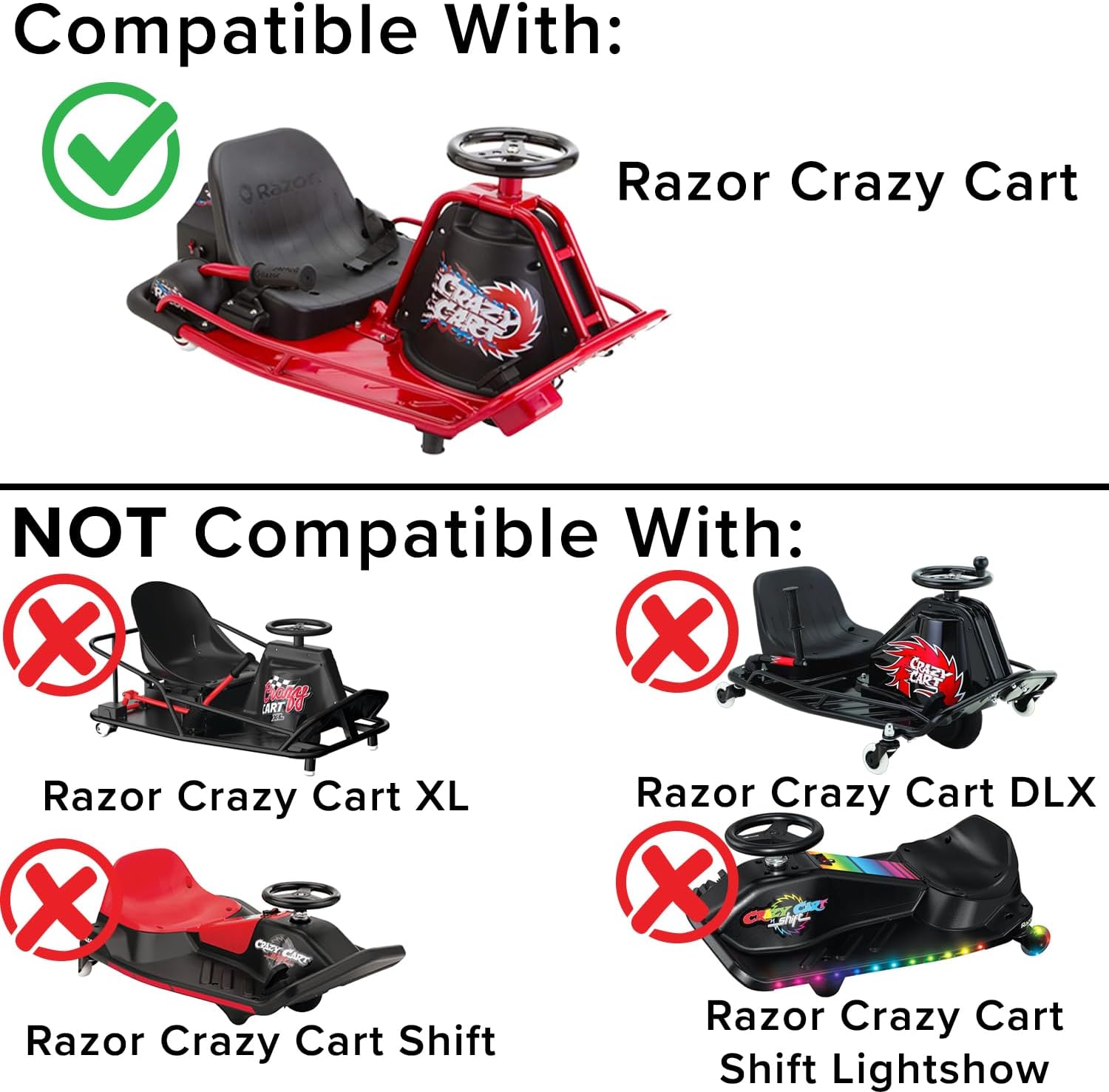
This control module is specifically compatible with Razor Crazy Cart (Versions 1-4). It is crucial to verify your Razor Crazy Cart's version number before installation.
Important Compatibility Notes:
- NOT compatible with Razor Crazy Cart versions 5 and up.
- NOT compatible with Razor Crazy Cart XL, Razor Crazy Cart DLX, Razor Crazy Cart Shift, or Razor Crazy Cart Shift Lightshow.
- This model (HB2430-TYD6K-FS-ROHS) is not interchangeable with model HB2430-TYD6K1-FS.

This image illustrates the compatible Razor Crazy Cart model and lists models that are not compatible with this control module.
2.1 How to Verify Your Model Version
To ensure correct compatibility, check the 19-digit product ID code on your Razor product. The 7th and 8th numbers in this code indicate the version number of your Razor product (e.g., "01" = Version 1, "09" = Version 9, etc.). The product ID code can typically be found on the battery cover and/or on the bottom of the frame.

Locate the 19-digit product ID code on your Razor product to determine its version number.
3. Installation and Setup
Installation of the AlveyTech HB2430-TYD6K-FS-ROHS control module requires careful attention to wiring connections. It is recommended that installation be performed by individuals with experience in electrical systems for electric vehicles.
3.1 Identifying the Control Module

The AlveyTech HB2430-TYD6K-FS-ROHS control module, showing its aluminum housing and multiple wire connectors.
The module features an aluminum housing with cooling fins for heat dissipation. It includes a main power input, motor output, and several accessory connectors.
3.2 Connector Identification
The control module is equipped with a 6-wire throttle connector and a total of 7 connectors for various functions. Refer to the detailed wiring diagram provided with your product or on the product listing for precise connection points. Key connectors include:
- Battery Main: Connects to the main power source (24V battery system).
- Motor Main: Connects to the electric motor.
- Throttle Connector: A 6-wire connector for throttle input.
- Brake Connectors: For brake lever input.
- Charger Port: For connecting the battery charger.
- Power Switch: For the main on/off switch.

A detailed view of the 6-wire throttle connector, essential for proper speed control.
The product label on the control module, displaying model number, rating voltage, maximum current, and undervoltage specifications.
4. Operating Instructions
Once the control module is correctly installed and all connections are secure, operate your Razor Crazy Cart according to its original manufacturer's instructions. The control module manages power delivery to the motor based on throttle input and provides overload protection.
- Ensure the battery is fully charged before operation.
- Turn on the main power switch.
- Engage the throttle smoothly to control speed.
- Apply brakes as needed; the module is designed to manage brake light signals if applicable.
5. Maintenance
To ensure the longevity and optimal performance of your control module:
- Regular Inspection: Periodically check all wire connections to ensure they are tight and free from corrosion or damage.
- Cleanliness: Keep the control module free from dirt, dust, and moisture. The aluminum housing with cooling fins is designed to dissipate heat, and blockages can reduce its efficiency.
- Avoid Overloading: Do not exceed the maximum current rating of 30A. Overloading can damage the module and other components.
- Battery Care: Maintain your Razor Crazy Cart's battery system according to its specific guidelines. The control module includes overload protection that turns off the motor if the battery voltage falls below a specific threshold (20.5 ± 0.5V) to prevent deep discharge and enhance system safety.
6. Troubleshooting
If you experience issues with your Razor Crazy Cart after installing the AlveyTech control module, consider the following:
- No Power:
- Check battery charge level.
- Verify all main power connections (battery to module).
- Ensure the power switch is functioning correctly.
- Motor Not Responding to Throttle:
- Inspect the 6-wire throttle connector for secure connection and damage.
- Confirm the throttle unit itself is operational.
- Intermittent Power/Operation:
- Check all connectors for loose or corroded pins.
- Ensure no wires are pinched or frayed.
- Overload Protection Activation:
- If the motor cuts out during use, the battery voltage may have dropped below the safe operating threshold (20.5 ± 0.5V). Recharge the battery.
- Reduce load on the Crazy Cart if consistently triggering overload protection.
For complex issues or if troubleshooting steps do not resolve the problem, it is recommended to consult a qualified technician or contact AlveyTech customer support.
7. Specifications
| Feature | Specification |
|---|---|
| Model Number | HB2430-TYD6K-FS-ROHS |
| Part Number | W25140009015 (Manufacturer: Z09-1707) |
| Rating Voltage | 24V |
| Maximum Current | 30A |
| Under Voltage Protection | 20.5 ± 0.5V |
| Throttle Connector | 6-wire |
| Total Connectors | 7 |
| Item Dimensions (LxWxH) | 9 x 6 x 2 inches |
| Item Weight | 0.5 Pounds |
| Package Dimensions (LxWxH) | 5 x 4.02 x 2.01 inches |
| Package Weight | 0.23 Kilograms |
8. Warranty and Support
For information regarding product warranty, returns, or technical support, please refer to the retailer's policy where the product was purchased or visit the official AlveyTech website. Keep your purchase receipt for warranty claims.
AlveyTech Store: Visit the AlveyTech Store on Amazon
Ask a question about this manual
Ask about setup, troubleshooting, compatibility, parts, safety, or missing instructions. Manuals+ will review the question and use this page’s manual context to help answer it.