
1. Introduction
This manual provides essential information for the safe and efficient installation, operation, and maintenance of your KING GATES Dy Kit 230/500 Sliding Gate Automation System. Please read these instructions carefully before beginning any installation or operation procedures. Keep this manual in a safe place for future reference.
The KING GATES Dy Kit 230/500 is designed to automate sliding gates, providing convenience and enhanced security for residential and commercial properties. This kit includes the necessary components for a complete automation setup.
2. Safety Information
WARNING: Improper installation or use can lead to serious injury or property damage. Always follow safety guidelines.
- Ensure all electrical connections are performed by a qualified electrician and comply with local regulations.
- Disconnect power before performing any maintenance or service.
- Keep children and pets away from the gate area during operation.
- Do not attempt to repair or modify the system components yourself. Contact qualified personnel.
- Install safety devices such as photocells and safety edges to prevent entrapment or collision.
- Ensure the gate moves freely and is properly balanced before installing the automation system.
3. Package Contents
The Dy Kit 230/500 automation system typically includes the following components. Please verify all parts are present and undamaged upon unpacking.
- Sliding gate motor unit
- Control unit (integrated or separate)
- Remote controls (transmitters)
- Photocells (safety sensors)
- Mounting plate and hardware
- Manual release key
- Installation manual
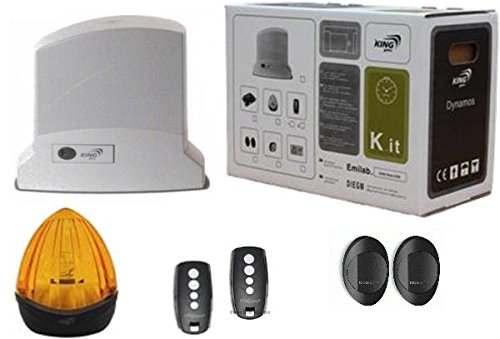
Image: Overview of the KING GATES Dy Kit 230/500 Sliding Gate Automation System, showing the main motor unit and typical accessories included in the kit.
4. Setup and Installation
Installation of the Dy Kit 230/500 requires technical knowledge and adherence to safety standards. It is recommended that installation be performed by a qualified professional.
- Site Preparation: Ensure the gate track is clean and clear, and the gate moves smoothly without obstruction. Verify adequate space for the motor unit.
- Mounting the Motor Unit: Securely attach the motor unit to a stable concrete base or mounting plate near the gate. Ensure it is level and aligned with the gate rack.
- Installing the Gate Rack: Attach the gear rack to the gate, ensuring proper engagement with the motor's pinion gear. Maintain a small clearance between the rack and pinion.
- Electrical Connections: Connect the motor unit to the main power supply and the control unit according to the wiring diagram provided in the detailed installation manual. Install safety devices like photocells.
- Limit Switch Adjustment: Adjust the mechanical or magnetic limit switches to define the gate's fully open and fully closed positions.
- Programming the Control Unit: Follow the control unit's specific instructions to program remote controls, operating modes, and safety features.
- Testing: Perform thorough tests of all functions, including opening, closing, emergency stop, and safety device activation, before final use.
5. Operating Instructions
Once installed and programmed, operating your KING GATES Dy Kit 230/500 is straightforward.
- Opening/Closing the Gate: Press the designated button on your remote control. The gate will begin to open or close. Pressing the button again during operation will typically stop the gate.
- Automatic Closing: If programmed, the gate will automatically close after a set delay once it reaches the fully open position. Ensure the area is clear before automatic closing.
- Manual Release: In case of power failure or malfunction, use the provided manual release key to disengage the motor and operate the gate manually. Insert the key into the lock and turn it as indicated to unlock the mechanism.
- Safety Features: The photocells will detect obstructions in the gate's path and reverse its movement or prevent it from closing. Do not bypass these safety features.
6. Maintenance
Regular maintenance ensures the longevity and reliable operation of your gate automation system.
- Monthly: Check the gate's movement for any obstructions, unusual noises, or signs of wear on the rack and wheels. Clean the photocell lenses to ensure proper function.
- Quarterly: Inspect all mounting hardware for tightness. Check electrical connections for corrosion or damage. Test the manual release mechanism.
- Annually: Have a qualified technician perform a comprehensive inspection of the motor, control unit, and all safety devices. Lubricate moving parts as recommended by the manufacturer.
- Keep the area around the motor unit clear of debris, leaves, and pests.
7. Troubleshooting
Refer to this section for common issues and their potential solutions.
- Gate does not move:
- Check if the power supply is connected and active.
- Ensure the manual release is engaged (not in manual mode).
- Verify remote control batteries are functional.
- Check if photocells are obstructed or misaligned.
- Gate stops unexpectedly:
- An obstruction might be detected by safety sensors. Clear the path.
- Check for mechanical obstructions in the gate's path or track.
- Overheating of the motor (allow it to cool down).
- Remote control not working:
- Replace remote control batteries.
- Re-program the remote control to the control unit.
- Ensure you are within the operating range.
If problems persist after attempting these solutions, contact a qualified service technician.
8. Specifications
| Manufacturer | KING GATES |
| Model | Dy Kit 230/500 |
| ASIN | B01NAXNMV6 |
| Batteries Included | No |
| Batteries Required | No |
| First Available Date | January 27, 2017 |
9. Warranty and Support
For warranty information, please refer to the documentation provided with your purchase or contact your retailer. KING GATES products are designed for durability and performance.
For technical support, spare parts, or service inquiries, please contact your authorized KING GATES dealer or the seller from whom you purchased the product. Provide your product model (Dy Kit 230/500) and ASIN (B01NAXNMV6) for faster assistance.


