
PerkinElmer W1026907
Instruction Manual: Platinum Skimmer
Brand: PerkinElmer
Model: W1026907
Introduction
The PerkinElmer W1026907 Platinum Skimmer is a precision-designed component for NexION 1000, 2000, 300, and 350 S series Inductively Coupled Plasma - Mass Spectrometry (ICP-MS) systems. It is engineered to provide superior long-term stability and resist clogging, enabling analysis under both high and low sample-uptake conditions.
This manual provides essential information for the proper setup, operation, and maintenance of your PerkinElmer Platinum Skimmer. Adhering to these guidelines will ensure optimal performance and longevity of the component within your ICP-MS system.
Product Overview
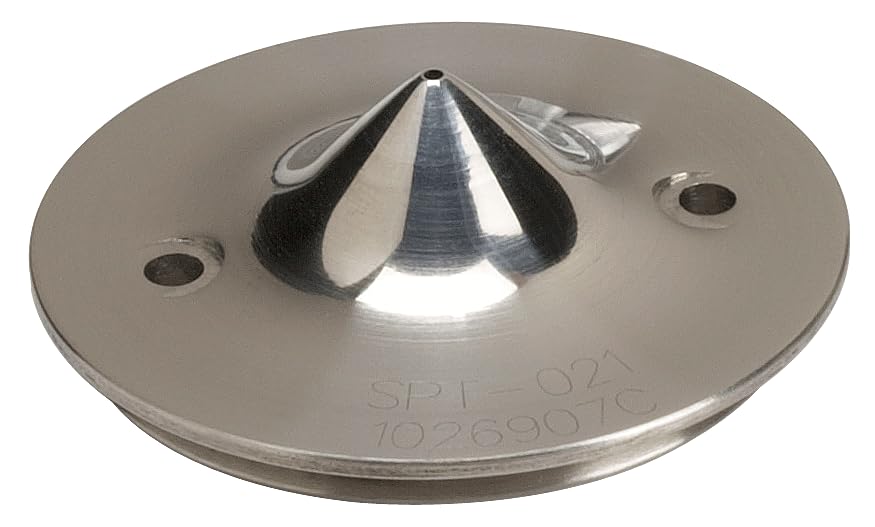
Image: The PerkinElmer W1026907 Platinum Skimmer. This component is a circular, metallic disc with a central conical element and two mounting holes. It is designed for use in ICP-MS systems.
The W1026907 Platinum Skimmer is a critical component for NexION ICP-MS systems. Its platinum construction makes it the material of choice for more corrosive samples, ensuring durability and consistent performance.
Key features include:
- Material: Constructed from platinum, offering excellent resistance to corrosive sample matrices.
- Compatibility: Designed for seamless integration with NexION 1000, 2000, 300, and 350 ICP-MS instruments.
- Performance: Engineered to maximize signal stability and minimize clogging during extended analytical runs, even with samples containing high dissolved solids.
Setup
This section outlines the general procedure for installing the Platinum Skimmer. Refer to your specific NexION ICP-MS instrument manual for detailed, model-specific instructions and safety precautions.
- Safety First: Ensure the ICP-MS system is powered off and all gas supplies are shut down before beginning any installation or maintenance. Allow sufficient time for components to cool if the system was recently in operation.
- Access the Interface Region: Carefully open the interface region of your NexION ICP-MS instrument according to the manufacturer's guidelines. This typically involves removing the torch box or interface cover.
- Remove Old Skimmer (if applicable): If replacing an existing skimmer, gently unscrew or unclip the old component. Handle with care to avoid damage to the interface block.
- Inspect New Skimmer: Before installation, visually inspect the new Platinum Skimmer (W1026907) for any signs of damage or manufacturing defects. Ensure the orifice is clear and free of debris.
- Install New Skimmer: Carefully align the Platinum Skimmer with the interface block. Ensure it seats properly and is securely fastened. Do not overtighten, as this can cause damage.
- Reassemble System: Close the interface region and reassemble any covers or components that were removed.
- Leak Check: After installation, perform a leak check as described in your instrument's manual to ensure proper vacuum integrity.
Operating
The Platinum Skimmer is a passive component within the ICP-MS system and does not require direct operational control. Its function is integral to the instrument's vacuum interface, shaping the ion beam for optimal analysis.
Proper operation of the skimmer is ensured by:
- Correct Installation: As detailed in the Setup section, ensure the skimmer is correctly seated and sealed.
- Appropriate Sample Matrix: While the platinum material offers excellent resistance to corrosive samples, prolonged exposure to extremely aggressive matrices or samples with very high dissolved solids may still impact its lifespan.
- Regular Maintenance: Follow the maintenance schedule to prevent clogging and maintain performance.
The skimmer's performance is directly linked to the overall vacuum conditions and sample introduction system. Monitor instrument performance metrics (e.g., signal stability, background noise) to identify potential issues related to the skimmer.
Maintenance
Regular cleaning and inspection of the Platinum Skimmer are crucial for maintaining optimal ICP-MS performance and extending the component's lifespan.
Cleaning Procedure
- Disassembly: Power off the ICP-MS system and allow it to cool. Carefully remove the skimmer as described in the Setup section (reverse order).
- Initial Rinse: Rinse the skimmer with deionized (DI) water to remove any loose deposits.
- Chemical Cleaning:
- For general deposits, immerse the skimmer in a dilute acid solution (e.g., 5-10% nitric acid) for 15-30 minutes.
- For organic deposits, an ultrasonic bath with a mild detergent solution may be used.
- Caution: Always use appropriate personal protective equipment (PPE) when handling chemicals. Consult your instrument manual for recommended cleaning agents and procedures specific to platinum components.
- Rinse Thoroughly: After chemical cleaning, rinse the skimmer extensively with DI water to remove all traces of cleaning agents.
- Drying: Allow the skimmer to air dry completely in a clean, dust-free environment, or use a gentle stream of clean, dry nitrogen.
- Inspection: Before reinstallation, inspect the skimmer for any remaining deposits, pitting, or damage. Replace if significant wear or damage is observed.
- Reinstallation: Reinstall the clean and dry skimmer following the Setup instructions.
Maintenance Frequency
The frequency of cleaning depends on the sample matrix, sample throughput, and instrument usage. A general guideline is to clean the skimmer:
- Weekly for high-throughput or challenging sample matrices.
- Bi-weekly or monthly for routine analysis with cleaner samples.
- Whenever a significant drop in signal intensity or increase in background noise is observed.
Troubleshooting
Issues related to the skimmer typically manifest as degraded instrument performance.
| Symptom | Possible Cause | Solution |
|---|---|---|
| Reduced Signal Intensity | Clogged skimmer orifice; Skimmer misalignment; Damaged skimmer | Clean the skimmer; Reinstall and ensure proper alignment; Replace the skimmer if damaged |
| Increased Background Noise | Contaminated skimmer; Poor vacuum seal around skimmer | Clean the skimmer thoroughly; Check O-rings and seals, ensure proper seating |
| Poor Long-Term Stability | Gradual build-up of deposits; Skimmer wear | Implement regular cleaning schedule; Consider skimmer replacement if performance does not improve after cleaning |
If troubleshooting steps do not resolve the issue, contact PerkinElmer technical support or a qualified service engineer.
Specifications
- Model Number: W1026907
- Material: Platinum
- Compatibility: NexION 1000, NexION 2000, NexION 300, NexION 350 ICP-MS Systems
- Technology Type: ICP-MS (Inductively Coupled Plasma - Mass Spectrometry)
- Manufacturer: PerkinElmer, Inc
- Package Dimensions: Approximately 1 x 1 x 1 inches
- Item Weight: Approximately 12.64 ounces
Warranty Information
Specific warranty terms for the W1026907 Platinum Skimmer are provided by PerkinElmer at the time of purchase. Please refer to your purchase documentation or contact PerkinElmer directly for detailed warranty coverage.
Generally, warranties cover defects in materials and workmanship under normal use. Damage resulting from improper installation, misuse, or unauthorized modifications is typically not covered.
Support
For technical assistance, service, or to order replacement parts, please contact PerkinElmer customer support.
- PerkinElmer Official Website: www.perkinelmer.com
- Contact Information: Refer to the "Contact Us" section on the official website for regional phone numbers and email support.
When contacting support, please have your instrument model, serial number, and the part number (W1026907) of the skimmer readily available.
Related documentsW1026907


Ask a question about this manual
Ask about setup, troubleshooting, compatibility, parts, safety, or missing instructions. Manuals+ will review the question and use this page’s manual context to help answer it.