
Introduction
This manual provides comprehensive instructions for the Smartby Apex LED LCD TV Remote Control (Model S-LD200RM). This remote is designed to be a direct replacement for original Apex TV remotes, offering immediate functionality without the need for complex programming.
It is compatible with a wide range of Apex TV models, including but not limited to: JE3708, LD 3249, LD3288, LD4077, LD4088, LD4688, LE 3212, LE40H88, LE4012, LE4612, LE3242, LD4088, LE5043.
Product Overview

Figure 1: Front view of the Smartby Apex TV Remote Control, showing all buttons and ergonomic design.

Figure 2: Angled view of the Smartby Apex TV Remote Control, highlighting its ergonomic shape.
The Smartby Apex TV Remote Control is designed for ease of use, featuring a standard layout of buttons for TV functions such as power, volume, channel, input selection, and menu navigation. Its ergonomic design ensures comfortable handling.
Setup
Installing Batteries
- Locate the battery compartment on the back of the remote control.
- Slide the battery compartment cover downwards or in the direction indicated by an arrow to open it.
- Insert two AAA batteries (not included), ensuring the positive (+) and negative (-) terminals align correctly with the markings inside the compartment.
- Slide the battery compartment cover back into place until it clicks securely.
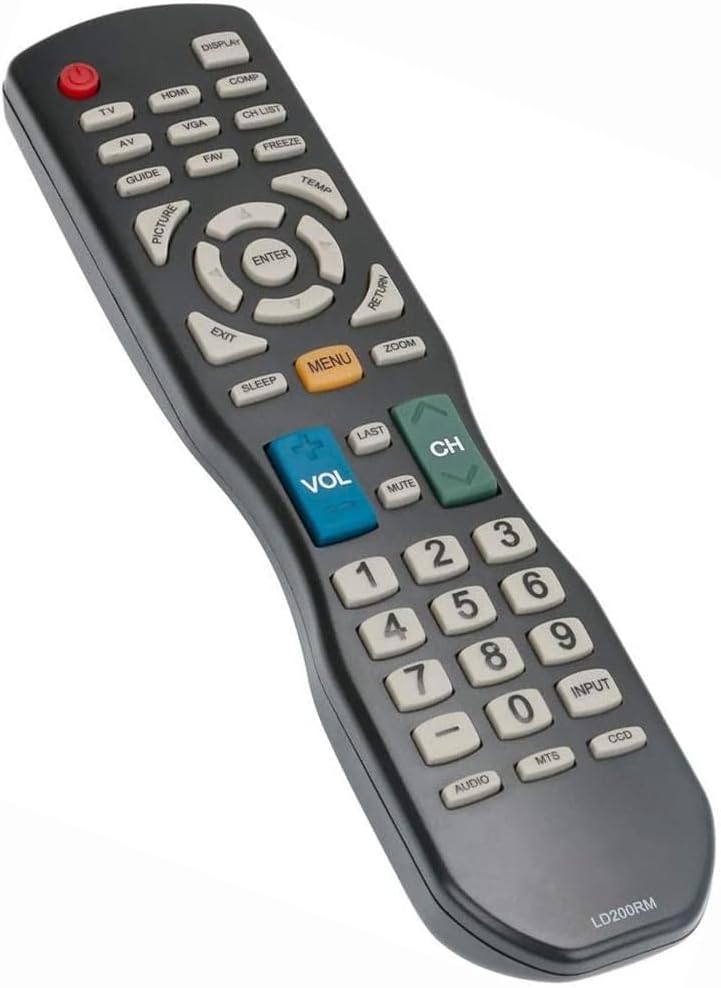
Figure 3: Back view of the remote control, showing the battery compartment.
The remote control is pre-programmed and ready to use with compatible Apex TV models immediately after battery installation. No additional programming or pairing is required.
Operating Instructions
The Smartby Apex TV Remote Control provides full functionality for your compatible Apex LED LCD TV. Point the remote directly at the TV's infrared receiver for optimal performance.
Key Functions:
- Power Button (●): Turns the TV on or off.
- TV/HDMI/VGA/COMP/AV Buttons: Selects the corresponding input source.
- DISPLAY: Shows on-screen display information.
- CH LIST: Displays the channel list.
- GUIDE: Accesses the electronic program guide (if available).
- FAV: Accesses favorite channels.
- FREEZE: Freezes the current image on screen.
- PICTURE/TEMP: Adjusts picture settings or color temperature.
- Navigation Pad (Up, Down, Left, Right, ENTER): Navigates menus and confirms selections.
- EXIT: Exits the current menu or function.
- RETURN: Returns to the previous screen or channel.
- MENU: Opens the TV's main menu.
- ZOOM: Zooms in on the picture.
- SLEEP: Sets the sleep timer.
- VOL (+/-): Adjusts the volume level.
- MUTE: Mutes or unmutes the TV sound.
- CH (+/-): Changes channels up or down.
- LAST: Returns to the previously viewed channel.
- Numeric Keypad (0-9): Directly enters channel numbers.
- INPUT: Cycles through available input sources.
- AUDIO/MTS/CCD: Controls audio settings, Multi-channel Television Sound, or Closed Captioning.
Maintenance
- Cleaning: Wipe the remote control with a soft, dry cloth. Do not use liquid cleaners or abrasive materials.
- Battery Replacement: Replace batteries when the remote's response becomes sluggish or stops working. Always replace both batteries at the same time with new ones of the same type.
- Storage: If the remote control will not be used for an extended period, remove the batteries to prevent leakage and potential damage. Store in a cool, dry place.
- Avoid Damage: Do not drop the remote control or expose it to extreme temperatures, humidity, or direct sunlight.
Troubleshooting
| Problem | Possible Cause | Solution |
|---|---|---|
| Remote not working. | Dead or incorrectly inserted batteries. | Replace batteries with new ones, ensuring correct polarity (+/-). |
| Remote works intermittently. | Weak batteries; obstruction between remote and TV; remote too far from TV. | Replace batteries. Remove any obstructions. Move closer to the TV. |
| Specific buttons not responding. | Button stuck or damaged; TV model incompatibility for specific advanced functions. | Check if the button is physically stuck. While this remote is widely compatible, some advanced TV-specific functions might not be supported. |
| TV does not turn on/off with remote. | TV's power sensor issue; remote's power button issue. | Ensure TV is plugged in. Try turning TV on/off manually. If other remote functions work, the issue might be with the TV's power reception or a specific remote button defect. |
If troubleshooting steps do not resolve the issue, please refer to the support information provided.
Specifications
- Model Number: S-LD200RM
- Compatible Devices: Apex LED LCD Televisions
- Power Source: 2 x AAA Batteries (not included)
- Dimensions (L x W x H): 9 x 2.7 x 1.5 inches
- Weight: 3.2 ounces
- Color: Black
- Special Feature: Ergonomic Design
Warranty and Support
This Smartby remote control is designed for reliable performance. For any issues not covered in the troubleshooting section, please contact your retailer or the manufacturer's customer support for assistance. Please retain your proof of purchase for warranty claims.