
Introduction
This manual provides detailed instructions for the safe operation, installation, and maintenance of your ceamorfco Electric Fireplace, Model SSDQ-DBL-50D. Please read this manual thoroughly before installation and use, and retain it for future reference.
The ceamorfco Electric Fireplace offers both wall-recessed and wall-mounted installation options, featuring adjustable flame colors, a heating function (750W/1500W), remote control, timer, and touch screen operation.
Important Safety Information
WARNING: To reduce the risk of fire, electric shock, or injury, read all instructions before using this appliance.
- Always unplug the fireplace when not in use or before cleaning.
- Do not operate any fireplace with a damaged cord or plug, or if the heater has malfunctioned or been dropped/damaged.
- Do not run power cord under carpeting. Do not cover cord with throw rugs, runners, or similar coverings. Arrange cord away from traffic area and where it will not be tripped over.
- Do not insert or allow foreign objects to enter any ventilation or exhaust opening as this may cause an electric shock or fire, or damage the fireplace.
- To prevent a possible fire, do not block air intakes or exhaust in any manner. Do not use on soft surfaces, like a bed, where openings may become blocked.
- This fireplace is hot when in use. To avoid burns, do not let bare skin touch hot surfaces. Keep combustible materials, such as furniture, pillows, bedding, papers, clothes, and curtains at least 3 feet (0.9 m) from the front of the fireplace and away from the sides and rear.
- Extreme caution is necessary when any heater is used by or near children or invalids and whenever the fireplace is left operating and unattended.
- The fireplace is for indoor use only.
Package Contents
Carefully unpack all components and check against the list below. Ensure all items are present and undamaged before proceeding with installation.
- ceamorfco Electric Fireplace Unit (Model SSDQ-DBL-50D)
- Remote Control
- Crystal Stones (1 pack)
- Installation Hardware Kit
- User Manual (this document)

Image: Key components of the ceamorfco electric fireplace, showing the control panel, air outlet, mounting bracket, side handle, power cable connection, and the included 6-foot power cord.
Setup and Installation
Your ceamorfco electric fireplace can be installed in two ways: fully recessed into a wall or mounted directly onto a wall surface.
1. Wall-Mounted Installation
- Select a suitable location on a wall, ensuring it is away from curtains, furniture, and high-traffic areas.
- Mark the desired height and position for the mounting bracket.
- Securely attach the mounting bracket to the wall using the provided hardware, ensuring it is level.
- Carefully lift the fireplace unit and hook it onto the mounting bracket.
- Ensure the unit is securely seated and stable.
2. Recessed Installation
For recessed installation, a wall opening must be prepared according to the specified dimensions.
- Recommended Opening Dimensions:
- Width (A): Approximately 68.90 inches
- Depth (B): Approximately 2.97 inches
- Height (C): Approximately 17.03 inches
- Create a framed opening in the wall according to the recommended dimensions. Ensure the framing is sturdy and can support the weight of the fireplace.
- Carefully slide the fireplace unit into the prepared opening.
- Secure the fireplace to the wall framing using the provided screws through the designated mounting holes on the unit.
- Ensure the unit is flush with the wall and securely fastened.
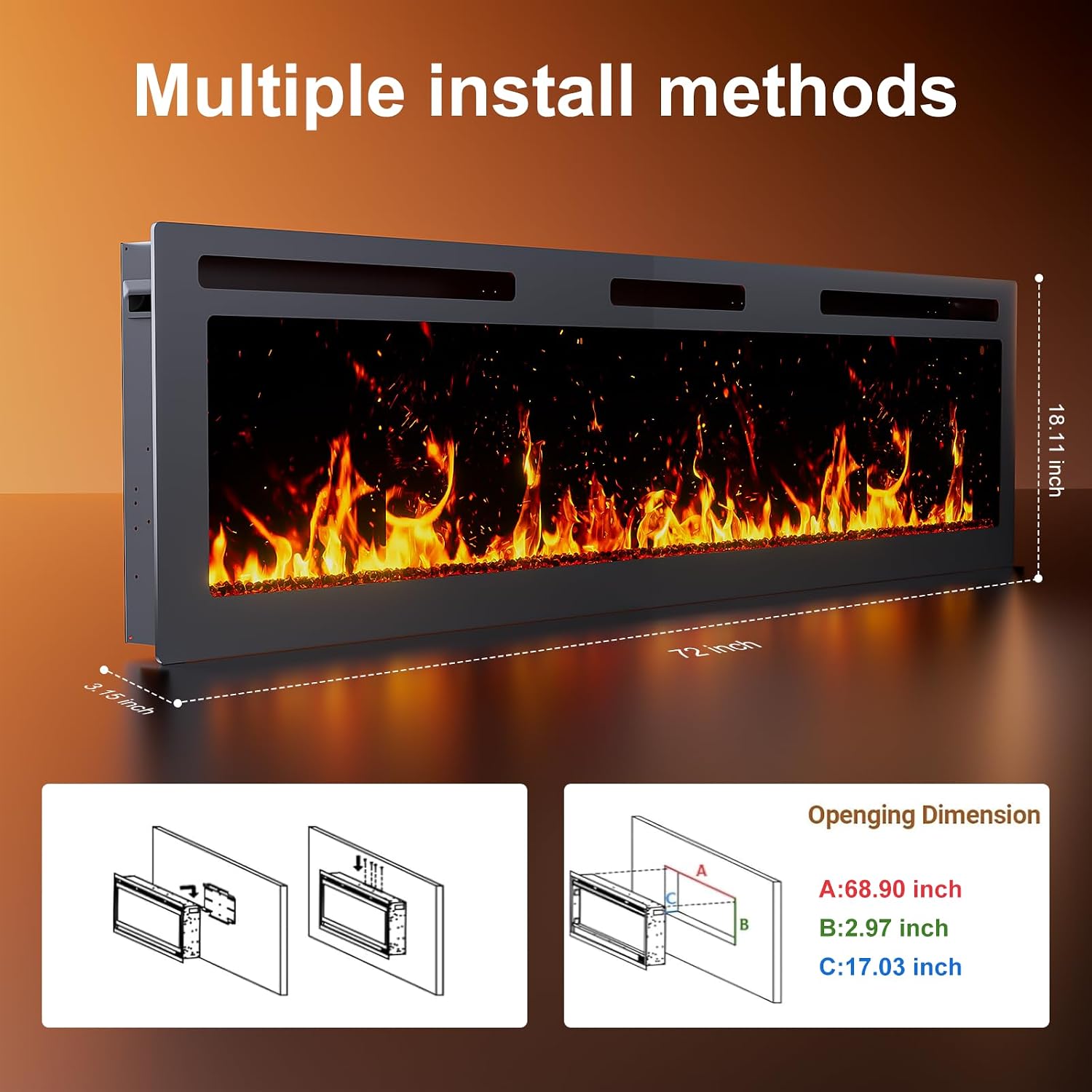
Image: Illustration of the two installation methods: wall-mounted and recessed. The diagram also provides the recommended opening dimensions for recessed installation: Width (A) 68.90 inches, Depth (B) 2.97 inches, Height (C) 17.03 inches.

Image: Visual comparison of mounting the fireplace on a wall versus building it into a wall, emphasizing the unit's ultra-thin profile and the convenience of remote control operation.
Electrical Connection
- Ensure the power outlet is a standard 120V, 60Hz grounded outlet.
- Do not use extension cords or power strips. Plug the fireplace directly into a wall outlet.
- The fireplace operates at 750W (energy-saving) or 1500W (high-efficiency). Ensure your circuit can handle the load.
Operating Instructions
Your ceamorfco electric fireplace can be controlled via the touch screen panel on the unit or the included remote control.
Control Panel and Remote Control Functions

Image: Overview of the fireplace's control functions, illustrating options for 1500W heating, switching flame colors, power on/off, setting a sleep timer (1-8 hours), and changing the flame base color.

Image: A user operating the electric fireplace with the remote control, highlighting the convenience of adjusting settings from a distance.
- Power On/Off: Press the power button on the unit or remote to turn the fireplace on or off.
- Heat Settings:
- Press the heat button to cycle between 750W (energy-saving) and 1500W (high-efficiency) heating modes.
- Adjust the temperature between 62°F and 82°F using the temperature control buttons.
- The heating function can be used independently or with the flame effect.
- Flame Effect:
- Press the flame color button to cycle through 12 different flame colors.
- Press the flame brightness button to adjust between 5 levels of flame brightness.
- The flame effect can be operated without heat for year-round ambiance.
- Fuel Bed Color: Press the fuel bed color button to cycle through 12 different LED fuel bed hues.
- Timer Function:
- Press the timer button to set an automatic shut-off timer from 1 to 8 hours.
- The fireplace will turn off automatically after the set time.
- Quiet Operation: The fireplace operates at approximately 45 decibels, ensuring a quiet environment.

Image: A visual representation of the 12 distinct flame base colors, ranging from cool to warm tones, that can be selected to customize the fireplace's appearance.

Image: A chart demonstrating the fireplace's quiet operation, indicating a noise level of approximately 35dB, which is significantly quieter than a library (50dB) and comparable to falling leaves (20dB).
Maintenance
Regular maintenance ensures optimal performance and longevity of your electric fireplace.
- Cleaning:
- Always unplug the fireplace before cleaning.
- Use a soft, damp cloth to clean the exterior surfaces. Do not use abrasive cleaners or sprays.
- Gently wipe the tempered glass front with a soft, lint-free cloth. Glass cleaner can be used sparingly if needed, applied to the cloth first, not directly to the glass.
- Ventilation:
- Ensure the air intake and exhaust vents are clear of dust and obstructions.
- Periodically vacuum the vents to remove any accumulated debris.
- Light Bulbs: The flame effect uses LED technology, which typically does not require bulb replacement.
Troubleshooting
If you encounter any issues with your fireplace, refer to the following common problems and solutions:
| Problem | Possible Cause | Solution |
|---|---|---|
| Fireplace does not turn on. | No power, power switch off, circuit breaker tripped. | Check if the unit is plugged in. Ensure the main power switch is on. Reset the circuit breaker if tripped. |
| No heat, but flame effect works. | Heater function off, temperature set too low, thermal cut-off activated. | Activate the heater function. Increase the temperature setting. Unplug the unit for 15 minutes to reset the thermal cut-off, then plug back in. |
| Remote control not working. | Dead batteries, remote out of range, sensor blocked. | Replace batteries in the remote. Ensure you are within range and pointing the remote at the fireplace. Clear any obstructions between the remote and the fireplace sensor. |
| Flame effect not working. | Flame effect off, LED issue. | Ensure the flame effect is turned on. If the issue persists, contact customer support. |
| Unusual noise during operation. | Obstruction in fan, loose component. | Turn off and unplug the unit. Inspect vents for obstructions. If noise persists, contact customer support. |
Specifications
| Feature | Detail |
|---|---|
| Brand | ceamorfco |
| Model Name | SSDQ-DBL-50D |
| Size | 72-inch |
| Product Dimensions (Approx.) | 72"W x 18.11"H x 3.15"D (based on image data) |
| Power Source | Corded Electric |
| Material | Tempered Glass (front panel) |
| Installation Type | Wall Mount, Recessed |
| Heat Output | 750W / 1500W |
| Temperature Range | 62°F – 82°F |
| Special Features | Adjustable Flame Color (12 options), Adjustable Fuel Bed Color (12 options), 5 Flame Brightness Levels, Timer (1-8 hours), Touch Screen Control, Remote Control, Automatic Heat-Off Safety Function, Quiet Operation (~45dB) |
| Certifications | ETL-certified |
Warranty and Support
ceamorfco provides 2-year technical support for this product. If you have any questions, require assistance with installation, operation, or troubleshooting, please contact ceamorfco customer service. Please refer to your purchase documentation for contact details.
For warranty claims, retain your proof of purchase. The warranty covers manufacturing defects under normal use conditions.