1. Important Safety Information
Please read all instructions carefully before using the JFIT Under Desk & Stand Up Mini Elliptical. Retain this manual for future reference.
- Consult a physician before starting any exercise program.
- Ensure the elliptical is placed on a stable, level surface.
- Keep children and pets away from the equipment during use.
- Do not stand on the elliptical when not in use.
- Wear appropriate footwear during exercise.
- Stop exercising immediately if you feel faint, dizzy, or experience pain.
- The maximum user weight capacity for this unit is 250 pounds (113 kg).
2. Product Overview
The JFIT Under Desk & Stand Up Mini Elliptical is designed for versatile use, allowing for both seated and standing exercise. It features a compact design, adjustable resistance, and a monitor to track your progress.

Figure 2.1: JFIT Under Desk & Stand Up Mini Elliptical, showcasing its dual-use design for both standing and seated positions.
Key Features:
- Adjustable Pedals: Unique design allows for comfortable use while seated or standing.
- Compact Design: Easily fits under most desks and can be stored conveniently.
- Magnetic Tension Dial: Provides adjustable resistance for varied workout intensity.
- Series 1050 Monitor: Tracks time, speed, distance, and calories burned.
- Portability: Equipped with a top handle for easy carrying and front rollers for movement.
3. Setup and Assembly
The JFIT Mini Elliptical requires minimal assembly. All necessary tools are typically included.
- Unpacking: Carefully remove all components from the packaging. Ensure all parts are present according to the packing list.
- Base Assembly: Attach any separate base components or stabilizers as instructed in the included quick-start guide.
- Pedal Attachment: Secure the pedals to the main unit if they are not pre-attached. Ensure they are firmly tightened.
- Monitor Battery Installation: The Series 1050 Monitor requires batteries (not always included). Open the battery compartment, insert the correct battery type (e.g., LR44), and close the compartment.
- Placement: Position the elliptical on a flat, stable surface. For optimal stability and to prevent movement during use, consider placing a mat underneath the unit.

Figure 3.1: The JFIT Mini Elliptical highlighting its molded top handle for carrying and front rollers for easy movement.
4. Operating Instructions
4.1 Seated Use
Place the elliptical under your desk or in front of your chair. Ensure there is enough clearance for your knees and the elliptical's movement. Sit comfortably and place your feet on the pedals.
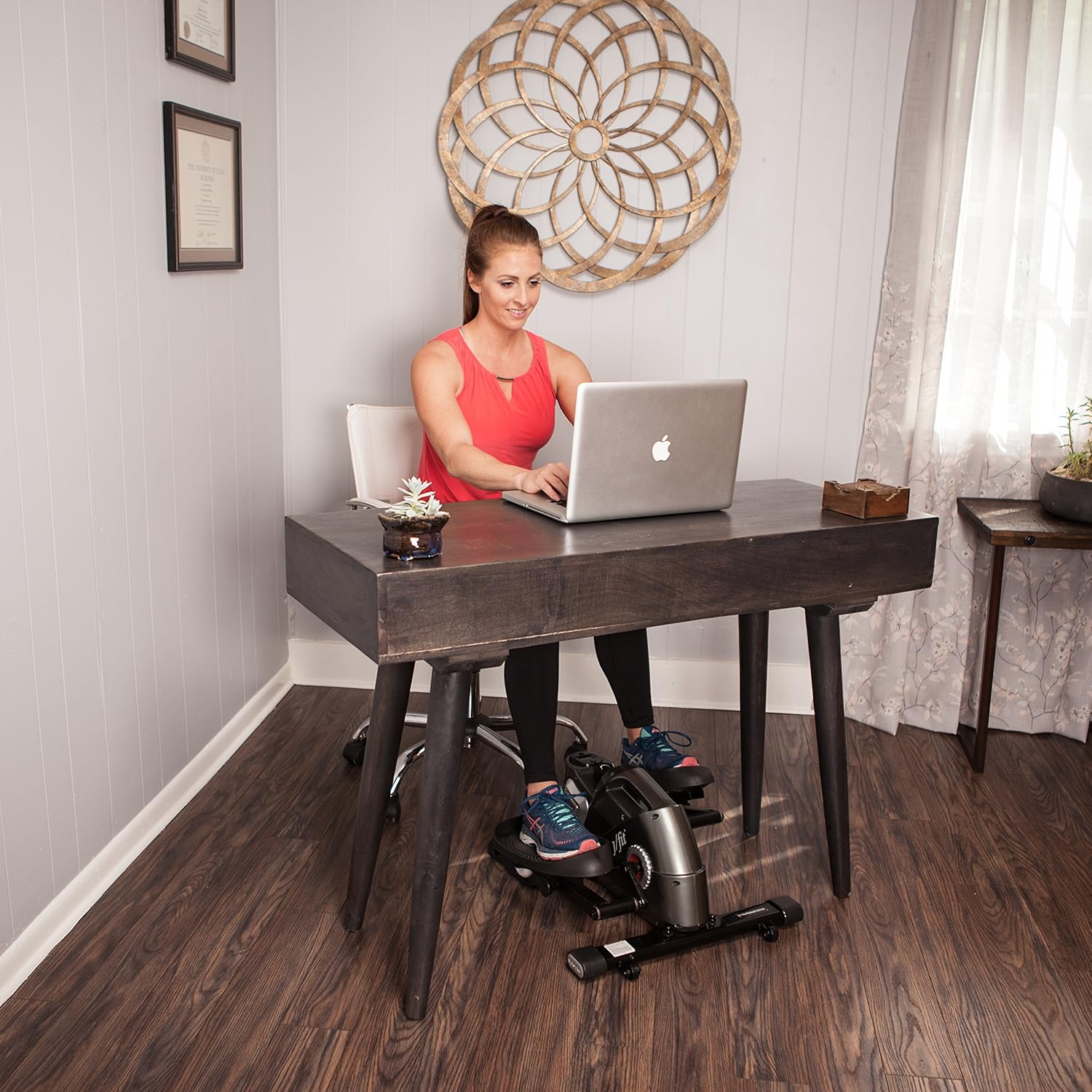
Figure 4.1: User engaging with the JFIT Mini Elliptical in a seated position under a desk.
4.2 Standing Use
Position the elliptical on a stable surface. Carefully step onto the pedals, ensuring your balance. You may use a nearby stable object for support if needed. Begin pedaling at a comfortable pace.

Figure 4.2: User engaging with the JFIT Mini Elliptical in a standing position.
4.3 Adjusting Resistance
The elliptical features a magnetic tension dial. Turn the dial clockwise to increase resistance for a more challenging workout, and counter-clockwise to decrease resistance for an easier pace.
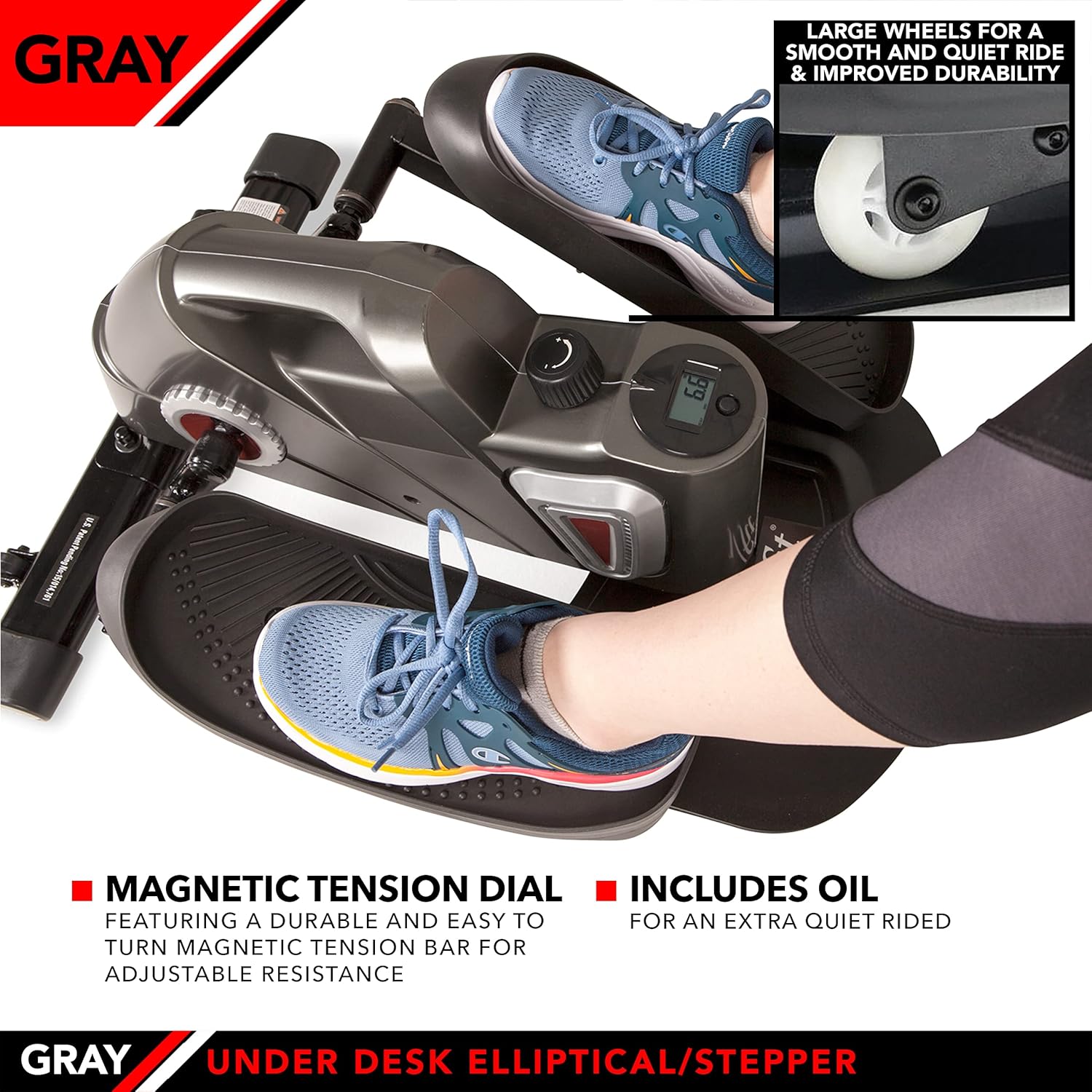
Figure 4.3: Detail of the magnetic tension dial for adjusting workout intensity and the large wheels designed for smooth operation.
4.4 Using the Series 1050 Monitor
The integrated Series 1050 Monitor displays key workout metrics:
- Time: Duration of your workout.
- Speed: Current pedaling speed.
- Distance: Estimated distance covered.
- Calories Burned: Estimated calories expended during your session.
Refer to the monitor's specific instructions for navigating between display modes and resetting values.
5. Maintenance
Regular maintenance ensures the longevity and optimal performance of your elliptical.
- Cleaning: Wipe down the unit with a damp cloth after each use to remove sweat and dust. Avoid abrasive cleaners.
- Lubrication: If the unit develops squeaking noises, apply a small amount of penetrating lubricant to moving parts, particularly around the pedal axles and internal mechanisms. Use lubricant sparingly.
- Monitor Battery: Replace the monitor battery (LR44) when the display becomes dim or stops functioning.
- Storage: Store the elliptical in a cool, dry place away from direct sunlight and extreme temperatures. The top handle facilitates easy transport and storage.

Figure 5.1: The JFIT Mini Elliptical being carried by its integrated top handle, demonstrating its portability.
6. Troubleshooting
- Squeaking Noise: If the elliptical makes a squeaking sound, apply a small amount of lubricant to the moving joints and axles. Ensure all bolts are tightened.
- Monitor Not Displaying: Check if the battery is correctly installed and has sufficient charge. Replace the battery if necessary.
- Unit Slides During Use: Ensure the elliptical is on a non-slip surface. A rubber mat placed underneath can improve stability.
- Resistance Not Changing: Verify that the tension dial is functioning correctly and is not obstructed.
7. Specifications
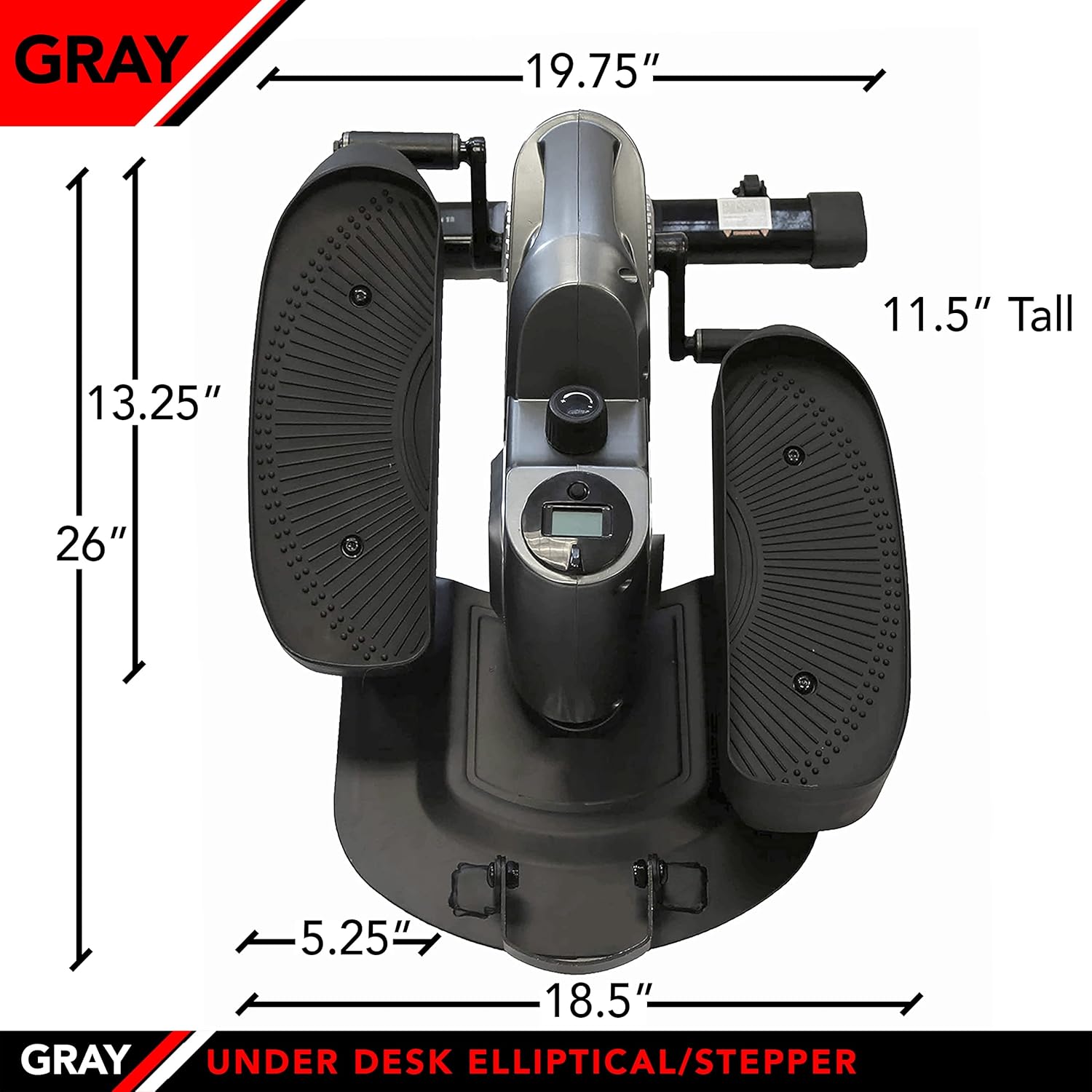
Figure 7.1: The JFIT Mini Elliptical with key dimensions indicated for reference.
| Feature | Detail |
|---|---|
| Model Number | J-ELLPEW |
| Product Dimensions | 69.09 x 38.1 x 27.94 cm (27.2 x 15 x 11 inches) |
| Item Weight | 14.65 kg (32.3 lbs) |
| Maximum Weight Capacity | 250 Pounds |
| Material | Metal |
| Color | Pewter |
| Display Size | 2 Inches |
| Meter Functions | Calories Burned, Distance, Speed, Time |
| UPC | 818020000579 |
8. Warranty and Support
For warranty information or technical support, please refer to the documentation provided at the time of purchase or contact JFIT customer service directly. Keep your proof of purchase for warranty claims.


