
BLAZEVIDEO A252
BLAZEVIDEO Trail Camera User Manual
Model: A252
Introduction
This manual provides comprehensive instructions for the setup, operation, and maintenance of your BLAZEVIDEO Trail Camera, Model A252. Designed for wildlife monitoring and outdoor surveillance, this camera captures high-quality photos and videos with advanced features like no-glow night vision and motion detection. Please read this manual thoroughly to ensure optimal performance and longevity of your device.

The BLAZEVIDEO Trail Camera A252, designed for discreet wildlife observation.
Setup
1. Battery Installation
The camera requires 8 AA high-performance alkaline batteries for optimal operation. Ensure correct polarity when inserting batteries into the compartment. For extended in-field battery life, lithium batteries are recommended, especially in cold weather conditions.
2. SD Card Insertion
This camera does not include internal memory. A compatible SD or SDHC card (up to 512GB, not included) is required for recording photos and videos. Before inserting, ensure the write-protect switch on the SD card is in the "off" position. Insert the card into the designated slot until it clicks into place.

The camera requires an SDHC card and batteries, which are not included in the package.
3. Mounting the Camera
Secure the camera to a tree or sturdy post using the provided strap. Position the camera to capture the desired area, ensuring it is stable and free from obstructions. The camera features a 110° wide view angle for comprehensive coverage.

The BLAZEVIDEO Trail Camera A252, shown from two angles, ready for outdoor deployment.
Operating the Camera
1. Modes of Operation
The camera offers three primary modes: Still Image, Video, and Cam + Video. In "Cam + Video" mode, the camera captures both pictures and video clips upon each trigger event. Use the built-in 2.4-inch color screen and intuitive buttons to navigate the menu and select your preferred settings.
2. Image and Video Quality
Capture crystal clear images up to 24MP and 1296P video. The camera's selected large aperture lens ensures high-quality captures.
Example of a 24MP photo captured by the trail camera.
3. Night Vision Capabilities
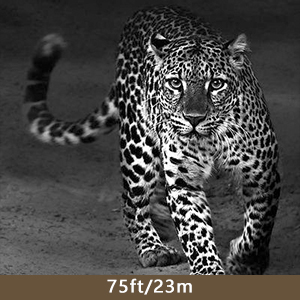
Equipped with 36 no-glow, invisible infrared LEDs, the camera captures clear shots in total darkness without disturbing wildlife. The IR flash range extends up to 23 meters (75 feet), ensuring excellent night-time visibility.

Night vision capture at 75 feet (23 meters).
4. Motion Detection and Trigger Speed
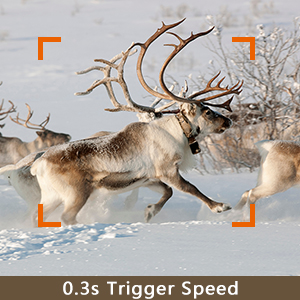
The camera features a fast trigger time of less than 0.5 seconds and a wide detection angle of 70°, with a detection distance up to 70 feet. This ensures you capture even fast-moving subjects.
Fast trigger speed captures dynamic moments.
5. Official Product Videos
Clear Day Video Taken by Trail Camera
This video demonstrates the camera's ability to capture clear footage during daylight hours, showcasing its video quality in natural light conditions.
Deer in Trail Camera's Video
Observe deer activity captured by the trail camera, highlighting its effectiveness in monitoring wildlife movement.
Game Camera with Motion Sensor and Night Vision
This video showcases the camera's motion sensor and night vision capabilities, capturing animals in low-light conditions.
Night Vision Video from Customer
A demonstration of the camera's night vision performance, capturing clear footage of wildlife in the dark.
Day Video of Trail Camera
Footage captured during the day, illustrating the camera's ability to record clear and detailed video in various outdoor settings.
Game Camera's Clear Video
Another example of clear video recording from the game camera, capturing natural scenes effectively.
Maintenance
1. Cleaning
Regularly clean the camera lens and IR sensors with a soft, dry cloth to ensure clear image capture. Avoid using abrasive materials or chemical cleaners that could damage the surfaces.
2. Weather Resistance
The BLAZEVIDEO Trail Camera is IP66 waterproof, making it dust-proof, drop-proof, and rain-proof. It is designed to perform reliably in various environments, from deserts to tropical rainforests, throughout all seasons. However, prolonged submersion is not recommended.
3. Storage
When not in use for extended periods, remove the batteries to prevent leakage and store the camera in a cool, dry place away from direct sunlight.
Troubleshooting
If you encounter any issues with your BLAZEVIDEO Trail Camera, please refer to the comprehensive user manual (PDF) available for download. Common issues include:
- Camera not powering on: Check battery installation and ensure batteries are fully charged.
- No images/videos recorded: Verify SD card is inserted correctly, not write-protected, and has sufficient space. Check camera mode settings.
- Poor image/video quality: Clean the lens and IR sensors. Ensure adequate lighting for night vision.
- False triggers: Adjust motion sensor sensitivity settings.
Specifications
| Feature | Detail |
|---|---|
| Model | A252 |
| Photo Resolution | Up to 24MP |
| Video Resolution | 1296P (Full HD) |
| Trigger Speed | Less than 0.5 seconds |
| Detection Distance | Up to 70 feet |
| Night Vision Range | Up to 75 feet (23 meters) |
| IR LEDs | 36 (No Glow, Invisible) |
| Water Resistance | IP66 Waterproof |
| Power Source | 8x AA Batteries (not included) |
| Storage | SD Card up to 512GB (not included) |
| Display Screen | 2.4-inch Color Screen |
Warranty
For detailed warranty information, please refer to the official BLAZEVIDEO website or the full user manual. Typically, products are covered against manufacturing defects for a specified period from the date of purchase.
Support
For further assistance, technical support, or to download the complete user manual, please visit the official BLAZEVIDEO website or refer to the provided PDF document:
Related documentsA252


Ask a question about this manual
Ask about setup, troubleshooting, compatibility, parts, safety, or missing instructions. Manuals+ will review the question and use this page’s manual context to help answer it.