
Introduction
This manual provides essential information for the safe installation, operation, and maintenance of your Heathco HZ-5846-WH Motion Activated LED Security Light. This fixture is designed to provide reliable outdoor lighting with energy-efficient LED technology and motion detection capabilities. Please read these instructions thoroughly before installation and retain them for future reference.

Image: Heathco HZ-5846-WH Motion Activated LED Security Light, showing the two adjustable lamp heads and the motion sensor below.
Safety Information
WARNING: Risk of electric shock. Disconnect power at the fuse or circuit breaker before installation or servicing. All electrical connections must be in accordance with local codes, ordinances, or the National Electrical Code (NEC).
- This product must be installed by a qualified electrician.
- Ensure the supply voltage is 120 VAC, 60 Hz.
- Do not attempt to disassemble or modify the fixture. There are no user-serviceable parts inside.
- Avoid looking directly into the LED light source when illuminated, as this may cause eye damage.
- Mount the fixture securely to a structural surface.
Setup and Installation
The Heathco HZ-5846-WH security light is designed for either wall mount or eave mount installation. Ensure the mounting location provides adequate coverage for the desired detection area and is within reach of the electrical supply.
Installation Steps:
- Power Disconnection: Turn off power at the circuit breaker or fuse box before beginning installation.
- Mounting Location: Select a suitable wall or eave location. The fixture should be mounted at a height that allows for optimal motion detection and light coverage.
- Wiring: Connect the fixture's wires to the household wiring according to local electrical codes. Typically, this involves connecting the black wire to live, white wire to neutral, and green/bare copper wire to ground.
- Secure Fixture: Mount the fixture securely to the junction box or mounting surface using the provided hardware.
- Adjust Lamp Heads and Sensor: The lamp heads and motion sensor are tool-free adjustable. Position them to cover the desired area.
- Power Restoration: Once installation is complete and all connections are secure, restore power at the circuit breaker.
Operating Instructions
Your Heathco HZ-5846-WH security light features a 180-degree motion detection zone and adjustable settings for optimal performance.
Motion Sensor Adjustment:
- Range: The motion sensor can detect movement up to 40 feet. Adjust the sensor's angle to modify the detection range and area. Avoid pointing the sensor at heat sources or moving objects (e.g., trees, traffic) that could cause false triggers.
- On-Time: The light-on time can be adjusted up to 5 minutes. Use the control dial (if present, typically on the sensor unit) to set how long the light remains illuminated after motion is detected.
Manual Override:
This fixture includes a manual override function. To activate the manual override, quickly turn the light switch OFF then ON. The light will remain ON continuously. To return to motion-activated mode, quickly turn the light switch OFF then ON again. The light will then operate based on motion detection.
Maintenance
The Heathco HZ-5846-WH security light utilizes energy-saving LED technology, meaning you will never need to change a bulb.
- Cleaning: To maintain the appearance and performance of your fixture, periodically clean the lens and housing with a soft, damp cloth. Do not use abrasive cleaners or solvents.
- Inspection: Periodically inspect the fixture for any signs of damage or loose connections. If any issues are found, disconnect power and consult a qualified electrician.
Troubleshooting
If your security light is not functioning as expected, refer to the following common issues and solutions:
| Problem | Possible Cause | Solution |
|---|---|---|
| Light does not turn ON. | No power; faulty wiring; sensor not detecting motion. | Check circuit breaker; verify wiring connections; adjust sensor angle and range. |
| Light stays ON continuously. | Manual override activated; constant motion in detection zone; faulty sensor. | Toggle power switch to reset manual override; reposition sensor; contact support if sensor is faulty. |
| Light turns ON/OFF frequently. | Sensor detecting unwanted motion (e.g., trees, traffic, animals). | Adjust sensor angle and sensitivity to exclude unwanted motion sources. |
| Detection range is poor. | Sensor obstructed or incorrectly aimed. | Clear obstructions; adjust sensor angle for optimal coverage. |
If troubleshooting steps do not resolve the issue, please contact customer support.
Specifications
| Feature | Detail |
|---|---|
| Model Number | HZ-5846-WH |
| Brand | Globe Electric |
| Light Source | Integrated LED |
| Brightness | 1250 Lumens |
| Color Temperature | 5296 Kelvin |
| Wattage | 13.73 Watts |
| Motion Detection Angle | 180 degrees |
| Motion Detection Range | Up to 40 feet |
| Adjustable On-Time | Up to 5 minutes |
| Power Source | Corded Electric (120 VAC, 60 Hz) |
| Material | Polycarbonate (Shade), Metal (Fixture) |
| Mounting Type | Wall Mount or Eave Mount |
| Water Resistance Level | Waterproof |
| Dimensions (L x W x H) | 7.54" x 6.79" x 6.22" |
| Item Weight | 1.9 Pounds |
| UPC | 016963158467 |
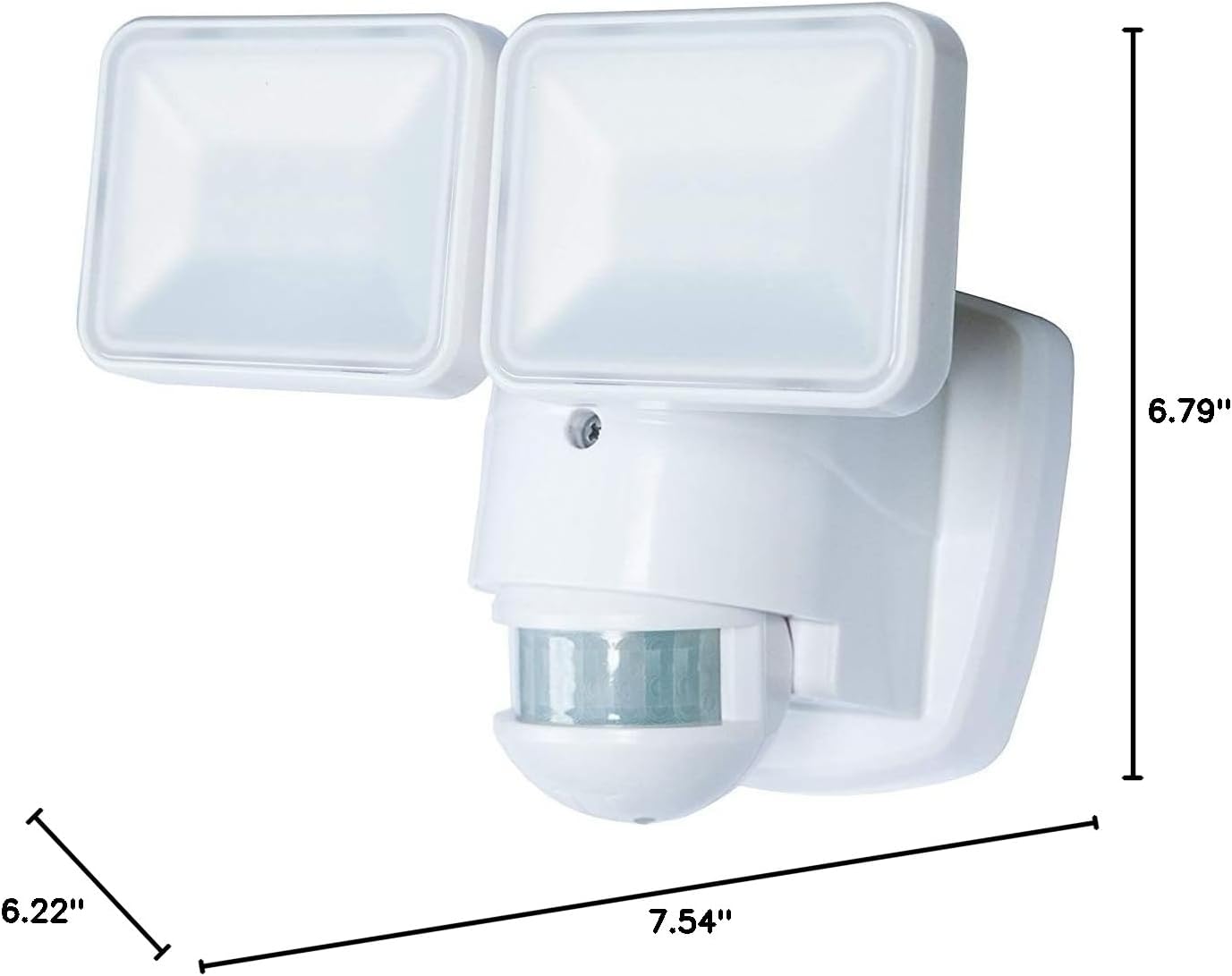
Image: Dimensions of the Heathco HZ-5846-WH security light, showing length (7.54"), width (6.79"), and height (6.22").
Warranty and Support
Warranty Information:
The manufacturer warranty description for this product is Not applicable. Please refer to your retailer's return policy for details regarding returns or exchanges.
Customer Support:
For further assistance, technical support, or inquiries regarding your Heathco HZ-5846-WH Motion Activated LED Security Light, please contact Globe Electric customer service. Refer to the product packaging or the Globe Electric website for current contact information.


