
1. Introduction and Overview
The Ferm AGM1088 Professional Angle Grinder is a powerful and robust tool designed for heavy-duty grinding and cutting tasks. Equipped with a 2500W motor and capable of using 230mm diameter grinding wheels, it is suitable for working with materials such as steel, stone, and concrete. Key features include a soft start function for controlled power-up, a safety switch for secure operation, and a spindle lock for quick and easy disc changes. The integrated 3-meter rubber power cable provides ample reach and flexibility during use.

Figure 1: Main view of the Ferm AGM1088 Angle Grinder.
2. Safety Instructions
Always prioritize safety when operating power tools. Read and understand all safety warnings and instructions provided with this tool. Failure to follow these instructions may result in electric shock, fire, and/or serious injury.
- Personal Protective Equipment: Always wear eye protection (safety glasses or goggles), hearing protection, and heavy-duty gloves. A dust mask is recommended when grinding materials that produce fine particles.
- Work Area Safety: Keep the work area clean and well-lit. Do not operate power tools in explosive atmospheres, such as in the presence of flammable liquids, gases, or dust.
- Electrical Safety: Ensure the power supply matches the specifications on the tool. Avoid body contact with earthed or grounded surfaces. Do not expose power tools to rain or wet conditions.
- Tool Specific Safety: Ensure the grinding disc is correctly mounted and secured before operation. Never use damaged or incorrect discs. Always use the adjustable safety guard.
- Secure Workpiece: Always clamp or secure the workpiece to prevent movement during operation.

Figure 2: Safety icons indicating required personal protective equipment and general product information.
3. Product Features
The Ferm AGM1088 Angle Grinder is designed with several features to enhance performance and user convenience:
- Powerful 2500W Motor: Provides ample power for demanding grinding and cutting applications.
- 230mm Disc Diameter: Accommodates large grinding and cutting discs for efficient material removal.
- Soft Start Function: Ensures a gradual increase in speed upon startup, reducing kickback and improving control.
- Spindle Lock: Facilitates quick and easy changing of grinding or cutting discs.
- Adjustable Safety Guard: Provides protection from sparks and debris, and can be positioned for optimal safety.
- 3-Position Side Handle: Allows for comfortable and controlled operation for both left and right-handed users, and in various working positions.
- 3-Meter Rubber Cable: Offers extended reach and durability.

Figure 3: Labeled components of the angle grinder.
4. Setup
Before operating the angle grinder, ensure it is properly assembled and configured for your task.
4.1 Attaching the Side Handle
- Identify the three threaded holes on the gear housing of the grinder.
- Screw the side handle firmly into the desired position (left, right, or top) for optimal control and comfort.
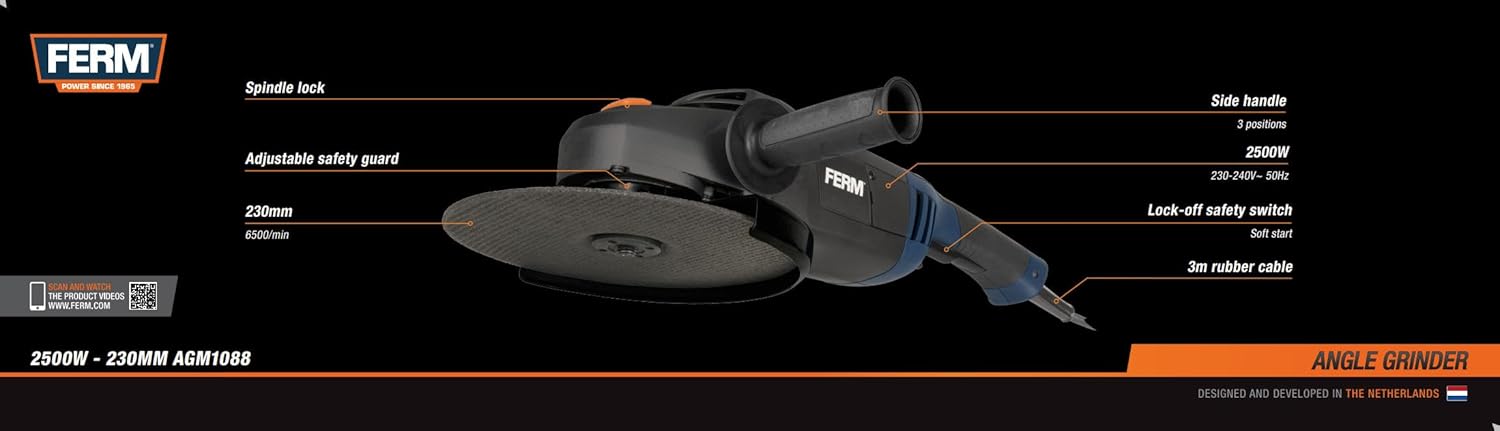
Figure 4: Side handle attachment points.
4.2 Mounting/Changing Grinding Discs
- Ensure the tool is unplugged from the power source.
- Press and hold the spindle lock button to prevent the spindle from rotating.
- Using the tightening wrench provided, loosen and remove the outer flange nut.
- Place the desired grinding or cutting disc onto the inner flange, ensuring it sits flush.
- Re-attach the outer flange nut and tighten it firmly with the wrench while holding the spindle lock button. Do not overtighten.

Figure 5: Spindle lock button for disc changes.
4.3 Adjusting the Safety Guard
The safety guard protects against sparks and accidental contact with the rotating disc. It can be adjusted without tools:
- Loosen the clamping lever on the safety guard.
- Rotate the guard to the desired position to provide maximum protection for your working angle.
- Tighten the clamping lever firmly to secure the guard in place.
5. Operating Instructions
Follow these steps for safe and effective operation of your angle grinder.
5.1 Powering On and Off
- Ensure the tool is properly assembled and the workpiece is secured.
- Plug the power cable into a suitable 240V power outlet.
- To start the grinder, press the safety switch (often a trigger or slide switch with a lock-off button). The soft start feature will ensure a smooth power-up.
- To turn off the grinder, release the safety switch. Allow the disc to come to a complete stop before setting the tool down.

Figure 6: Trigger and handle for operation.
5.2 Grinding and Cutting Techniques
- Grinding: Hold the grinder firmly with both hands. Apply light, even pressure, allowing the disc to do the work. Maintain a shallow angle (typically 15-30 degrees) between the disc and the workpiece for grinding.
- Cutting: For cutting, hold the grinder at a 90-degree angle to the workpiece. Use a cutting disc, not a grinding disc. Make straight cuts and avoid twisting the disc in the cut.
- Material Compatibility: Use appropriate discs for the material being worked on (e.g., metal, stone, concrete).
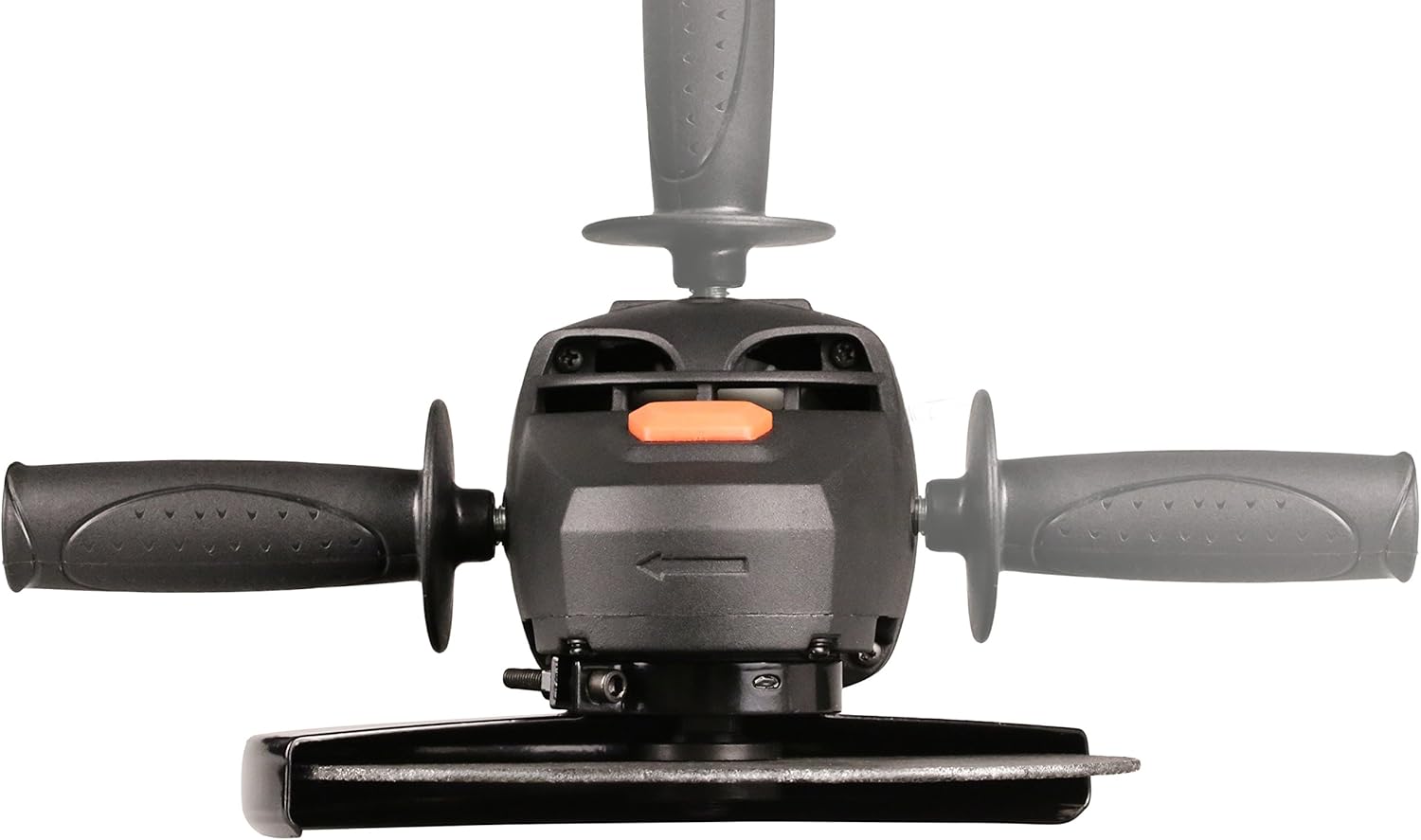
Figure 7: Angle grinder in operation.
6. Maintenance
Regular maintenance ensures the longevity and safe operation of your angle grinder.
- Cleaning: After each use, unplug the tool and clean it thoroughly. Use a soft brush or compressed air to remove dust and debris from ventilation openings. Do not use water or chemical cleaners.
- Disc Inspection: Regularly inspect grinding and cutting discs for wear, cracks, or damage. Replace damaged discs immediately.
- Cable Inspection: Check the power cable for any cuts, fraying, or damage. Replace damaged cables by a qualified electrician.
- Carbon Brushes: The carbon brushes may need periodic inspection and replacement. Refer to a qualified service technician for this procedure if you notice reduced power or excessive sparking.
- Storage: Store the tool in a dry, secure place out of reach of children.
7. Troubleshooting
This section addresses common issues you might encounter with your angle grinder.
| Problem | Possible Cause | Solution |
|---|---|---|
| Tool does not start | No power supply; Damaged cable; Faulty switch; Worn carbon brushes | Check power connection; Inspect cable for damage; Contact service for switch/brush replacement. |
| Excessive vibration | Damaged or unbalanced disc; Loose flange nut; Worn bearings | Replace disc; Tighten flange nut; Contact service for bearing inspection. |
| Reduced power or excessive sparking | Worn carbon brushes; Motor overload | Inspect/replace carbon brushes; Reduce load on the tool. |
| Disc not spinning freely | Spindle lock engaged; Obstruction | Ensure spindle lock is disengaged; Clear any obstructions. |
If you encounter problems not listed here or if the suggested solutions do not resolve the issue, please contact Ferm customer support or a qualified service technician.
8. Specifications
Detailed technical specifications for the Ferm AGM1088 Angle Grinder:
| Specification | Value |
|---|---|
| Manufacturer | Ferm |
| Model Number | AGM1088 |
| Power Input | 2500 Watts |
| Voltage | 240 Volts |
| Disc Diameter | 230 mm |
| No-load Speed | 6,500 /min |
| Spindle Thread | M14 |
| Power Source | Corded Electric |
| Cord Length | 3 Meters |
| Item Weight | 6.2 Kilograms |
| Product Dimensions | 55 x 12 x 15 cm |
| Color | Black/Blue |
| Material | Rubber, Steel |
| Included Components | Side handle, Tightening wrench, Hex key |
9. Warranty and Support
For warranty information, please refer to the documentation provided with your purchase or visit the official Ferm website. In case of technical issues, repairs, or questions regarding the operation of your Ferm AGM1088 Angle Grinder, please contact Ferm customer support. Ensure you have your model number (AGM1088) and purchase details available when seeking support.
Ferm B.V.
Lingenstraat 6
8028 PM Zwolle
NETHERLANDS
Website: www.ferm.com


