
1. Product Overview
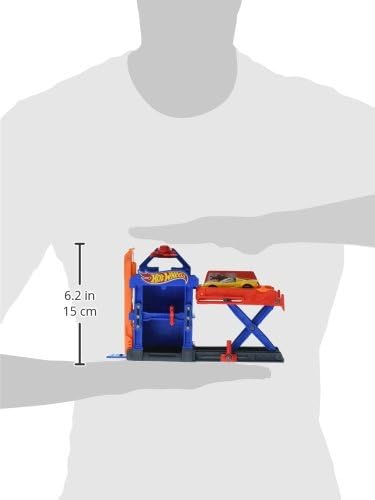
The Hot Wheels Robo-Lift Speed Shop Play Set (Model DWL02) is a portable and interactive track set designed for Hot Wheels vehicles. It features a fold-out design for easy transport and storage, and includes a functional lift mechanism for vehicle play. This set is compatible with other Hot Wheels track sets, allowing for expanded play configurations.
Key Features:
- Fold-out design for portability and storage.
- Interactive lift mechanism for vehicle service simulation.
- Includes one Hot Wheels vehicle.
- Connects to other Hot Wheels track sets.
2. Safety Information
Please read and understand all safety information before using this product. This product is recommended for ages 4 to 15 years. Adult supervision is recommended during play.
- Choking Hazard: Small parts may be generated. Not for children under 3 years.
- Keep fingers and hair away from moving parts, especially the lift mechanism.
- Do not modify the product in any way. Use only as intended.
- Inspect the product regularly for damage. Discontinue use if damaged.
3. Package Contents
Ensure all items are present in the package:
- Hot Wheels Robo-Lift Speed Shop Play Set (main structure)
- One (1) Hot Wheels vehicle
- Additional track connector piece (if applicable)
4. Setup Instructions
The Robo-Lift Speed Shop Play Set is designed for quick setup. Follow these steps to prepare the set for play:
- Carefully remove all components from the packaging.
- Unfold the main play set structure. The blue garage section and the orange lift platform should extend outwards. Ensure all hinged parts click securely into place.
- Attach any additional track connector pieces to the designated slots on the play set, if included. These pieces allow connection to other Hot Wheels tracks.

5. Operating Instructions
The Robo-Lift Speed Shop features an interactive lift mechanism. Follow these steps to operate the play set:
- Placing a Vehicle: Gently place a Hot Wheels vehicle onto the orange lift platform. Ensure the vehicle is centered and stable.
- Raising the Lift: Locate the red lever or knob at the base of the lift mechanism. Turn or push this lever to raise the platform, lifting the vehicle to the upper level of the speed shop.

- Lowering the Lift: To lower the platform, operate the red lever or knob in the opposite direction. The platform will descend, allowing the vehicle to exit the lift area.

The play set can be connected to other Hot Wheels tracks for extended play. Simply align the connector tabs and push them together until they click.
6. Maintenance
To ensure the longevity of your Hot Wheels Robo-Lift Speed Shop Play Set, follow these simple maintenance guidelines:
- Cleaning: Wipe the play set with a damp cloth to remove dust and dirt. Do not immerse in water. Avoid harsh chemicals or abrasive cleaners.
- Storage: When not in use, fold the play set for compact storage in a cool, dry place away from direct sunlight.
- Inspection: Periodically check for any loose parts, cracks, or damage. If any damage is found, discontinue use.
7. Troubleshooting
If you encounter issues with your play set, refer to the following common solutions:
- Lift Mechanism Not Moving Smoothly: Ensure no debris is obstructing the gears or tracks of the lift. Check that the lever is fully engaged.
- Vehicles Not Staying on Track/Lift: Verify that the vehicle is properly aligned on the track or lift platform. Ensure the track connections are secure.
- Difficulty Connecting to Other Tracks: Ensure the connector pieces are correctly oriented and fully pushed into place. Some force may be required for a secure connection.
8. Specifications
| Feature | Detail |
|---|---|
| Model Number | DWL02 |
| Brand | Hot Wheels |
| Product Dimensions (L x W x H) | 6.4 x 20.3 x 19.1 cm (2.5 x 8.0 x 7.5 inches) |
| Weight | 273 g (0.6 lbs) |
| Recommended Age | 4 - 15 years |
| Material | Plastic |
| Power Source | Non-powered (Manual Operation) |
| Included Components | Play set, 1 vehicle |
| Manufacturer | Fisher Price / Mattel Canada |
9. Warranty Information
This Hot Wheels product is covered by a 1-year warranty against manufacturer defects. Please retain your proof of purchase for warranty claims. For specific warranty terms and conditions, refer to the information provided by the manufacturer at the time of purchase.
10. Customer Support
For further assistance, product information, or to explore other Hot Wheels products, please visit the official Hot Wheels store or contact customer service.
Hot Wheels Official Store: Visit the Hot Wheels Store
Manufacturer Contact Information: Fisher Price / Mattel Canada, WEST LINN, OR, 97068 US
