
EasyAcc FNHD
EasyAcc Mini Handheld Fan (Model FNHD) Instruction Manual
Your guide to operating and maintaining your portable cooling device.
Introduction
Thank you for choosing the EasyAcc Mini Handheld Fan. This manual provides essential information for the safe and efficient operation of your new portable fan. Please read it thoroughly before first use and keep it for future reference.
Important Safety Instructions
- Do not insert fingers or any objects into the fan grille.
- Keep the fan away from water and moisture.
- Do not disassemble or attempt to repair the fan yourself. Contact customer support if needed.
- Keep out of reach of children.
- Use only the provided charging cable or a compatible 5V USB charger.
- Remove the insulating sheet from the battery compartment before first use.
Package Contents
Please check the package for the following items:
- 1 x EasyAcc Mini Handheld Fan
- 1 x USB Charging Cable (0.8M)
- 1 x Rechargeable Lithium-Ion Battery
- 1 x User's Manual (this document)
Product Overview
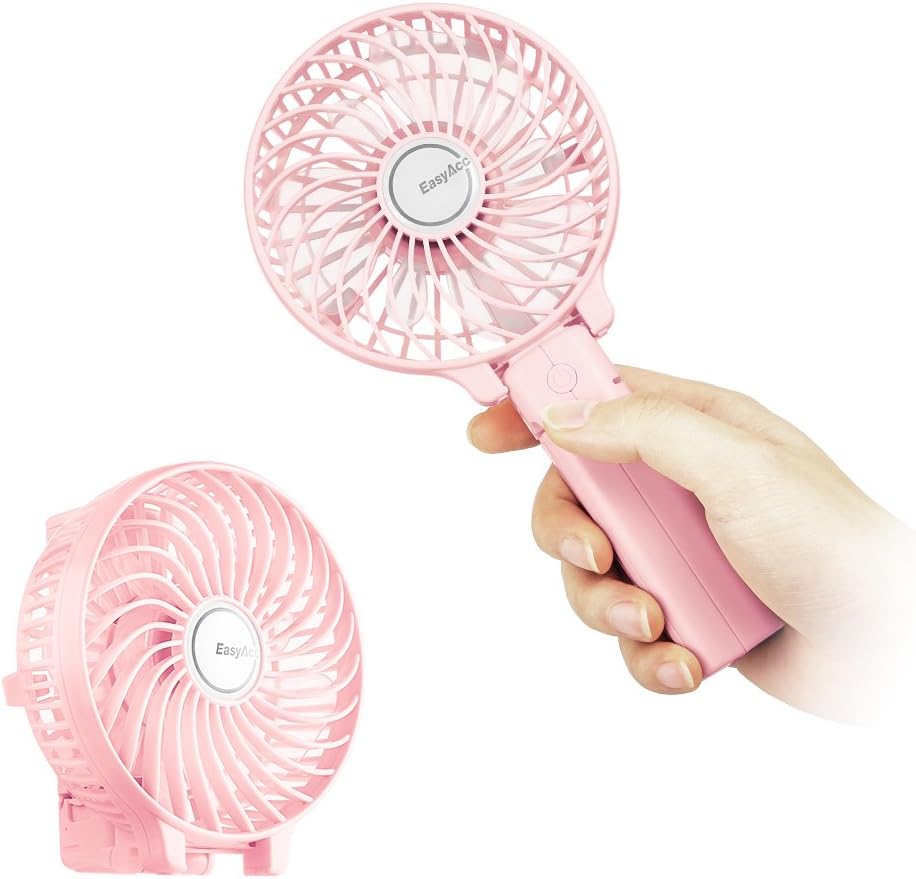
Figure 1: The EasyAcc Mini Handheld Fan in its handheld and folded desk configurations.

Figure 2: Illustration of the battery compartment, highlighting the insulating sheet that must be removed prior to operation.
Key Components:
- Fan Head: Contains the blades and protective grille.
- Handle/Base: Ergonomically designed for handheld use, also folds to form a stable desk stand.
- Power Button: Controls power ON/OFF and fan speed settings.
- USB Charging Port: Micro-USB port for recharging the internal battery.
- Battery Compartment: Houses the rechargeable Lithium-Ion battery.
- LED Indicator: Displays charging status.
Setup
- Unpack: Carefully remove all components from the packaging.
- Battery Installation:
- Locate the battery compartment on the handle.
- Open the battery cover.
- Important: Remove the insulating sheet from the battery before inserting it. This sheet prevents battery discharge during shipping.
- Insert the rechargeable Lithium-Ion battery, ensuring correct polarity.
- Close the battery cover securely.
- Initial Charge: For optimal performance, fully charge the fan before its first use. Refer to the "Charging" section for instructions.
Operating Instructions
- Power ON/Speed Adjustment:
- Press the Power Button once to turn on the fan at Speed 1 (2100rpm).
- Press the Power Button a second time for Speed 2 (2900rpm).
- Press the Power Button a third time for Speed 3 (3600rpm).
- Power OFF: Press the Power Button a fourth time to turn off the fan.
- Handheld Use: Hold the fan by its handle for personal cooling.
- Desk Fan Use: Fold the handle back to create a stable base, allowing the fan to stand on a flat surface.

Figure 3: The fan can be folded to function as a desk fan.
Charging
The EasyAcc Mini Handheld Fan is equipped with a rechargeable Lithium-Ion battery, providing up to 10 hours of use at the lowest speed on a full charge.
- Connect the small end of the provided USB charging cable to the Micro-USB port on the fan's handle.
- Connect the larger end of the USB cable to any standard USB power source (e.g., computer USB port, USB wall adapter, power bank).

Figure 4: The fan can be charged using various USB power sources, including laptops, power banks, and wall chargers.
- The LED indicator light will illuminate during charging. It typically takes approximately 4 hours for a full charge.
- Once fully charged, the LED indicator light may change color or turn off (refer to specific model's indicator behavior). Disconnect the charging cable.
Note: The battery is replaceable. Additional rechargeable batteries of this size can be purchased for extended use.
Maintenance
- Cleaning: Ensure the fan is turned off and unplugged before cleaning. Use a soft, dry cloth to wipe the exterior. For the fan blades, use a cotton swab or a soft brush to gently remove dust. Do not use water or harsh chemicals.
- Storage: Store the fan in a cool, dry place when not in use. If storing for an extended period, ensure the battery is partially charged (around 50%) to prolong its lifespan.
Troubleshooting
| Problem | Possible Cause | Solution |
|---|---|---|
| Fan does not turn on. | Battery is dead or not properly installed. Insulating sheet not removed. | Charge the fan. Ensure the battery is correctly inserted and the insulating sheet has been removed. |
| Weak airflow. | Low battery. Fan blades are dirty. | Recharge the fan. Clean the fan blades as per maintenance instructions. |
| Fan stops unexpectedly. | Battery is depleted. | Recharge the fan. |
If you encounter issues not listed here, please contact EasyAcc customer support.
Specifications
| Brand: | EasyAcc |
| Model Number: | FNHD |
| Color: | Pink |
| Power Source: | Battery Powered |
| Battery Type: | 1 Lithium Ion battery (included) |
| Number of Power Levels: | 3 |
| Speed 1: | 2100rpm |
| Speed 2: | 2900rpm |
| Speed 3: | 3600rpm |
| Wireless Working Time: | Up to 10 hours (at lowest speed) |
| Product Dimensions: | 4.33"D x 9.25"W x 1.49"H |
| Item Weight: | 8.8 ounces |
| Control Method: | Push Button |
Official Product Videos
EasyAcc Portable Fan Overview
This video provides a general overview of the EasyAcc Portable Fan, demonstrating its compact size and basic functionality.
EasyAcc Portable Handheld Fan Features
This video showcases the key features of the EasyAcc Portable Handheld Fan, including its portability and various uses.
Warranty & Support
EasyAcc offers a Lifetime Warranty for this product. For any questions, technical support, or warranty claims, please contact EasyAcc customer service through their official website or the retailer where the product was purchased.
For more information, visit the EasyAcc Store on Amazon.
Ask a question about this manual
Ask about setup, troubleshooting, compatibility, parts, safety, or missing instructions. Manuals+ will review the question and use this page’s manual context to help answer it.