
1. Introduction
1.1 Overview
The Davis Instruments 0271 Turbo Meter is a precision instrument designed for accurate wind speed measurement. It is suitable for a wide range of applications including marine, outdoor, and industrial environments, and is accurate enough for HVAC industry use. Its easy-to-read, lighted display ensures visibility in both daytime and low-light conditions. The turbine rotates on sapphire jewel bearings, providing sensitive response to even very light wind and airflow.
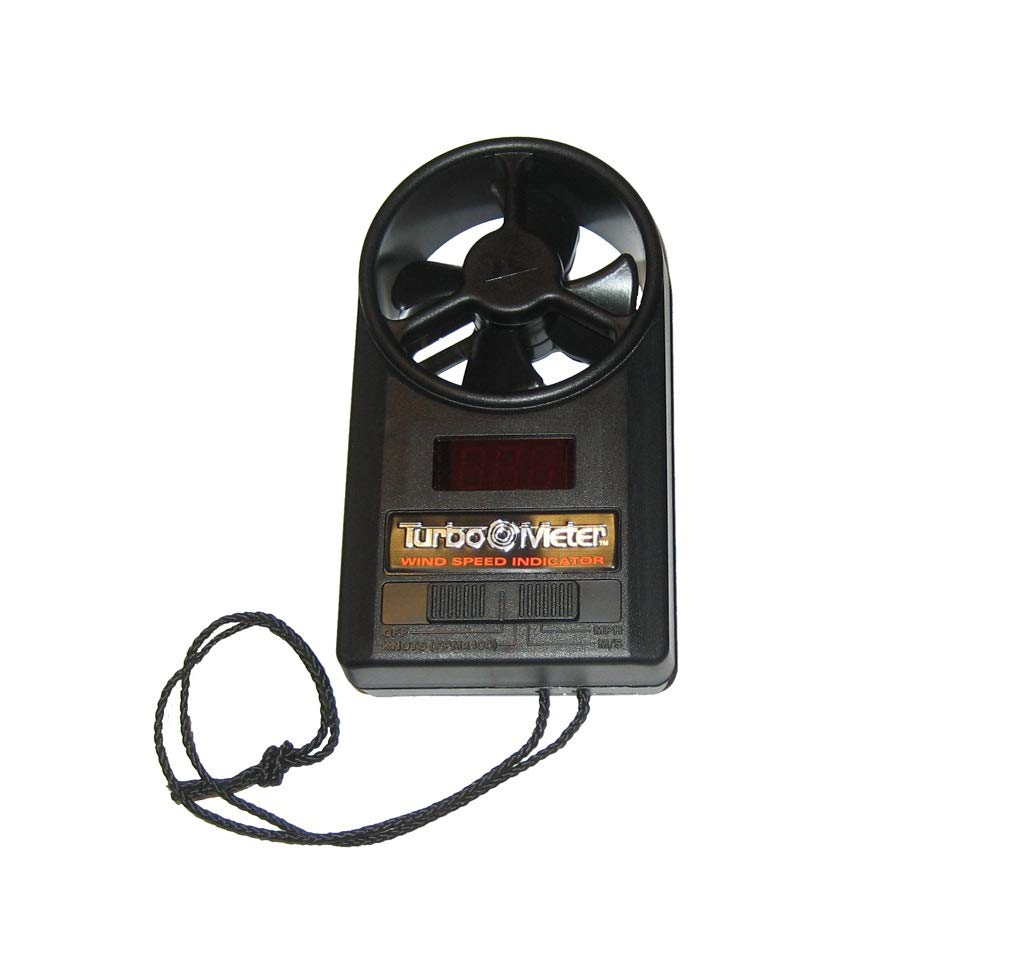
Figure 1: Davis Instruments 0271 Turbo Meter Wind Speed Indicator. This image shows the compact, handheld device with its turbine at the top and a digital display below.
1.2 Key Features
- Measures wind speed in four selectable scales: miles per hour (mph), knots, meters per second (m/s), and feet per minute (ft/min).
- Highly responsive turbine design, utilizing sapphire jewel bearings, for accurate readings even in the lightest winds, making it ideal for HVAC applications.
- Provides high accuracy, typically within 3% of the reading.
- Features an easy-to-read, lighted display for clear visibility in various lighting conditions.
2. Setup
The Davis Instruments 0271 Turbo Meter is designed for immediate use with minimal setup. Upon unboxing, ensure the device is free from any packaging materials. The unit is typically powered by an internal battery (not user-replaceable in most models) or comes with a pre-installed battery. No assembly is required.
2.1 Initial Inspection
- Inspect the turbine for any obstructions or damage. Ensure it spins freely.
- Check the display for any cracks or abnormalities.
- Confirm all buttons (if present) operate smoothly.
3. Operating Instructions
To obtain accurate wind speed readings, follow these steps:
- Power On: Locate the power button (if applicable) and press it to turn on the device. The display should illuminate. If there is no explicit power button, the device may activate automatically when exposed to airflow or when a measurement mode is selected.
- Select Units: Use the unit selection button (if available) to cycle through the desired measurement units: mph, knots, m/s, or ft/min. The selected unit will be indicated on the display.
- Positioning for Measurement: Hold the Turbo Meter so that the turbine is directly facing the wind or airflow you wish to measure. Ensure no part of your hand or body obstructs the airflow to the turbine. For best results, hold the meter at arm's length and away from any large objects that might create turbulence.
- Read Display: The wind speed will be displayed digitally on the screen. The lighted display ensures readability in various lighting conditions. Allow a few seconds for the reading to stabilize.
- Power Off: To conserve battery life, press and hold the power button (if applicable) or wait for the device to automatically power off after a period of inactivity.
Note: For highly accurate readings, ensure the turbine is clean and spins freely without resistance.
4. Maintenance
Proper maintenance ensures the longevity and accuracy of your Davis Instruments 0271 Turbo Meter.
4.1 Cleaning
- Exterior: Wipe the exterior of the meter with a soft, damp cloth. Do not use abrasive cleaners or solvents, as these can damage the casing or display.
- Turbine: Gently clean the turbine blades with a soft brush or a puff of compressed air to remove dust, dirt, or debris. Avoid touching the sapphire jewel bearings directly. Ensure the turbine spins freely after cleaning.
4.2 Storage
When not in use, store the Turbo Meter in a clean, dry place, away from extreme temperatures and direct sunlight. Protect the turbine from physical impact or pressure that could damage the blades or bearings.
5. Troubleshooting
If you encounter issues with your Turbo Meter, refer to the following common problems and solutions:
| Problem | Possible Cause | Solution |
|---|---|---|
| No display or dim display | Low or depleted battery. | If user-replaceable, replace the battery. If not, contact Davis Instruments for service. |
| Inaccurate or inconsistent readings | Obstructed turbine; damaged turbine blades or bearings; incorrect positioning. | Clean the turbine. Ensure it spins freely. Hold the meter correctly, facing the airflow directly. If damage is suspected, contact support. |
| Turbine not spinning | Obstruction; damaged bearings; very low wind speed. | Remove any obstructions. Gently clean the turbine. Ensure there is sufficient airflow. If still not spinning, contact support. |
If the problem persists after attempting these solutions, please contact Davis Instruments customer support for further assistance.
6. Specifications
| Specification | Detail |
|---|---|
| Brand | Davis Instruments |
| Model Number | 0271 |
| Item Type Name | Turbo Meter Wind Speed Indicator |
| Measurement Scales | mph, knots, meters per second, feet per minute |
| Accuracy | 3% of reading |
| Item Dimensions (L x W x H) | 6 x 4 x 6.4 inches |
| Item Weight | 1 Pound |
| Included Components | Turbo Meter Wind Speed Indicator |
| Manufacturer | Davis Instruments |
| Part Number | 0271 |
| UPC | 687927209398 |
7. Warranty and Support
Specific warranty details for the Davis Instruments 0271 Turbo Meter are not provided in this manual. For information regarding warranty coverage, terms, and conditions, please refer to the documentation included with your purchase or contact Davis Instruments directly.
7.1 Customer Support
For technical assistance, troubleshooting beyond what is covered in this manual, or to inquire about repairs, please contact Davis Instruments customer support. You can typically find contact information on the manufacturer's official website or on the product packaging.
Manufacturer: Davis Instruments
Please have your model number (0271) and any purchase details ready when contacting support.