
Mastercraft 037-8987-8
Mastercraft 120 Lumens Waterproof Spotlight User Manual
Model: 037-8987-8
Introduction
Thank you for purchasing the Mastercraft 120 Lumens Waterproof Spotlight. This manual provides essential information for the safe and efficient operation, maintenance, and troubleshooting of your new spotlight. Please read this manual thoroughly before use and retain it for future reference.

Image: Front view of the Mastercraft 120 Lumens Waterproof Spotlight, showcasing its blue casing and large LED lens.
Safety Information
- Do not look directly into the LED light.
- Keep out of reach of children.
- Ensure the USB charging port cover is securely closed when not charging to maintain waterproof integrity.
- Do not attempt to disassemble or modify the spotlight.
- Use only the specified charging method.
Product Features
- Bright LED Light: Provides 120 lumens of bright illumination.
- Waterproof Design: Withstands submersion up to 1 meter deep (IPX7 rated).
- Built-in USB Charger: Conveniently charges devices with a USB port.
- 3 Volt Battery: Long-lasting power source for extended use.
- Durable and Portable: Made from sturdy plastic with an ergonomic grip for easy carrying.
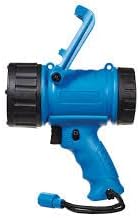
Image: Side view of the Mastercraft 120 Lumens Waterproof Spotlight, showing the handle and charging port area.
Setup
Initial Charge
- Locate the built-in USB charging line.
- Connect the USB charging line to a compatible USB power adapter (not included) or a powered USB port.
- Allow the spotlight to charge fully before first use. The charging indicator light (if present) will change color or turn off when charging is complete.
Battery Installation (Not User Replaceable)
The Mastercraft 120 Lumens Waterproof Spotlight comes with a built-in, non-user-replaceable Lithium Ion battery. No installation is required. If the battery performance significantly degrades, contact customer support for assistance.
Operating Instructions
Turning On/Off and Light Modes
- To turn on the spotlight, press the power button located on the handle.
- Press the power button repeatedly to cycle through available light modes (e.g., High, Low, Strobe, Off). Refer to the product's specific button functionality for exact modes.
- To turn off the spotlight, continue pressing the power button until the light turns off, or hold the button down for a few seconds.
Using the USB Charging Line
- Uncoil the built-in USB charging line from its storage compartment.
- Insert the USB-A end of the cable into a compatible device you wish to charge (e.g., smartphone, tablet).
- The spotlight's internal battery will begin to charge the connected device.
- After use, securely return the USB charging line to its compartment and ensure the cover is sealed to maintain waterproof integrity.
Maintenance
- Cleaning: Wipe the spotlight with a soft, damp cloth. Do not use abrasive cleaners or solvents.
- Storage: Store the spotlight in a cool, dry place away from direct sunlight when not in use. For long-term storage, ensure the battery is partially charged (around 50%) to prolong its lifespan.
- Waterproof Seal: Periodically inspect the rubber seal around the USB charging port cover for any signs of wear or damage. A damaged seal can compromise the waterproof rating.
Troubleshooting
| Problem | Possible Cause | Solution |
|---|---|---|
| Spotlight does not turn on. | Battery is depleted. | Charge the spotlight fully using the built-in USB charging line. |
| Light is dim. | Low battery charge. | Recharge the spotlight. |
| Device not charging via USB port. | USB cable not properly connected or spotlight battery is low. | Ensure the USB cable is firmly connected to both devices. Charge the spotlight if its battery is low. |
| Water inside the spotlight. | USB port cover not sealed properly or unit damaged. | Immediately turn off the unit and do not use. Ensure the USB port cover is always securely closed. If damage is suspected, contact customer support. |
Specifications
| Feature | Detail |
|---|---|
| Brand | Mastercraft |
| Model Number | 037-8987-8 |
| Light Source Type | LED |
| Brightness | 120 Lumens |
| Power Source | Battery Powered |
| Battery Type | 1 Lithium Ion (included, non-replaceable) |
| Voltage | 3 Volts |
| Water Resistance Level | Waterproof (IPX7) |
| Material | Plastic |
| Product Dimensions | 6.1 x 3.35 x 6.89 inches |
| Item Weight | 14.8 ounces |
| Recommended Uses | Outdoor activities, emergency situations, general household use |
Warranty and Support
For warranty information or technical support, please refer to the product packaging or contact Mastercraft customer service directly. Keep your purchase receipt as proof of purchase.
Manufacturer: Motomaster
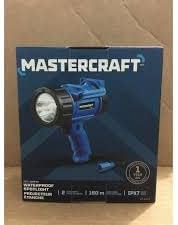
Image: The Mastercraft 120 Lumens Waterproof Spotlight shown in its retail box, indicating brand and key features.
Ask a question about this manual
Ask about setup, troubleshooting, compatibility, parts, safety, or missing instructions. Manuals+ will review the question and use this page’s manual context to help answer it.