
Schneider Electric HOM250GFICP
Square D by Schneider Electric HOM250GFICP Homeline 50-Amp Two-Pole GFCI Circuit Breaker User Manual
Model: HOM250GFICP
Product Overview
The Square D by Schneider Electric HOM250GFICP is a Homeline 50-Amp Two-Pole Ground Fault Circuit Interrupter (GFCI) circuit breaker. It is designed to provide protection against ground faults, which can cause electrical shock or fire. This breaker is suitable for use in Homeline load centers and is rated for 120/240 V~ applications.
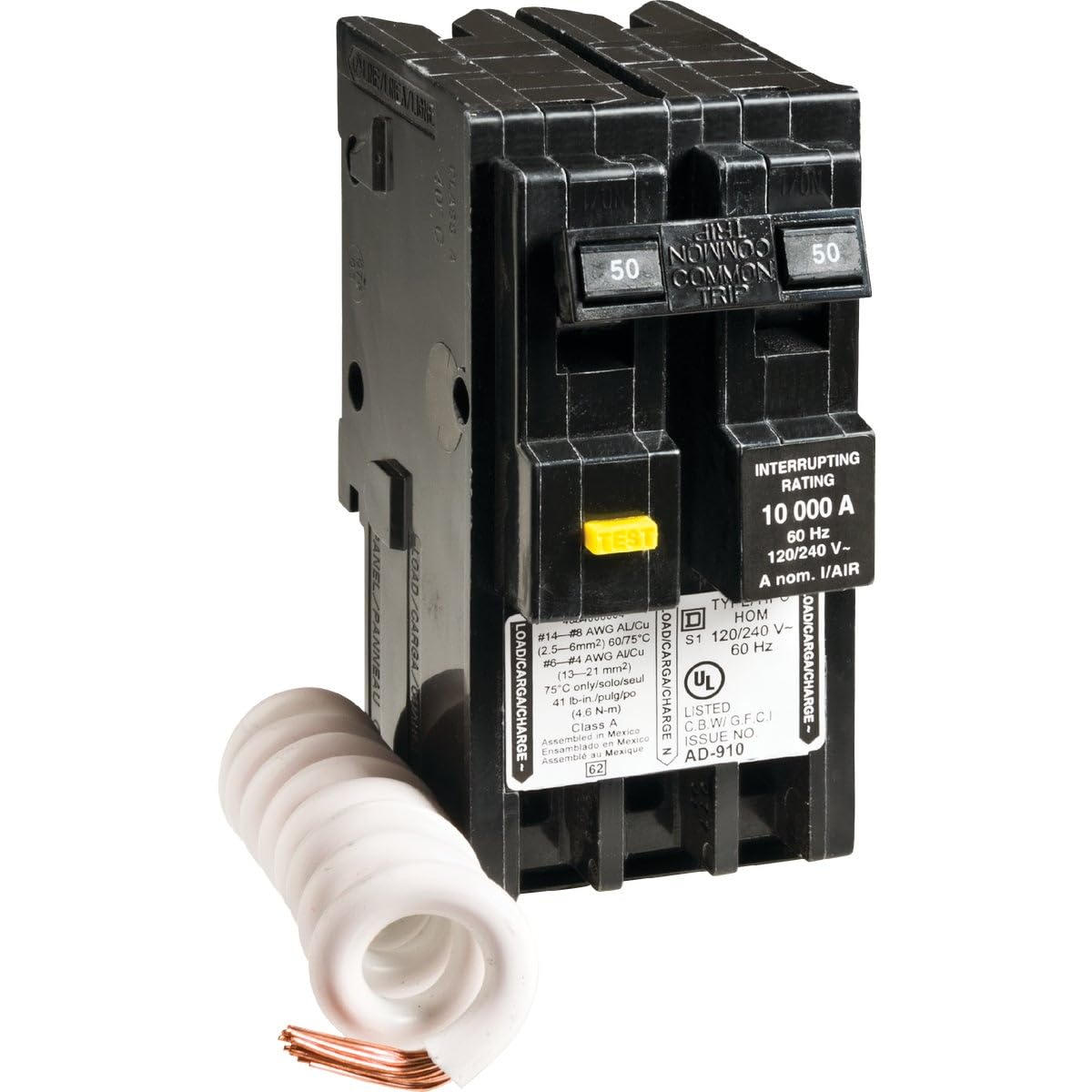
Figure 1: Square D HOM250GFICP 50-Amp Two-Pole GFCI Circuit Breaker. This image shows the black circuit breaker with two poles, each rated 50 amps. A yellow 'TEST' button is visible on the front. The breaker also displays interrupting rating of 10,000 A and voltage ratings.
Safety Information
WARNING: Risk of electric shock or fire. Installation and servicing must be performed by qualified electrical personnel only. Disconnect power before working on or near electrical equipment. Always follow local electrical codes and regulations.
- Ensure the main power supply to the load center is turned OFF before installation or maintenance.
- Verify voltage and current ratings of the circuit breaker match the application requirements.
- Do not use if the product appears damaged.
- This GFCI circuit breaker is designed to protect against ground faults. It does not protect against overloads or short circuits, which are handled by the circuit breaker's primary function.
Setup and Installation
This section provides general guidelines for installing the HOM250GFICP GFCI circuit breaker. Refer to the specific wiring diagram of your Homeline load center for detailed instructions.
- Power Disconnection: Turn off the main power to the electrical panel at the utility meter or main disconnect. Verify power is off using a voltage tester.
- Panel Access: Remove the cover of the electrical panel.
- Breaker Installation:
- Locate an available space in the Homeline load center.
- Hook the rear of the breaker onto the bus bar clips in the panel.
- Press the front of the breaker firmly until it snaps into place.
- Wiring Connections:
- Connect the load wires (hot wires) to the appropriate terminals on the breaker. The breaker is a two-pole device, so connect both hot wires from the circuit.
- Connect the neutral wire from the circuit to the pigtail neutral wire of the GFCI breaker. This pigtail neutral wire must then be connected to the neutral bar in the load center.
- Ensure all connections are tight and secure. Refer to the wire gauge specifications on the breaker label: #14-#8 AWG AL/Cu (2.5-6mm²) 60/75°C and #6-#4 AWG Al/Cu (13-21 mm²). Torque terminals to 41 lb-in. (4.6 N-m).
- Panel Reassembly: Replace the electrical panel cover.
- Power Restoration: Turn the main power back on.
Operating Instructions
The HOM250GFICP GFCI circuit breaker operates like a standard circuit breaker with added ground fault protection.
- ON Position: Push the breaker handle fully to the "ON" position to supply power to the circuit.
- OFF Position: Push the breaker handle fully to the "OFF" position to disconnect power from the circuit.
- TRIPPED Position: If a ground fault occurs, the breaker handle will move to a center "TRIPPED" position. To reset, push the handle fully to the "OFF" position, then push it to the "ON" position.
- TEST Button: The yellow "TEST" button is used to verify the GFCI function. Pressing this button should cause the breaker to trip immediately. If it does not trip, the GFCI is not functioning correctly and should be replaced.
Maintenance
Regular testing of the GFCI circuit breaker is crucial to ensure its proper operation and continued safety.
- Monthly Test: Press the yellow "TEST" button on the face of the breaker. The breaker should trip immediately, moving to the center "TRIPPED" position.
- Reset After Test: After testing, reset the breaker by pushing the handle fully to the "OFF" position, then to the "ON" position.
- Failure to Trip: If the breaker does not trip when the "TEST" button is pressed, or if it fails to reset, it indicates a malfunction. The breaker must be replaced immediately by qualified personnel.
- Cleaning: Keep the area around the circuit breaker clean and free from dust and debris. Do not use liquids for cleaning inside the electrical panel.
Troubleshooting
| Problem | Possible Cause | Solution |
|---|---|---|
| Breaker trips frequently. | Ground fault in the circuit, overloaded circuit, faulty appliance, or faulty breaker. |
|
| Breaker does not trip when TEST button is pressed. | Faulty GFCI mechanism. | The GFCI breaker is defective and must be replaced immediately by qualified personnel. |
| Breaker will not reset. | Persistent ground fault, short circuit, or internal breaker damage. |
|
Specifications
| Feature | Detail |
|---|---|
| Model Number | HOM250GFICP |
| Brand | Schneider Electric (Square D) |
| Current Rating | 50 Amps |
| Number of Poles | 2 |
| Voltage Rating | 120/240 V~ |
| Frequency | 60 Hz |
| Circuit Breaker Type | GFCI (Ground Fault Circuit Interrupter) |
| Mounting Type | Homeline load center |
| Interrupting Rating | 10,000 A |
| Wire Compatibility | #14-#8 AWG AL/Cu (2.5-6mm²) 60/75°C; #6-#4 AWG Al/Cu (13-21 mm²) |
| Product Dimensions | 30 x 8 x 6 inches; 0.16 ounces (as per product data) |
| Manufacturer | Square D |
Warranty Information
Specific warranty details for Square D by Schneider Electric products can typically be found on the manufacturer's official website or included with the product packaging. For warranty claims or inquiries, please refer to the contact information provided in the Support section.
Support and Contact
For technical assistance, product support, or warranty inquiries, please contact Schneider Electric directly:
- Official Website: www.se.com/us/en/ (Schneider Electric USA)
- Customer Service: Refer to the "Contact Us" section on their official website for phone numbers and online support options.
- Product Documentation: Additional documentation and FAQs may be available on the Schneider Electric support portal.
Related documentsHOM250GFICP


Ask a question about this manual
Ask about setup, troubleshooting, compatibility, parts, safety, or missing instructions. Manuals+ will review the question and use this page’s manual context to help answer it.