
Introduction
This manual provides instructions for the Redi-Remote replacement remote control, model RTIR800. This remote is specifically designed to function as a direct replacement for the original Lightware IR800, RC-80101, VP800, and VP800+ remote controls. It requires no programming and is ready for use upon battery installation.
Product Overview
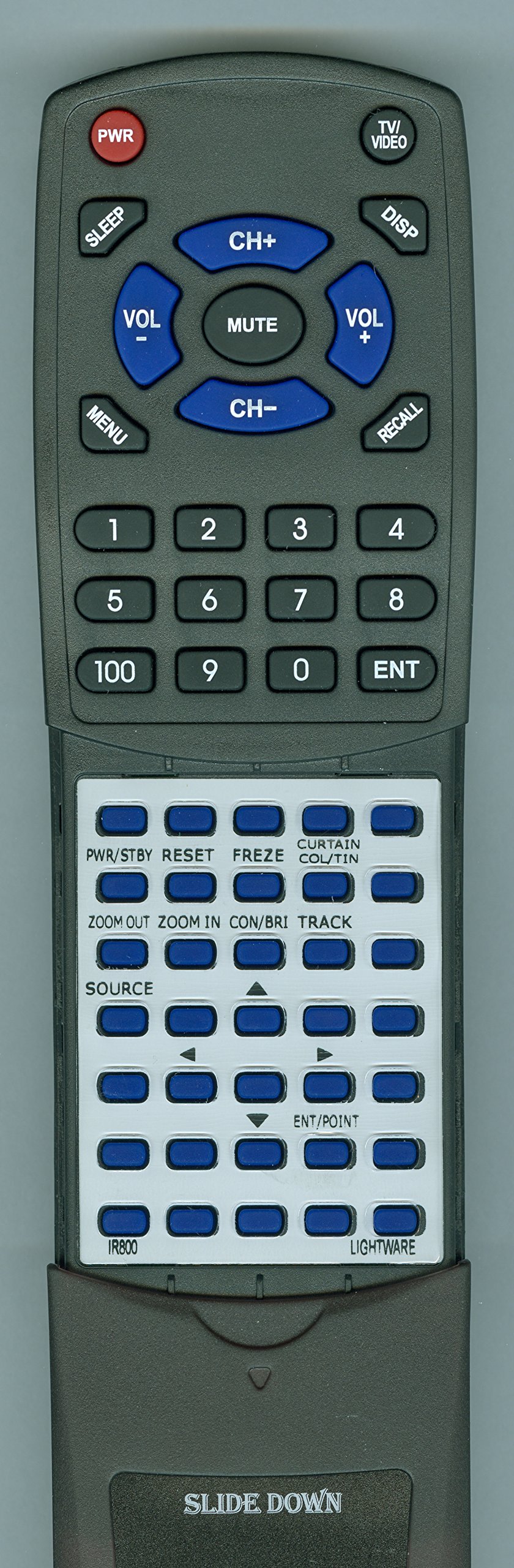
Image: Redi-Remote Replacement Remote Control. This image displays the black, rectangular remote control with numerous buttons. The design includes a sliding cover on the lower half to reveal additional buttons. This remote is a direct replacement for Lightware IR800, RC-80101, VP800, and VP800+ models.
Setup
Battery Installation
- Locate the battery compartment on the back of the remote control.
- Slide open the battery compartment cover.
- Insert four (4) AAA batteries, ensuring correct polarity (+ and -) as indicated inside the compartment.
- Close the battery compartment cover securely.
Note: Four AAA batteries are included with the remote.
Operating Instructions
Basic Operation
The Redi-Remote replacement remote control is pre-programmed and requires no additional setup. Simply install the batteries, point the remote towards your Lightware device, and press the desired function button.
Compatibility
This remote is designed to be compatible with the following Lightware models:
- Lightware IR800
- Lightware RC-80101
- Lightware VP800
- Lightware VP800+
Button Functions
The remote features 58 buttons, providing comprehensive control over your compatible Lightware device. A sliding cover is present over the lower half of the remote; slide this cover down to access additional buttons and functions.
Features
- No Programming Required: Ready to use out of the box after battery installation.
- Dedicated Functionality: Controls only the specific Lightware unit it is designed for; cannot be programmed for auxiliary devices.
- Compact Design: Measures approximately 7.5 inches (19 cm) in length, 2.25 inches (5.7 cm) in width, and 0.75 inches (1.9 cm) in thickness.
- Infrared Technology: Utilizes standard infrared signals for communication.
- No Laser Pointers or LED Lights: Designed for straightforward control without additional features.
Maintenance
Cleaning and Care
- To clean the remote, use a soft, dry cloth. Do not use liquid cleaners or abrasive materials.
- Avoid exposing the remote to extreme temperatures, direct sunlight, or high humidity.
- If the remote will not be used for an extended period, remove the batteries to prevent leakage.
Troubleshooting
Remote Not Responding
- Check Batteries: Ensure batteries are inserted with correct polarity and are not depleted. Replace with fresh AAA batteries if necessary.
- Line of Sight: Confirm there is a clear line of sight between the remote's infrared emitter and the Lightware device's IR receiver. Obstructions can block the signal.
- Distance: Ensure you are within the maximum operating range of 20 feet (approximately 6 meters).
- Device Power: Verify that the Lightware device is powered on.
Limited Range or Intermittent Operation
- Replace Batteries: Weak batteries can reduce the remote's effective range.
- Environmental Interference: Strong light sources (e.g., direct sunlight, certain fluorescent lights) can interfere with IR signals. Try operating the remote in a different environment.
Specifications
| Feature | Detail |
|---|---|
| Brand | Redi-Remote |
| Model Number | RTIR800 |
| Compatible Devices | Lightware IR800, RC-80101, VP800, VP800+ (Projector) |
| Connectivity Technology | Infrared (IR) |
| Special Feature | No Programming Required |
| Maximum Number of Supported Devices | 1 |
| Button Quantity | 58 |
| Maximum Range | 20 Feet (approx. 6 meters) |
| Batteries Required | 4 AAA (included) |
| Item Weight | 5 Ounces (approx. 142 grams) |
| Dimensions (L x W x H) | 7.5" x 2.25" x 0.75" (approx. 19 x 5.7 x 1.9 cm) |
| UPC | 791090955621 |
Warranty and Support
Warranty Information
Specific warranty details are typically provided at the point of purchase or by the seller. For any concerns with the remote after purchase, please contact the seller directly for assistance.
Customer Support
For further assistance, troubleshooting, or inquiries regarding your Redi-Remote replacement remote control, please refer to the contact information provided by your retailer or the manufacturer, Redi-Remote.