
1. Introduction
Thank you for purchasing the wster WS-K66 Mini Portable Bluetooth Speaker. This manual provides important information on how to set up, operate, and maintain your device. Please read it carefully before use and retain it for future reference.
2. Safety Information
- Do not expose the speaker to extreme temperatures, direct sunlight, or high humidity.
- Avoid dropping or subjecting the speaker to strong impacts.
- Do not disassemble or attempt to repair the speaker yourself. This will void the warranty.
- Keep the speaker away from water and other liquids.
- Use only the specified charging cable and power source.
- Dispose of the battery and speaker responsibly according to local regulations.
3. Package Contents
Please check the package for the following items:
- wster WS-K66 Mini Portable Bluetooth Speaker
- USB Charging / 3.5mm Audio Cable
- Instruction Manual (this document)
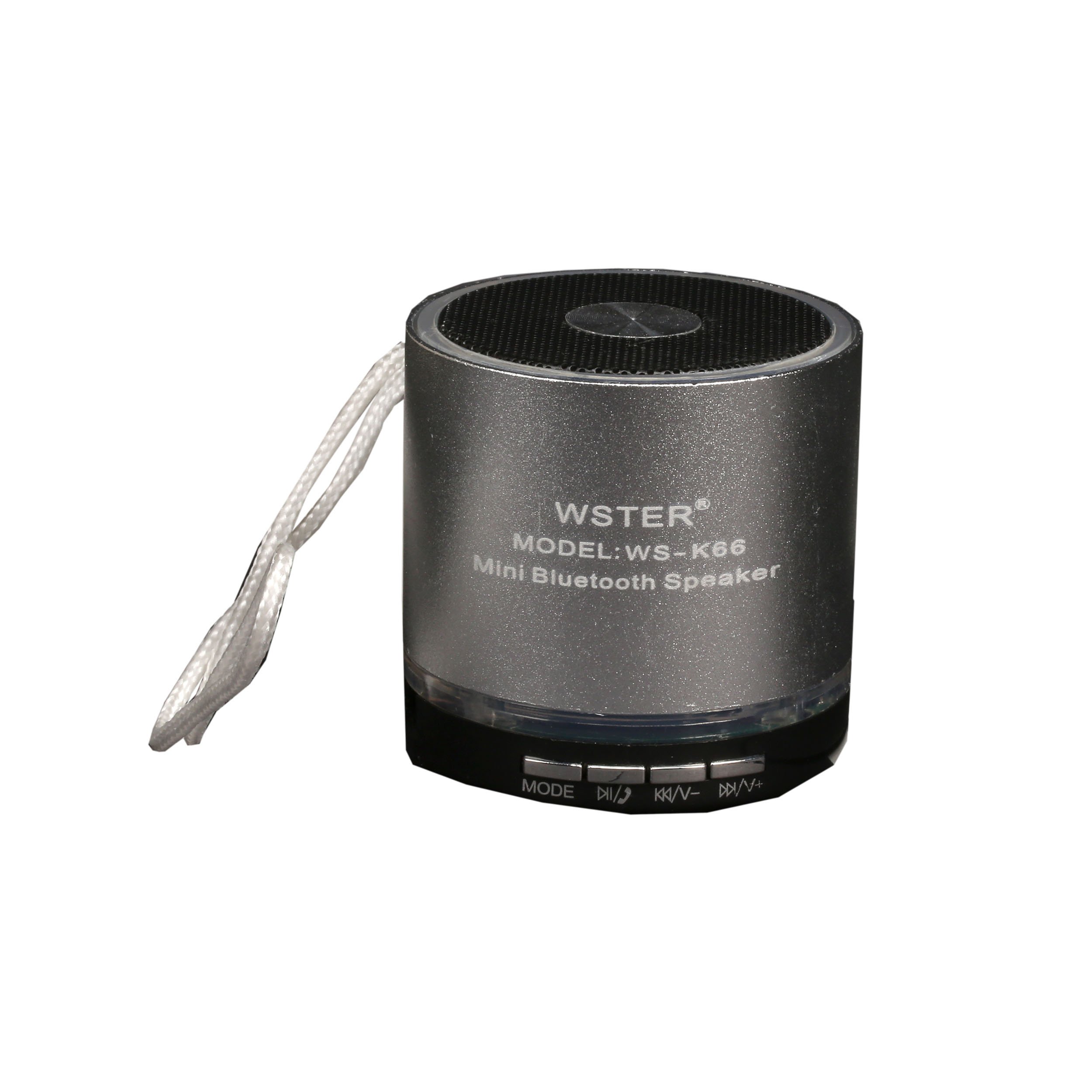
Image: The retail packaging for the wster WS-K66 speaker, showing the speaker and its features.

Image: The included USB charging and 3.5mm audio cable for connecting and powering the speaker.
4. Product Overview
Familiarize yourself with the speaker's controls and ports:

Image: Top view of the wster WS-K66 speaker, highlighting the speaker grille and control buttons.

Image: Side view of the wster WS-K66 speaker, illustrating the USB, Micro SD, AUX, and charging ports.
Controls and Ports (Typical Layout):
- Power Switch: On/Off.
- Mode Button (M): Switches between Bluetooth, FM Radio, USB/Micro SD, and AUX modes.
- Play/Pause Button (►/−−): Play/pause music; Answer/end calls.
- Volume Down / Previous Track (-/◀◀): Short press for previous track; Long press to decrease volume.
- Volume Up / Next Track (+/►►): Short press for next track; Long press to increase volume.
- USB Port: For USB flash drives.
- Micro SD Card Slot: For Micro SD memory cards.
- AUX Input: For connecting external audio devices via 3.5mm cable.
- Charging Port: For charging the speaker.
5. Setup
Initial Charging:
- Before first use, fully charge the speaker.
- Connect the small end of the USB charging cable to the speaker's charging port.
- Connect the larger USB end to a USB power adapter (not included) or a computer's USB port.
- The charging indicator light will illuminate during charging and turn off when fully charged.
6. Operating Instructions
Power On/Off:
- Slide the Power Switch to the 'ON' position to turn on the speaker.
- Slide the Power Switch to the 'OFF' position to turn off the speaker.
Bluetooth Mode:
- Turn on the speaker. It will automatically enter Bluetooth pairing mode (a voice prompt or indicator light will confirm).
- Enable Bluetooth on your mobile device (smartphone, tablet, etc.).
- Search for available Bluetooth devices and select "WS-K66" from the list.
- Once paired, the speaker will confirm with a voice prompt. You can now play audio from your device through the speaker.
- The Bluetooth range is up to 10 meters (33 feet) in an open area.
FM Radio Mode:
- Turn on the speaker. Press the 'M' (Mode) button repeatedly until you hear the FM radio prompt.
- To auto-scan and save available stations, press and hold the Play/Pause button (►/−−). The speaker will scan and store stations automatically.
- Use the Previous Track (◀◀) and Next Track (►►) buttons to navigate between saved stations.
- For better FM reception, connect the USB charging cable to the speaker's charging port; it acts as an external antenna.
USB / Micro SD Card Mode:
- Insert a USB flash drive or a Micro SD card (with MP3 audio files) into the respective slot.
- The speaker will automatically detect the storage device and switch to USB/Micro SD mode, beginning playback.
- Use the Play/Pause, Previous Track, and Next Track buttons to control playback.
AUX Mode:
- Connect one end of the 3.5mm audio cable to the speaker's AUX input.
- Connect the other end to the audio output of your external device (e.g., MP3 player, laptop).
- Press the 'M' (Mode) button until the speaker enters AUX mode.
- Control playback from your external device.
Hands-free Function:
- When connected via Bluetooth to your phone, incoming calls will be announced through the speaker.
- Press the Play/Pause button (►/−−) to answer an incoming call.
- Press the Play/Pause button (►/−−) again to end the call.
7. Charging
- When the battery is low, the speaker may emit a warning tone or automatically power off.
- Connect the speaker to a USB power source using the provided cable.
- A full charge typically takes 2-3 hours, depending on the power source.
- Do not overcharge the speaker for extended periods.
8. Maintenance
- Clean the speaker with a soft, dry cloth. Do not use abrasive cleaners or solvents.
- Store the speaker in a cool, dry place when not in use.
- Avoid exposing the speaker to dust, dirt, or sand, which can damage internal components.
9. Troubleshooting
| Problem | Solution |
|---|---|
| Speaker does not turn on. | Ensure the battery is charged. Connect to a power source and try again. Check the power switch position. |
| No sound. | Check the volume level on both the speaker and your connected device. Ensure the correct mode is selected (Bluetooth, AUX, etc.). |
| Bluetooth pairing fails. | Ensure the speaker is in Bluetooth mode and discoverable. Turn off and on Bluetooth on your device. Move the speaker closer to your device. Clear previous pairings on your device. |
| Poor FM radio reception. | Connect the USB charging cable to act as an external antenna. Move to an area with better signal. Perform an auto-scan again. |
| USB/Micro SD card not playing. | Ensure the card/drive contains compatible audio files (e.g., MP3). Check if the card/drive is inserted correctly. Try a different card/drive. |
10. Specifications
| Feature | Detail |
|---|---|
| Brand | wster |
| Model Number | WS-K66 |
| Connectivity Technology | Bluetooth, Auxiliary |
| Special Features | Portable, Hands-free function, FM Radio |
| Power Source | Cable Electric, 1 Product-Specific Battery (included) |
| Bluetooth Range | Up to 10 meters |
| Inputs | USB, Micro SD, AUX |
11. Warranty and Support
This product comes with a standard manufacturer's warranty. For specific warranty terms and conditions, please refer to the documentation provided at the time of purchase or contact your retailer.
If you encounter any issues or require technical assistance, please contact the customer support of your retailer or the manufacturer.