
Introduction
This user manual provides comprehensive instructions for the LGIDTECH FUT092 4-Zone RGB+CCT 2.4GHz RF Remote Controller. It covers product features, specifications, setup, operating instructions, maintenance, and troubleshooting to ensure optimal performance and user experience. This remote is designed to control Milight/LED Light Bulbs, Flood Lights, and LED Strip Controllers.
Product Features
- Compatibility: Compatible with various LED lighting products including light bulbs (e.g., B079HLDGFD), spotlights (e.g., B06XT4BLHD, B06XZ3S3PW), downlights (e.g., B01N7NR3JC, B01NAOFFXM), flood lights (e.g., B01MZ3281M), and LED strip controllers (e.g., B01N9TPFPQ).
- Long Control Distance: Offers a control distance of up to 30 meters (98 feet), allowing control of lamps from different rooms without direct line of sight.
- Group Control: One remote can control up to 4 zones of LED lamps. Each zone or group of lamps can be controlled individually or simultaneously.
- Full Touch Screen Design: Features a sensitive full touch screen for intuitive color selection and control. The lamp's color changes corresponding to the finger's position on the color ring.
- Easy Linking: Simple linking process: switch on the LED lamp, and within 3 seconds of it lighting up, press any [Zone ON] key (1, 2, 3, or 4) on the remote controller 3 times.
- The LED lamp will blink 3 times to confirm successful linking.
- Luminous Edge: The remote features luminous material on its edge for easy visibility in the dark.
- Ergonomic Design: Designed with a comfortable back curve for improved grip and handling.

Image: Front view of the LGIDTECH FUT092 4-Zone RGB+CCT RF Remote Controller, showcasing its touch color ring and zone control buttons.
Specifications
| Attribute | Detail |
|---|---|
| Product Name | 4 Zone RGB+CCT Remote Controller |
| Model Number | FUT092 |
| Brand | LGIDTECH |
| Voltage | 3V (2pcs AAA batteries, not included) |
| Dimensions | 138*56*38mm (5.43 x 2.2 x 0.79 inches) |
| Item Weight | 3.2 ounces |
| Control Distance | Up to 30 meters (98 feet) |
| Transmission Frequency | 2.4GHz |
| Modulation Method | GFSK |
| Transmitting Power | 6dBm |
| Standby Power Consumption | 20uA |
| Material | Plastic |
| Max Number of Supported Devices | 4 (zones) |
| Compatible Devices | LED Lighting Products |
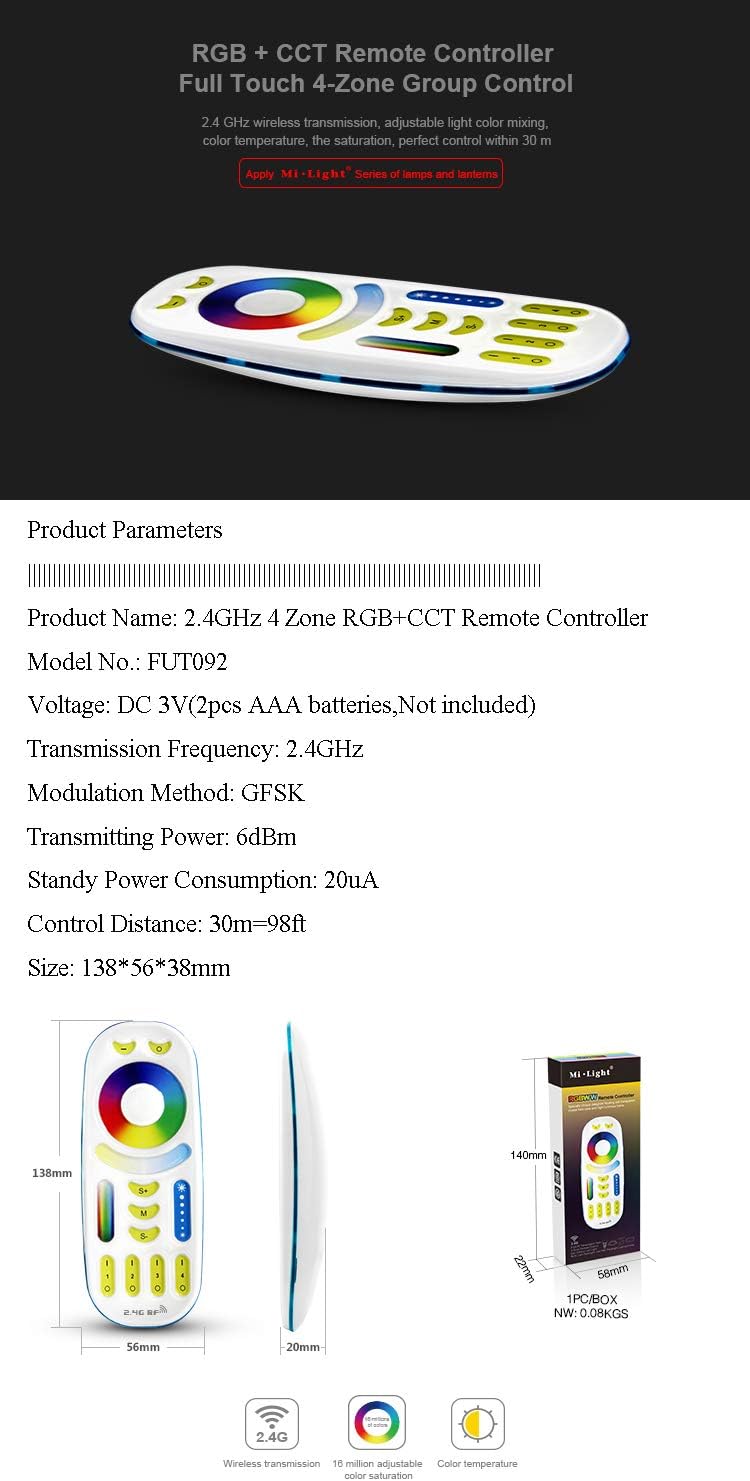
Image: Detailed product parameters and dimensions of the FUT092 remote controller.
Setup
This section guides you through linking and unlinking your LGIDTECH FUT092 remote controller with compatible LED lamps.
Linking the Remote Controller
- Ensure the LED lamp is powered off.
- Switch on the LED lamp.
- Immediately after the lamp lights up, within 3 seconds, press any [Zone ON] key (1, 2, 3, or 4) on the remote controller 3 times.
- The LED lamp will blink 3 times to confirm that linking is successful.
Once linked, the remote can control the lamp within the selected zone.
Unlinking the Remote Controller
- Ensure the LED lamp is powered off.
- Wait for 3 seconds or longer.
- Switch on the LED lamp.
- Immediately after the lamp lights up, within 3 seconds, press the [Zone ON] key (1, 2, 3, or 4) on the remote controller 5 times.
- The LED lamp will blink 9 times to confirm that unlinking is successful.
Video: Demonstrates the linking and unlinking process for the Mi.Light RGB+CCT 4-Zone Remote FUT092 with an LED bulb. It shows how to pair the remote by pressing a zone ON button three times after powering on the bulb, and how to unpair by pressing it five times.

Image: Illustrates the 2.4 GHz wireless transmission capability and 4-zone group control feature of the remote controller within a home environment.
Operating Instructions
The LGIDTECH FUT092 remote offers various functions to control your lighting. Below are the primary operating modes:
Color Changing (RGB)
Use the large circular touch color ring to select any color from the 16 million available options. Simply touch the desired color on the ring, and the connected lamp will change accordingly.
Color Temperature Adjustment (CCT)
The remote allows adjustment of the white light color temperature. Use the dedicated "Color Temperature Line" area on the remote to slide and select your preferred warm to cool white tones.
Brightness Dimming
Adjust the brightness of your lights using the "Brightness Dimming" control. Slide your finger along this vertical bar to increase or decrease the light intensity.
Saturation Control
Modify the saturation of colors using the "Saturation Control" bar. This allows you to make colors more vibrant or more muted.
Dynamic Modes
The remote features 9 preset dynamic modes for various lighting effects. Press the "M" (Mode) button to cycle through these modes. Use the "S+" and "S-" buttons to adjust the speed of the dynamic modes.
Night Light Mode
To activate the night light mode, long press any [Zone OFF] key. This will set the light to a soft, low-brightness setting suitable for night use.

Image: Diagram illustrating the various buttons and touch controls on the FUT092 remote, including Master ON/OFF, Color Ring, Speed, Saturation Control, Mode, Brightness Dimming, and Zone ON/OFF.
Maintenance
To ensure the longevity and proper functioning of your LGIDTECH FUT092 remote controller, follow these maintenance guidelines:
- Battery Replacement: The remote requires 2 AAA batteries (not included). When the remote's performance degrades or the indicator light dims, it's time to replace the batteries. Ensure correct polarity when inserting new batteries.
- Cleaning: Wipe the remote with a soft, dry cloth. Avoid using abrasive cleaners or solvents, as they may damage the surface or internal components.
- Storage: Store the remote in a cool, dry place away from direct sunlight and extreme temperatures. If storing for an extended period, remove the batteries to prevent leakage.
- Handling: Handle the remote with care. Avoid dropping it or subjecting it to strong impacts, which can damage the internal circuitry or the touch screen.

Image: Shows the battery compartment of the FUT092 remote controller, indicating where to insert 2 AAA batteries (not included).
Troubleshooting
If you encounter issues with your LGIDTECH FUT092 remote controller, refer to the following common troubleshooting steps:
- Remote Not Responding:
- Check the batteries. Ensure they are inserted correctly with the proper polarity and are not depleted. Replace with fresh AAA batteries if necessary.
- Verify that the remote is within the effective control distance (up to 30 meters) and there are no major obstructions.
- Lamp Not Responding to Remote:
- Confirm that the lamp is properly linked to the remote controller. Follow the "Linking the Remote Controller" steps in the Setup section.
- Ensure the lamp is powered on and functioning correctly.
- If the lamp was previously linked to another remote or has been reset, you may need to unlink it first before re-linking to this remote.
- Difficulty Opening Battery Compartment:
- The battery compartment cover is designed to fit snugly. Apply firm, even pressure when sliding it open. Avoid using excessive force or sharp objects that could damage the remote.
- Inconsistent Color/Brightness Changes:
- This could indicate low battery power. Replace the batteries.
- Ensure the remote's touch surface is clean and free from dirt or moisture.
Warranty and Support
LGIDTECH products are manufactured to high-quality standards. For specific warranty information, please refer to the product packaging or contact LGIDTECH customer support directly. If you require further assistance or have questions not covered in this manual, please visit the official LGIDTECH website or contact their customer service team.
LGIDTECH Official Store: Visit the LGIDTECH Store on Amazon