
Introduction
This manual provides detailed instructions for the LGIDTECH FUT096 Mi.Light RGBW 4-Zone 2.4GHz RF Remote LED Controller. This remote is designed to control Mi.Light RGBW LED products, such as bulbs and downlights, allowing for color changes, dimming, and zone control. Please read this manual thoroughly before use to ensure proper operation and to maximize the product's functionality.
Product Overview
The FUT096 remote features a full-touch interface for intuitive control of your LED lighting. It allows for individual or group control of up to four distinct lighting zones.

Front view of the LGIDTECH FUT096 Mi.Light RGBW 4-Zone 2.4GHz RF Remote LED Controller, showcasing its touch color wheel and control buttons.
Setup
1. Battery Installation
The FUT096 remote requires two AAA batteries (not included). Ensure correct polarity when inserting the batteries.

Image showing the open battery compartment of the remote, indicating where to insert two AAA batteries.
- Remove the battery cover on the back of the remote.
- Insert two AAA batteries, observing the correct positive (+) and negative (-) terminals.
- Replace the battery cover securely.
2. Linking the Remote to LED Lights
To control your LED lights, the remote must be linked to them. This process establishes a connection between the remote and the light(s) within a specific zone.
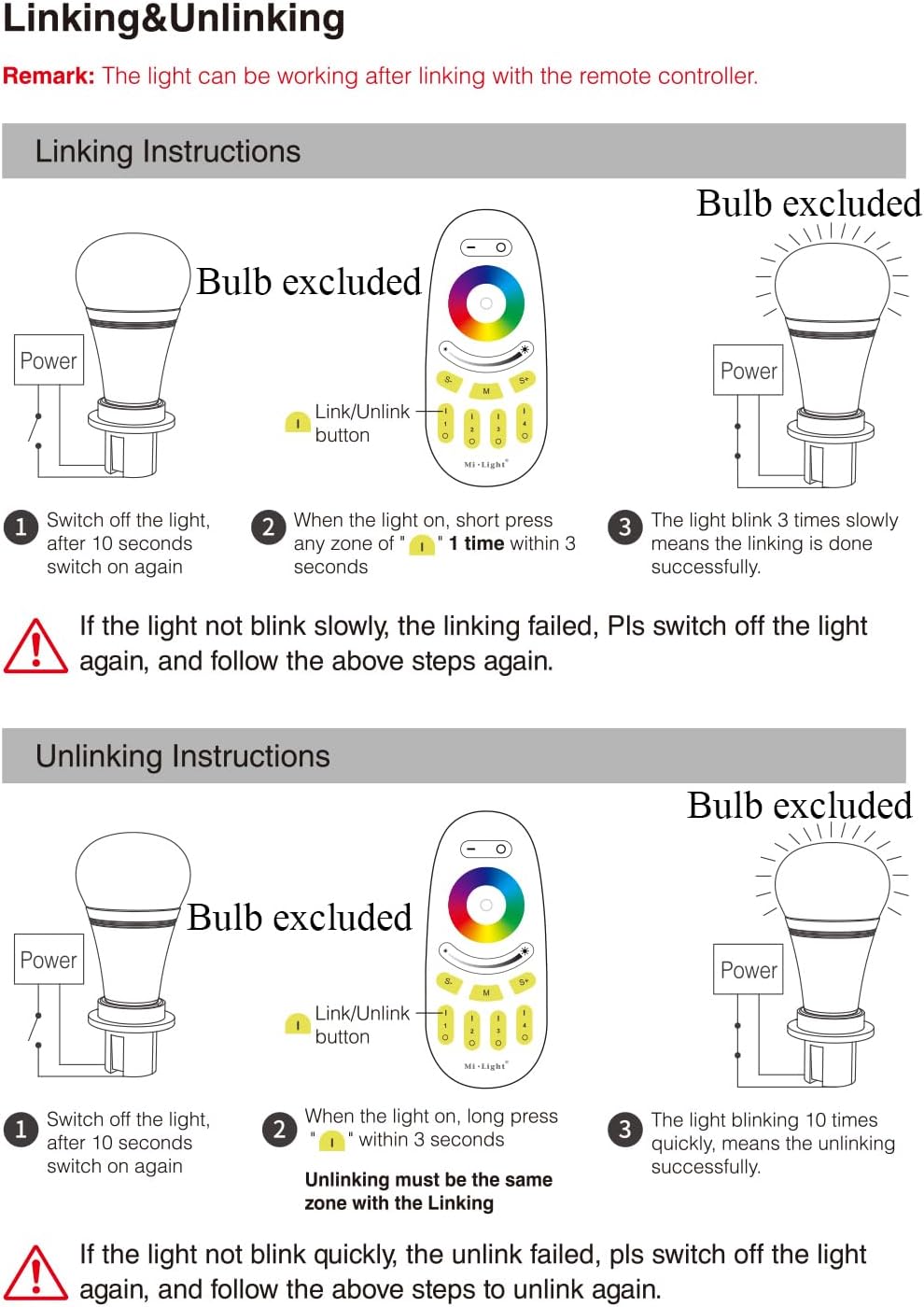
Visual guide for linking and unlinking the remote with an LED bulb, showing power cycles and button presses.
- Ensure the LED light bulb is powered off.
- Power on the LED light bulb.
- Within 3 seconds of the bulb lighting up, quickly press any 'Zone ON' button (e.g., 'I 1', 'I 2', 'I 3', or 'I 4') on the remote one time.
- If linking is successful, the LED light will blink slowly three times.
Note: If the light does not blink slowly, the linking process has failed. Switch off the light, wait for more than 10 seconds, and repeat the steps.
3. Unlinking the Remote from LED Lights
To remove a light from a specific zone, follow these unlinking instructions:
- Ensure the LED light bulb is powered off.
- Power on the LED light bulb.
- Within 3 seconds of the bulb lighting up, quickly long-press the 'Zone ON' button for the specific zone you wish to unlink (e.g., 'I 1' for Zone 1).
- If unlinking is successful, the LED light will blink quickly ten times.
Note: If the light does not blink quickly, the unlinking process has failed. Switch off the light, wait for more than 10 seconds, and repeat the steps.
Operating Instructions
The FUT096 remote offers various controls for your Mi.Light RGBW LED products.

Detailed diagram showing the function of each button and touch area on the FUT096 remote.
- Master ON (—) / Master OFF (O): Press the 'Master ON' button to turn on all linked lights across all zones. Press the 'Master OFF' button to turn off all linked lights.
- Color Ring: Touch the color ring to select any desired color for the active zone(s).
- Brightness - (☀) / Brightness + (★): Use the brightness slider or the dedicated buttons to decrease or increase the light intensity.
- Speed - (S-) / Speed + (S+): When in a dynamic mode (program), these buttons adjust the speed of the color changing effects.
- Modes (M): Press the 'M' button to cycle through 9 different dynamic lighting programs.
- Zone ON (I 1-4) / Zone OFF (O 1-4): Each pair of 'I' and 'O' buttons corresponds to a specific zone (1-4). Press 'I' to turn on a zone and 'O' to turn it off. You can control each zone separately or all together using the Master ON/OFF.
- Accessing White Color: To switch to pure white light for a specific zone, long-press the 'Zone ON' button for that zone.
The remote has a control distance of up to 30 meters (98 feet), allowing flexible placement without needing to point directly at the lights.
Maintenance
Battery Replacement
When the remote's performance degrades or the indicator light does not respond, it is time to replace the batteries. Follow the battery installation steps outlined in the Setup section.
- Always use two new AAA batteries.
- Dispose of old batteries responsibly according to local regulations.
Troubleshooting
- Remote not responding:
- Check if the batteries are correctly inserted and have sufficient charge. Replace if necessary.
- Ensure the remote is within the 30-meter operating range of the LED lights.
- Linking/Unlinking failed (light does not blink as expected):
- Ensure the light is powered off for at least 10 seconds before attempting to link/unlink.
- Press the 'Zone ON' button within 3 seconds of powering on the light. Some users report success by pressing within 1 second.
- For unlinking, ensure you long-press the 'Zone ON' button for the correct zone.
- Lights not changing color/brightness:
- Verify that the remote is linked to the correct zone(s).
- Ensure the LED lights are compatible with RGBW control.
Specifications
| Feature | Detail |
|---|---|
| Model Number | FUT096 |
| Brand | LGIDTECH / Mi.Light |
| Control Type | RF Touch Control Remote |
| Frequency | 2.4GHz |
| Control Zones | 4 Zones |
| Control Distance | Up to 30 meters (98 feet) |
| Power Source | 2 x AAA Batteries (not included) |
| Material | Acrylonitrile Butadiene Styrene (ABS) |
| Light Color Support | RGBW |
| Indoor/Outdoor Usage | Indoor |
Warranty and Support
For warranty information or technical support, please refer to the product packaging or contact LGIDTECH customer service directly. Keep your purchase receipt for any warranty claims.