
Fosmon 51012HOM
Fosmon Digital Luggage Scale User Manual
Model: 51012HOM
Brand: Fosmon
Introduction
The Fosmon Digital Luggage Scale is an essential tool for any traveler, designed to help you avoid unexpected overweight baggage fees. This compact and lightweight scale provides accurate weight measurements for your luggage, along with a built-in temperature sensor. Its user-friendly design ensures simple operation and clear readings on the backlit LCD display.

Image: The Fosmon Digital Luggage Scale, showcasing its sleek design, LCD display, and durable black strap for weighing luggage.
Safety Information
- Do not exceed the maximum weight capacity of 50kg (110lbs) to prevent damage to the scale or injury.
- Keep the scale away from water and extreme temperatures.
- Do not drop or subject the scale to strong impacts.
- Store the scale in a dry place when not in use.
- Keep batteries out of reach of children.
Package Contents
- 1 x Fosmon Digital Luggage Scale
- 1 x CR2032 Lithium Battery
- 1 x User Manual
Setup
Battery Installation
The scale requires one CR2032 lithium battery. Ensure correct polarity when inserting the battery.
- Locate the battery compartment on the back of the scale.
- Open the battery cover.
- Insert the CR2032 battery with the positive (+) side facing up.
- Close the battery cover securely.
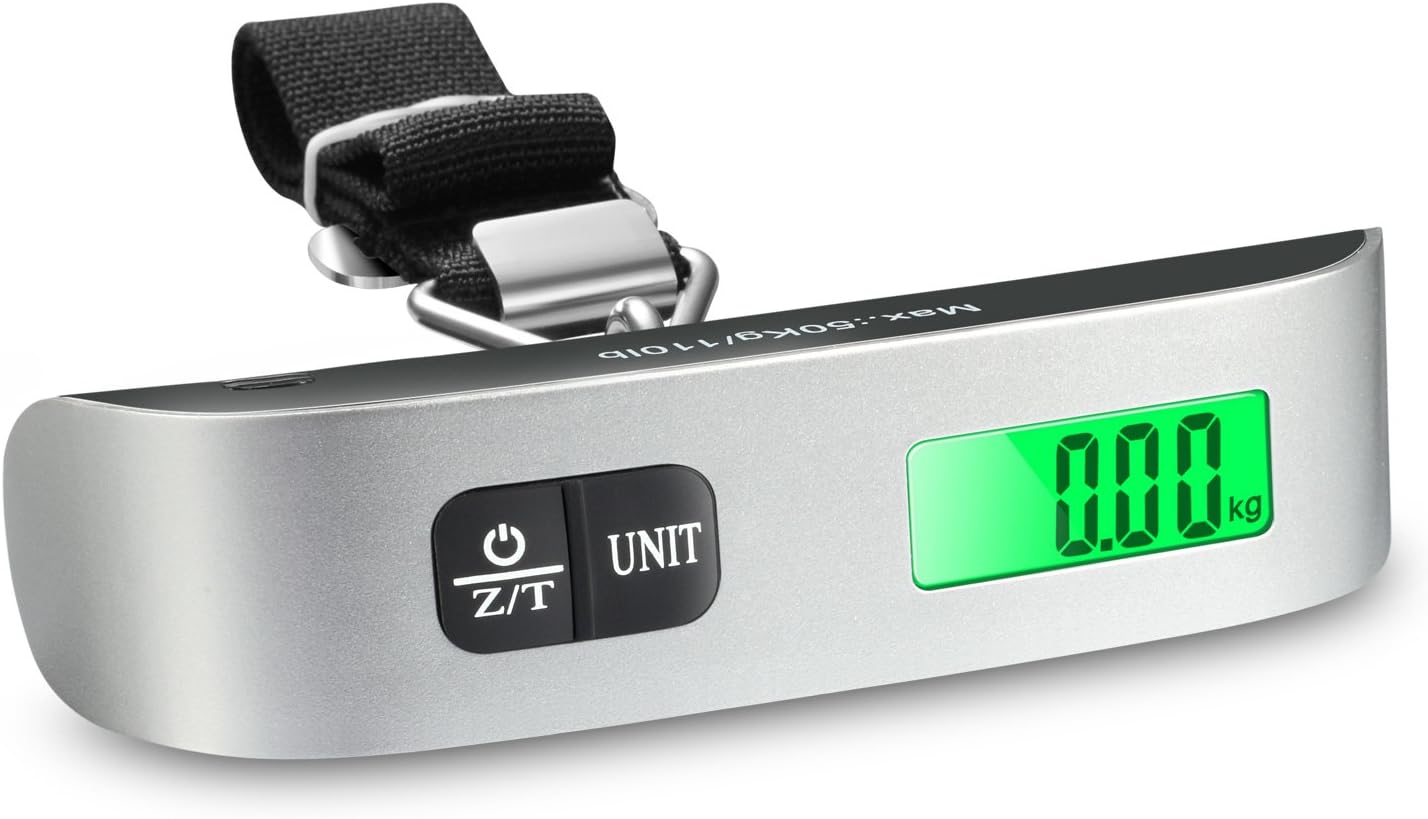
Image: A detailed view of the scale's LCD display and the two control buttons (Power/Tare and Unit), indicating where the battery compartment is typically located on the reverse side.
Operating Instructions
Weighing Luggage
- Attach the Strap: Loop the scale's strap through the handle of your luggage. Secure the metal buckle.
- Power On: Press the Z/T button to turn on the scale. Wait for the display to show "0.00" or "0.0".
- Lift and Read: Hold the scale firmly and lift your luggage off the ground. The display will show the stable weight.

Image: A visual guide demonstrating the three simple steps to use the scale: loop the strap around the luggage handle, hook the scale to the strap, and lift to obtain the weight reading.

Image: A hand holding the Fosmon Digital Luggage Scale, which is attached to a suitcase, displaying a weight of 3.65 kg on its bright green LCD screen, illustrating its use for avoiding overweight baggage fees.
Changing Weight Units (lb/kg)
With the scale turned on, press the UNIT button to toggle between pounds (lb) and kilograms (kg).

Image: A close-up view of the scale's LCD screen displaying "0.00 lb" and highlighting the "UNIT" button, which is used to switch between different units of measurement.
Tare Function
The tare function allows you to weigh items in a container by subtracting the container's weight. To use:
- Place the empty container on the scale (if applicable, or hold it as if weighing).
- Press the Z/T button. The display will reset to "0.00".
- Add the items you wish to weigh into the container. The display will show the net weight of the items.
Temperature Sensor
The scale features a built-in temperature sensor. When the scale is turned on and not actively weighing, it will display the ambient temperature. Press and hold the UNIT button to switch between Fahrenheit (°F) and Celsius (°C).

Image: The Fosmon luggage scale displaying a temperature of 68 degrees Fahrenheit on its screen, with a blurred background suggesting a hotel room setting, highlighting its built-in thermometer feature.
Battery and Overload Indicators
- Low Battery Indicator: A low battery icon will appear on the display when the battery needs to be replaced.
- Overload Indicator: If the weight exceeds the maximum capacity (50kg/110lbs), the display will show "EEEE" or "O-L" to indicate an overload. Remove the excess weight immediately to prevent damage.
Maintenance
- Clean the scale with a soft, damp cloth. Do not use abrasive cleaners or immerse the scale in water.
- Store the scale in a cool, dry place when not in use.
- If the scale will not be used for an extended period, remove the battery to prevent leakage.

Image: A hand demonstrating the compact size of the Fosmon luggage scale by easily fitting it into a small zippered pocket of a travel bag, emphasizing its portability and ease of storage.
Troubleshooting
| Problem | Possible Cause | Solution |
|---|---|---|
| Scale does not turn on. | Dead or incorrectly installed battery. | Replace battery (CR2032) and ensure correct polarity. |
| Inaccurate readings. | Scale not stable, overloaded, or battery low. | Ensure stable hold, do not exceed capacity, replace battery. |
| "EEEE" or "O-L" displayed. | Overload. | Remove weight immediately. Do not exceed 50kg/110lbs. |
| Display shows "Lo". | Low battery. | Replace battery (CR2032). |
Specifications
| Feature | Detail |
|---|---|
| Model Number | 51012HOM |
| Weight Capacity | 50 kg / 110 lbs |
| Weight Units | lb / kg |
| Temperature Sensor | Built-in |
| Temperature Units | °F / °C |
| Display Type | LCD with Backlight |
| Power Source | 1 x CR2032 Lithium Battery |
| Dimensions | 15.24 x 7.62 x 5.08 cm (6 x 3 x 2 inches) |
| Weight | 90 g (0.2 lbs) |
Warranty and Support
Fosmon products come with a limited lifetime warranty. This warranty covers defects in materials and workmanship under normal use. For warranty claims or technical support, please contact Fosmon customer service.
For assistance, please visit the official Fosmon website or contact their customer support team through the contact information provided on their packaging or website. Please have your product model number and purchase details ready.
Ask a question about this manual
Ask about setup, troubleshooting, compatibility, parts, safety, or missing instructions. Manuals+ will review the question and use this page’s manual context to help answer it.