
Cygolite Metro Pro 1100 Lumens
Cygolite Metro Pro 1100 Lumen Bicycle Headlight Instruction Manual
Model: Metro Pro 1100 Lumens (MTR-1100-USB)
Introduction
This manual provides detailed instructions for the safe and effective use of your Cygolite Metro Pro 1100 Lumen Bicycle Headlight. Please read this manual thoroughly before operating the device and retain it for future reference.
What's Included
- Metro Pro 1100 Bicycle Headlight
- Locktite Handlebar Mount
- Micro USB Charging Cable

Image: The package contents including the Metro Pro 1100 bicycle headlight, Locktite handlebar mount, and Micro USB charging cable.
Setup: Mounting the Light
The Cygolite Metro Pro 1100 features a secured hard handlebar mount for stable attachment to your bicycle.
- Attach the Handlebar Mount: Clamp the Locktite handlebar mount onto your bicycle's handlebar. The mount fits handlebars up to 32mm in diameter. Use the provided rubber spacers for added grip on rough terrain if needed.
- Secure the Mount: Tighten the thumbscrew on the mount until it is firmly secured in place on the handlebar.
- Slide in the Headlight: Once the mount is secure, slide the Metro Pro 1100 headlight onto the mount until it snaps into place. The quick-release tab allows for fast light removal when needed.
- Adjust Position: The mount allows for side-to-side swivel for wide coverage, enabling you to adjust the light's direction as required.

Image: Detailed view of the hard handlebar mount, showing how it fits handlebars up to 32mm, features a quick release tab, side-to-side swivel, rubber spacers, and a thumbscrew for secure attachment.
Video: An overview of the Cygolite Metro Series Bicycle Light, demonstrating its features and how to mount it on a bicycle. This video is provided by SSB Design, Inc.
Operating Instructions
Lock Mode Feature
The light is initially set to a "Lock Mode" to prevent accidental activation during transport or storage. When in Lock Mode, pressing the power button will cause the light to flash rapidly.
- To Exit Lock Mode: Press and hold the power button for 6 seconds. Release the button when the light stops flashing and turns solid. The light is now "Unlocked" and ready for normal use.
- To Enter Lock Mode: Turn the light ON. Then, press and hold the power button for 8 seconds. Release the button when the light begins flashing. The light is now "Locked" and ready for safe packing.
Video: Instructions on how to unlock the Cygolite Metro light if it is flashing when the button is pressed. This video is provided by SSB Design, Inc.
Lighting Modes
The Metro Pro 1100 offers 9 lighting modes, optimized for both night and day use.
- To Turn On/Off: Press and hold the power button for 1 second.
- To Change Modes: Press the power button briefly to cycle through the available modes.
Night Use Modes:
- Boost: Maximum brightness for critical visibility.
- High: Strong illumination for general night riding.
- Medium: Balanced brightness for moderate conditions.
- Low: Extended runtime for less demanding situations.
- SteadyPulse: Alerts motorists with attention-grabbing light pulses while maintaining a steady beam.
- Walking: A dim mode suitable for use as a flashlight off the bike.
Day Use Modes:
- DayLightningFlash: Bursts lightning-like flashes to enhance visibility in broad daylight.
- Triple Flash: A distinct flashing pattern for daytime awareness.
- Zoom: Another unique flash pattern for increased daytime presence.
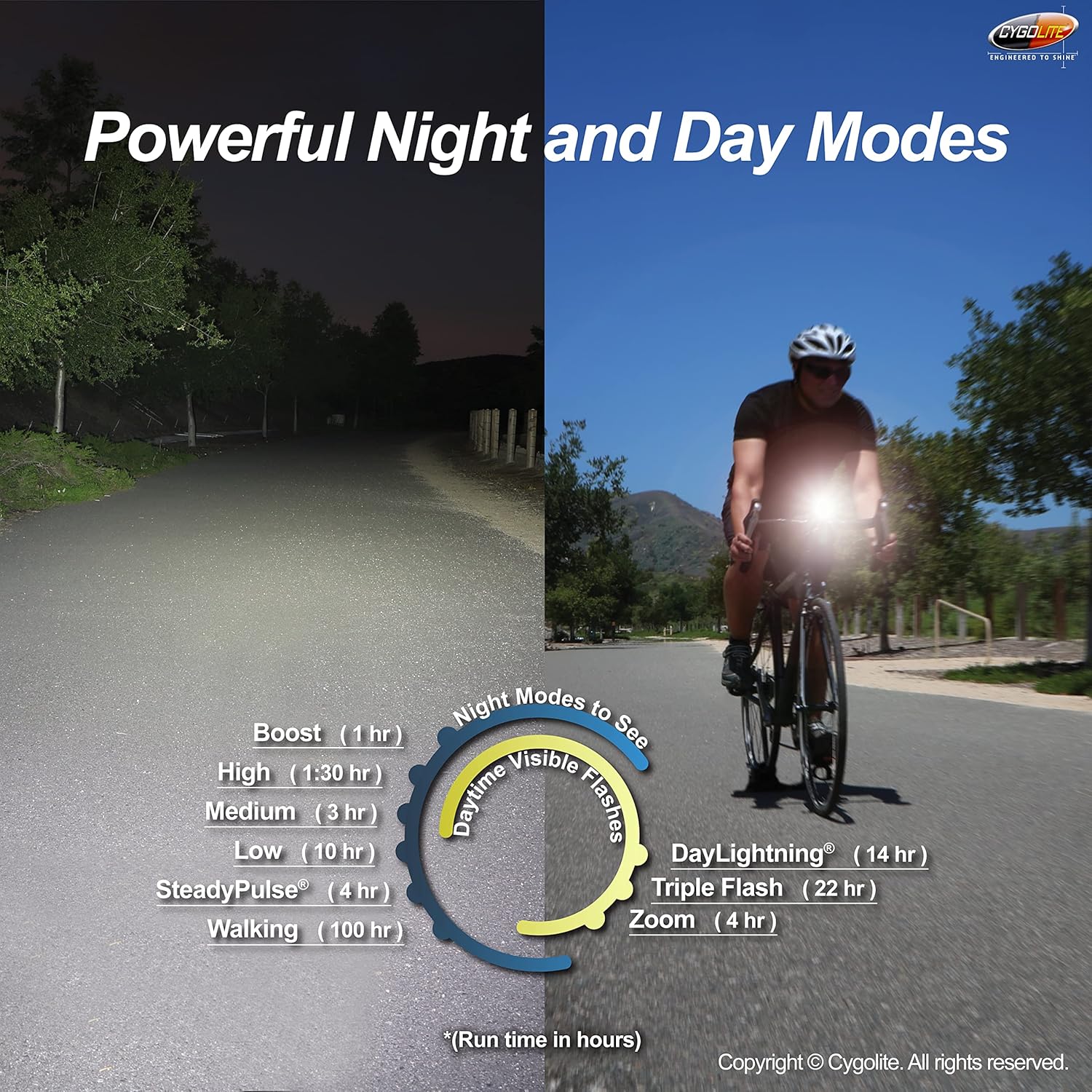
Image: Visual representation of the 9 lighting modes and their approximate run times in hours.
Charging
The Metro Pro 1100 is USB rechargeable for convenience.
- Connect the provided Micro USB charging cable to the light's charging port and to a USB power source (e.g., computer, wall adapter).
- A low battery indicator will alert you when charging is needed.
- The light supports fast USB recharging.

Image: The Metro Pro 1100 headlight being charged via a Micro USB cable connected to a laptop.
Maintenance
To ensure the longevity and optimal performance of your Cygolite Metro Pro 1100, follow these maintenance guidelines:
- Cleaning: Wipe the light's body and lens with a soft, damp cloth. Avoid using abrasive cleaners or solvents that could damage the finish or lens.
- Storage: Store the light in a cool, dry place when not in use. If storing for an extended period, ensure the battery is partially charged (around 50%) to maintain battery health.
- Water Resistance: The light is IP67 waterproof, meaning it is protected from dust and can withstand immersion in water up to 1 meter for 30 minutes. However, avoid prolonged submersion and ensure the USB port cover is securely closed to maintain water resistance.
- Charging Port: Keep the Micro USB charging port clean and free of debris. Ensure the rubber cover for the charging port is properly sealed after charging to prevent water and dust ingress.

Image: The Cygolite Metro Pro 1100 is built to endure rugged conditions with a durable and water-resistant body, meeting IP67 waterproof rating standards.
Troubleshooting
| Problem | Possible Cause | Solution |
|---|---|---|
| Light flashes rapidly when power button is pressed. | Light is in "Lock Mode". | Press and hold the power button for 6 seconds until the light turns solid to exit Lock Mode. |
| Light does not turn on. | Battery is depleted or light is in Lock Mode. | Charge the light using the Micro USB cable. If still not turning on, check if it's in Lock Mode and unlock it. |
| Light output is dim. | Low battery or incorrect mode selected. | Recharge the battery. Cycle through modes to select a brighter setting. |
| Light does not charge. | Faulty cable, power source, or charging port. | Try a different Micro USB cable and power source. Ensure the charging port is clean and free of debris. |
Specifications
- Light Output Maximum: 1100 Lumens
- Number of Settings: 9 (Night Use: Boost, High, Medium, Low, SteadyPulse; Day Use: DayLightningFlash, Triple Flash, Zoom; Walking mode)
- Power Source: Battery Powered (USB Rechargeable)
- Material: Aluminum (outer material), Plastic
- Color: Black
- Item Weight: 0.4 Pounds (approx. 181 grams)
- Product Dimensions: 3"L x 1.3"W x 1.3"H (approx. 7.6cm L x 3.3cm W x 3.3cm H)
- Mounting Type: Handlebar Mount (fits up to 32mm diameter)
- Water Resistance Level: Water Resistant (IP67 International Protection Rating)
- Model Number: MTR-1100-USB
- UPC: 745025060041
Warranty & Support
Warranty Description: One Year Limited Warranty.
For further assistance, troubleshooting, or warranty claims, please visit the official Cygolite website or contact their customer support.
Visit the Cygolite Store on Amazon for more information and products.
Ask a question about this manual
Ask about setup, troubleshooting, compatibility, parts, safety, or missing instructions. Manuals+ will review the question and use this page’s manual context to help answer it.