
1. Introduction
This manual provides detailed instructions for the safe and efficient operation of your Jebao DCP-6500 Sine Wave Water Return Pump. Please read this manual thoroughly before installation and use, and retain it for future reference.
The Jebao DCP series pumps offer enhanced performance and precise flow control, suitable for various aquarium applications such as reactors, sumps, or closed-loop systems. Key features include a high-performance motor with innovative electronics, energy efficiency, and quiet operation.
2. Safety Instructions
- Always disconnect power before performing any maintenance or installation.
- This pump is designed for internal use only within an aquarium system.
- Ensure all electrical connections are dry and secure.
- Do not operate the pump dry (without water). This can cause damage to the motor.
- Do not use the pump for purposes other than those specified.
- Keep the power adapter and controller away from water.
- Regularly inspect the power cord for any damage. Do not use if damaged.
- The pump contains no copper components, ensuring safety for aquatic life.
3. Package Contents
Verify that all items are present and in good condition upon unpacking:
- Jebao DCP-6500 Return Pump
- Power Adapter
- Controller
- In-line fittings (various sizes, typically 3/4" to 1-1/4" for connection)
- O-rings and other necessary seals
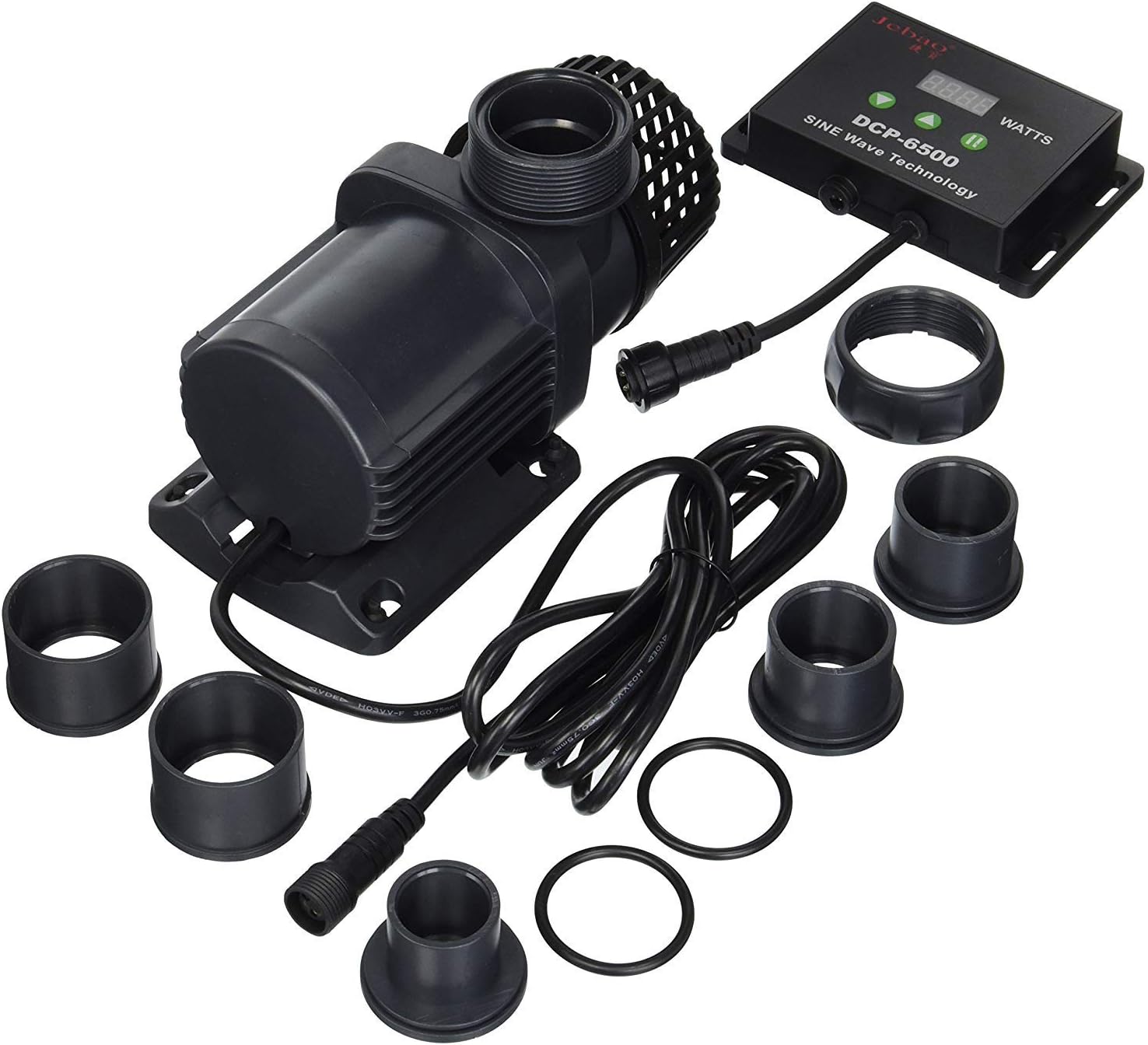
Image 1: Contents of the Jebao DCP-6500 pump package, including the pump, controller, power adapter, and various fittings.

Image 2: The Jebao DCP-6500 pump and its components displayed alongside its retail packaging, highlighting the "MARINE DC PUMP" and "SINE Wave Technology" branding.
4. Specifications
| Feature | Specification |
|---|---|
| Model | DCP-6500 |
| Power | 55 Watts |
| Voltage | 110-120V, 60Hz |
| Maximum Flow Rate | 1710 GPH (28.5 Gallons Per Minute) |
| Maximum Head Height | 14.7 Feet |
| Product Dimensions (L x W x H) | 9" x 5" x 5" |
| Item Weight | 6 Pounds |
| Shaft Material | Ceramic (Wear Resistant) |
| Protection Grade | IPX8 |

Image 3: A detailed chart showing the performance curves (Q max, H max) for various Jebao DCP pump models, including the DCP-6500, along with their dimensions and electrical specifications.

Image 4: A close-up view of the performance chart, illustrating the relationship between flow rate (L/H) and head height (M) for different Jebao DCP pump models.
5. Setup Instructions
- Unpack and Inspect: Carefully remove all components from the packaging. Inspect the pump, controller, power adapter, and fittings for any signs of damage.
- Connect Fittings: Attach the appropriate in-line fittings to the pump's inlet and outlet ports. Ensure O-rings are properly seated to prevent leaks. The pump is designed to accept various plumbing sizes, typically 3/4" to 1-1/4" connections.
- Position the Pump: Place the pump in your aquarium sump or desired location. Ensure it is fully submerged if used internally, or securely connected to external plumbing if used in-line.
- Connect to Controller: Connect the pump's cable to the designated port on the controller. Ensure the connection is firm and secure.
- Connect Power Adapter: Connect the power adapter to the controller, then plug the power adapter into a grounded electrical outlet.
- Initial Start-up: Once all connections are secure and the pump is submerged (if applicable), power on the unit. The pump should start operating.
6. Operating Instructions
The Jebao DCP-6500 pump features a controller for precise flow adjustment and other functions.
- Power On/Off: Press the power button on the controller to turn the pump on or off.
- Flow Adjustment: Use the "+" and "-" buttons on the controller to increase or decrease the flow rate. The digital display will show the current power level or flow setting.
- Feed Mode: Press the "Feed" button to activate a temporary shutdown (typically 10 minutes) for feeding. The pump will automatically resume operation after the set time. Press "Feed" again to exit feed mode manually.
- Memory Function: The pump includes a memory function that recalls the last operating settings after a power interruption.
- Motor Protection: The controller features motor protection that will shut down the pump if the rotor is blocked, preventing damage.
7. Maintenance
Regular maintenance ensures optimal performance and extends the lifespan of your pump.
- Disconnect Power: Always unplug the pump from the power outlet before performing any maintenance.
- Rotor and Impeller Cleaning: Periodically remove the pump's front cover and impeller assembly. Clean any debris, algae, or calcium buildup from the impeller and its chamber using a soft brush and warm water. For stubborn deposits, a mild vinegar solution can be used, followed by thorough rinsing.
- Shaft Inspection: Inspect the ceramic shaft for wear or damage. Replace if necessary.
- O-Ring Inspection: Check all O-rings for cracks, tears, or compression. Replace worn O-rings to maintain a watertight seal. Applying a small amount of silicone grease to O-rings can help with sealing and longevity.
- External Cleaning: Wipe down the exterior of the pump and controller with a damp cloth. Ensure no water enters the controller or power adapter.
- Reassembly: Reassemble all components carefully, ensuring all parts are correctly seated and secured.
8. Troubleshooting
| Problem | Possible Cause | Solution |
|---|---|---|
| Pump does not start | No power; Controller disconnected; Impeller blocked | Check power connection; Ensure controller is securely connected; Disconnect power and clean impeller. |
| Reduced flow rate | Impeller dirty or blocked; Kinked tubing; Low power setting | Clean impeller; Check and straighten tubing; Increase flow setting on controller. |
| Excessive noise/vibration | Debris in impeller; Worn impeller/shaft; Pump not properly seated | Clean impeller; Inspect and replace worn parts; Ensure pump is stable and free from obstructions. |
| Water leak | Loose fittings; Damaged O-rings | Tighten all connections; Inspect and replace O-rings if damaged. |
| Controller display error | Temporary electrical glitch; Internal fault | Disconnect power for 30 seconds and reconnect; If error persists, contact customer support. |
9. Warranty and Support
Jebao products are designed for reliability and performance. For warranty information, please refer to the documentation provided at the time of purchase or contact your retailer. Keep your proof of purchase for warranty claims.
For technical assistance or replacement parts, please contact Jebao customer support or your authorized dealer. When contacting support, please have your pump model (DCP-6500) and purchase date available.
Note: Unauthorized disassembly or modification of the pump may void the warranty.


