
1. Introduction
The Steinel IS 360-1 is a high-performance infrared motion detector designed for recessed mounting. It offers a 360-degree detection angle and a maximum range of 4 meters, making it suitable for various indoor and outdoor applications such as under eaves, carports, and suspended ceilings. This detector is compatible with all bulb types, including up to six LEDs, and features optional permanent lighting. It provides adjustable time and twilight settings for customized operation.
2. Safety Instructions
- Electrical Installation: Installation must be performed by a qualified electrician in accordance with national wiring regulations and electrical operating conditions.
- Power Disconnection: Always disconnect the power supply before attempting any installation, maintenance, or repair work.
- Damage Check: Do not operate the product if it shows any signs of damage.
- Intended Use: Use the product only for its intended purpose as described in this manual. Any modifications or alterations are not permitted.
- IP54 Rating: The device has an IP54 rating, indicating protection against dust and splashing water. Ensure proper sealing during installation to maintain this rating.
3. Product Overview
The Steinel IS 360-1 is an infrared motion detector that responds to heat radiation from moving objects. Its compact design allows for discreet recessed installation. The sensor features a multi-lens system for precise detection.

Figure 3.1: Close-up view of the Steinel IS 360-1 recessed motion detector.

Figure 3.2: Illustration of how an infrared sensor detects heat radiation from moving objects.
4. Installation (Setup)
The IS 360-1 is designed for recessed ceiling mounting. Ensure the mounting location is stable and provides adequate space for the device and wiring.
4.1 Mounting Dimensions
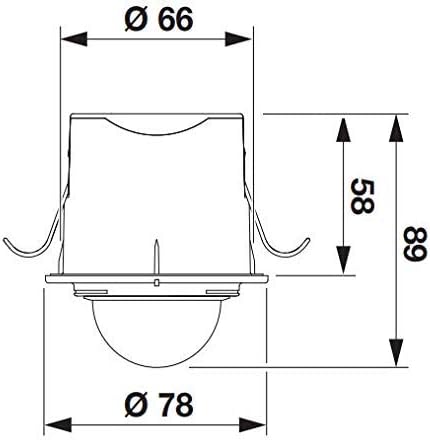
Figure 4.1: Technical drawing with dimensions. The detector has a diameter of 78mm and requires a mounting depth of 89mm, with a cutout diameter of 66mm.
4.2 Installation Steps
- Prepare Mounting Hole: Create a circular cutout in the ceiling with a diameter of 66mm.
- Wiring: Connect the electrical wires to the terminal block inside the detector housing. Ensure correct polarity and secure connections. The device operates on 240 Volts.
- Insert Detector: Carefully push the detector into the prepared hole. The spring clips will secure it in place.
- Final Adjustment: Ensure the sensor lens is facing the desired detection area.

Figure 4.2: Illustration of the recessed ceiling installation process.
5. Operation
Once installed and powered, the Steinel IS 360-1 motion detector will automatically switch on connected lights when it detects movement within its 360-degree detection zone. The light will remain on for the set time duration and will only activate when the ambient light level falls below the set twilight threshold.

Figure 5.1: The Steinel IS 360-1 motion detector installed in a ceiling, providing illumination upon detection.
6. Settings Adjustment
The IS 360-1 offers continuous adjustment for both time and twilight settings, as well as the detection area.
6.1 Time Setting (Time)
This dial controls how long the light remains switched on after motion is detected. It is continuously adjustable from approximately 8 seconds to 35 minutes.
6.2 Twilight Setting (Lux)
This dial determines the ambient brightness level at which the sensor becomes active. Turning it towards the sun symbol means the sensor will only activate in brighter conditions (e.g., during the day), while turning it towards the moon symbol means it will activate in darker conditions (e.g., at dusk or night).

Figure 6.1: Adjustable dials for time and twilight settings.
6.3 Detection Area Adjustment
The 360-degree detection area can be precisely adapted to your needs using the supplied blanking segments. These segments can be inserted into the lens to block out specific areas where detection is not desired, preventing unwanted triggering (e.g., from public pathways).

Figure 6.2: Diagram showing the 360-degree detection area and the use of blanking segments for customization.
7. Maintenance
The Steinel IS 360-1 motion detector is maintenance-free. For cleaning, use a soft, dry cloth. Do not use abrasive cleaners or solvents, as these may damage the lens or housing. Ensure no moisture enters the device.
8. Troubleshooting
| Problem | Possible Cause | Solution |
|---|---|---|
| Light does not switch on. | No power supply. Twilight setting too high. Detection area blocked. | Check power connection. Adjust twilight setting (towards moon symbol). Check for obstructions in the detection zone. |
| Light switches on too frequently. | Detection area too wide. Time setting too long. | Use blanking segments to narrow detection area. Reduce time setting. |
| Light stays on continuously. | Permanent ON function activated (if applicable). Continuous motion in detection area. | Check if permanent ON is enabled and disable if not desired. Adjust detection area or time setting. |
9. Specifications
| Feature | Specification |
|---|---|
| Model Number | 032845 |
| Manufacturer | Steinel |
| Dimensions (L x W x H) | 8.9 x 7.8 x 7.8 cm |
| Weight | 120 grams |
| Color | White |
| Power Source | Corded Electric |
| Voltage | 240 Volts |
| Max. Switching Capacity | 1000 Watts |
| Bulb Type Compatibility | LED (up to 6), Incandescent, Halogen |
| Detection Angle | 360 degrees |
| Max. Range | 4 meters |
| Time Setting | 8 seconds - 35 minutes (continuously adjustable) |
| Twilight Setting | Continuously adjustable |
| IP Rating | IP54 |
| Mounting Type | Ceiling Mount (Recessed) |
| Operating Temperature | Up to 40 Degrees Celsius |
| Country of Origin | Romania |
10. Warranty and Support
Steinel products are manufactured to the highest quality standards. This product comes with a 1-year availability of spare parts. For warranty claims, technical support, or further assistance, please refer to the contact information provided with your purchase or visit the official Steinel website. Please retain your proof of purchase for any warranty claims.


