
Introduction
The Microderm GLO Diamond Microdermabrasion Machine is an advanced at-home facial treatment system designed to provide professional-grade exfoliation and skin rejuvenation. Utilizing patented Diamond Safe 3D suction technology, this device helps to remove dead skin cells, improve skin texture, reduce the appearance of fine lines and wrinkles, minimize pore size, and address concerns such as acne scars, sun damage, and hyperpigmentation. It is engineered for safe and effective use on all skin types, including sensitive skin.

Image: The Microderm GLO Diamond Microdermabrasion Machine on its charging base, showcasing its sleek design.
Safety Information
- Do not hold the device on one spot for more than 2 seconds to avoid skin irritation or bruising.
- Always pull the skin taut during treatment to ensure smooth gliding and effective suction.
- The device features patented Diamond Safe 3D suction technology designed to prevent skin cutting.
- Suitable for all skin types, including sensitive skin. Start with the lowest suction level (Level 1) and gradually increase as your skin adapts.
- Consult a dermatologist if you have pre-existing skin conditions or concerns.
Package Contents
Your Microderm GLO system includes the following items:
- Microderm GLO Device
- Charging Base
- USB Charging Cable
- Large Diamond Tip (for broad areas like cheeks and forehead)
- Small Diamond Tip (for delicate and hard-to-reach areas like nose and chin)
- Smooth/Massaging Tip (for gentle massage)
- Replacement Felt Filters
- Cleaning Brush
- Travel Pouch
- Peptide Complex Serum (sample size)

Image: The Microderm GLO device displayed with its interchangeable diamond tips and other accessories.
Setup
- Charge the Device: Place the Microderm GLO device onto its charging base. Connect the USB charging cable to the base and a power source. The battery indicator on the display will show charging progress. Ensure the device is fully charged before first use.
- Insert a Filter: Remove the diamond tip by gently pulling it off. Insert a new felt filter into the filter slot at the top of the device. This filter collects dead skin cells and debris.
- Attach a Tip: Select the desired diamond tip (large or small) and firmly attach it to the device.
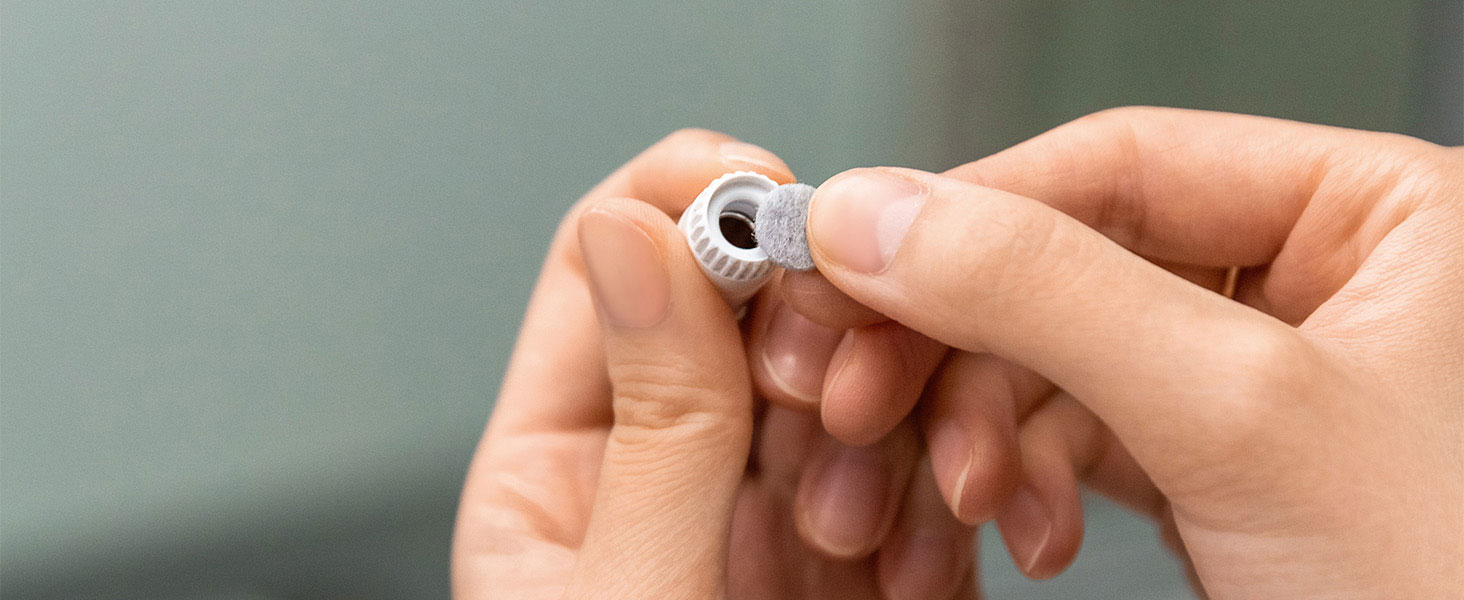
Image: A hand demonstrating how to insert a felt filter into the Microderm GLO device before use.
Operating Instructions
- Prepare Your Skin: Cleanse your face thoroughly and pat it dry. For optimal results, consider using a facial steamer to open pores before treatment.
- Power On: Press the power button to turn on the device. The display will illuminate, showing the current level, mode, and timer.
- Select Mode:
- Auto Mode: This guided mode provides a 4-minute treatment, automatically switching between facial areas (cheeks, nose, chin, forehead, eye area, neck) with a visual guide on the display. This is ideal for quick and comprehensive treatments.
- Manual Mode: Allows you to manually control the suction level (Level 1-3) and focus on specific areas for desired durations.
- Adjust Suction Level: Use the up/down arrows to select your preferred suction level. Start with Level 1 for sensitive skin or first-time users.
- Perform Treatment:
- Brace the skin with your free hand, pulling it taut.
- Place the diamond tip flat against the skin.
- Using short, even strokes, gently glide the diamond tip across the skin, ensuring the tip remains flush with the skin. Do not hold the device stationary on any spot for more than 2 seconds.
- Follow the on-screen guide in Auto Mode or target specific areas in Manual Mode.
- Post-Treatment: After completing the treatment, apply a hydrating serum, such as the Microderm GLO Peptide Complex Serum, to moisturize and soothe your skin.
- Frequency: For best results, use the Microderm GLO 1-3 times per week, depending on your skin's sensitivity and needs.
Video: Microderm GLO (Silver) - Product Showcase. This video provides a visual overview of the device and its features, including the display and interchangeable tips.
Video: Microderm GLO - Brand Ambassador. This video demonstrates the practical application of the device on various facial areas, highlighting the use of different tips and modes.

Image: A woman using the Microderm GLO device on her forehead, demonstrating the gliding motion.
Maintenance and Cleaning
- Clean Tips: After each use, remove the diamond tip and clean it with the provided cleaning brush and warm, soapy water. Rinse thoroughly and allow to air dry.
- Replace Filters: The felt filters should be replaced after each treatment to maintain hygiene and optimal suction performance. Dispose of used filters.
- Clean Device Body: Wipe the body of the device with a soft, damp cloth. Do not submerge the device in water.
- Storage: Store the device and its accessories in the provided travel pouch in a cool, dry place.
Troubleshooting
- Device Not Turning On: Ensure the device is fully charged. If the issue persists, try charging with a different USB port or adapter.
- Weak Suction: Check if the felt filter is clean and properly inserted. Replace the filter if it appears dirty or clogged. Ensure the diamond tip is securely attached.
- Skin Redness/Irritation: This can occur if the device is held too long in one spot or if the suction level is too high for your skin type. Reduce suction level or ensure continuous gliding motion. Apply a soothing serum post-treatment.
- Motor Not Running (Electronics Work): If the display is active but the motor does not engage, ensure the tip is correctly attached and the filter is not completely blocked. If the problem continues, contact customer support.
Specifications
| Model Number | NVD-MDG-SL1610 |
| Dimensions | 7.4 x 7.36 x 2.72 inches |
| Item Weight | 0.64 Kilograms (1.41 Pounds) |
| Battery | 1 Lithium Ion battery (included) |
| Material Type | Diamond |
| Color | Silver |
| Item Form | Suction Tool |
| Skin Type Compatibility | All, Combination, Dry, Normal, Oily |
| UPC | 852473007815 |
Warranty
The Microderm GLO Diamond Microdermabrasion Machine comes with a Lifetime Manufacturer Warranty. Please refer to the warranty card included in your package or visit the official Microderm GLO website for full details and registration.
Customer Support
For any questions, technical assistance, or warranty claims, please contact Microderm GLO customer support:
- Visit the Microderm GLO Store on Amazon
- Refer to the contact information provided in your product packaging.