
Audiovox VH240R
RCA VH240R 4-Way Video Signal Amplifier & Splitter User Manual
Model: VH240R
Introduction
The RCA VH240R is a 4-way video signal amplifier and splitter designed to enhance and distribute VHF, UHF, and FM signals. It is compatible with both RG6 and RG59 coaxial cables and amplifies signals by 10dB, compensating for signal loss over long cable runs and improving weak signals for multiple connected devices.
What's in the Box
- RCA VH240R 4-Way Video Signal Amplifier & Splitter
- Power Adapter (DC 12V)
- Mounting Screws

Image: The RCA VH240R amplifier unit shown alongside its included power adapter, ready for installation.
Key Features
- Coaxial Cable Compatibility: Designed for use with RG6 or RG59 coaxial cables.
- Signal Amplification: Amplifies VHF, UHF, and FM signals by 10dB.
- Signal Loss Compensation: Effectively compensates for video signal loss, especially with long cable runs.
- Multi-Device Distribution: Capable of sending an amplified cable signal to up to four video components simultaneously.
- Signal Improvement: Enhances weak video signals to multiple TV, VCR, and DVD connections from a single source.
Setup and Installation
Follow these steps to properly install your RCA VH240R amplifier and splitter:
- Connect Input: Connect the coaxial cable from your antenna or cable provider to the amplifier's IN jack.
- Connect Outputs: Connect coaxial cables from the amplifier's RF OUT 1, RF OUT 2, RF OUT 3, and RF OUT 4 jacks to the input jacks on your video components (TVs, VCRs, DVRs, etc.). Note that RF OUT 1 also serves as the PWR IN port for the power adapter.
- Power Connection: Plug the amplifier's AC power adapter into a standard electrical outlet. Ensure the power adapter is securely connected to the DC 12V INPUT port on the amplifier.
- Secure Mounting (Optional): Use the provided mounting screws to secure the amplifier to a wall or other stable surface, if desired.
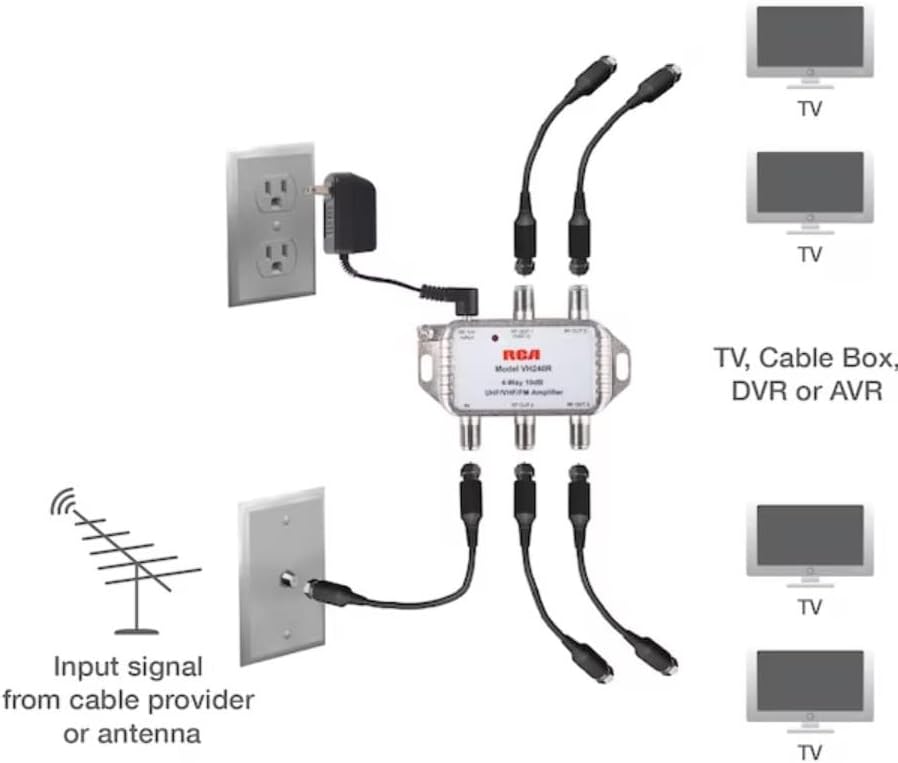
Image: A detailed diagram illustrating the connection of the RCA VH240R amplifier, showing input from antenna/cable and outputs to multiple televisions and other video components, along with the power connection.
Operation
Once properly installed and powered, the RCA VH240R amplifier operates automatically. It continuously amplifies incoming VHF, UHF, and FM signals and distributes them to all connected output devices. The 10dB gain helps overcome signal degradation caused by long cable runs or splitting the signal to multiple televisions, ensuring a clearer and stronger signal for all connected components.
A small red LED indicator light on the unit will illuminate when the device is receiving power, confirming operational status.
Maintenance
The RCA VH240R amplifier requires minimal maintenance. To ensure optimal performance and longevity:
- Cleaning: Periodically wipe the unit with a soft, dry cloth to remove dust. Do not use liquid cleaners or abrasive chemicals.
- Environment: Keep the amplifier in a dry location, away from direct sunlight, extreme temperatures, and moisture.
- Connections: Ensure all coaxial cable connections remain tight and secure. Loose connections can lead to signal degradation.
Troubleshooting
If you experience issues with your RCA VH240R amplifier, refer to the following common problems and solutions:
| Problem | Possible Cause | Solution |
|---|---|---|
| No signal or poor signal on connected TVs. |
|
|
| Red LED indicator is off. |
|
|
Specifications
| Attribute | Detail |
|---|---|
| Model Number | VH240R |
| Brand | Audiovox (RCA) |
| Channels | 4-Way Splitter |
| Signal Amplification | 10dB (VHF, UHF, FM) |
| Impedance | 75 Ohm |
| Compatible Cable Types | RG6, RG59 Coaxial Cable |
| Color | Silver |
| Item Weight | 9.6 ounces |
| Product Dimensions | 7 x 6 x 3 inches |
| UPC | 044476129209 |
| Date First Available | December 29, 2016 |
Warranty and Support
Warranty Information
This RCA VH240R amplifier is covered by a 12-month limited warranty from the date of purchase. This warranty covers defects in materials and workmanship under normal use. For full warranty terms and conditions, please refer to the product packaging or contact customer support.
Customer Support
For technical assistance, troubleshooting, or warranty claims, please contact Audiovox Customer Service:
- Phone: 1-800-645-4994
- Website: www.rcaaudiovideos.com
Please have your product model number (VH240R) and proof of purchase ready when contacting support.
Related documentsVH240R


Ask a question about this manual
Ask about setup, troubleshooting, compatibility, parts, safety, or missing instructions. Manuals+ will review the question and use this page’s manual context to help answer it.