
1. Introduction
This manual provides detailed instructions for the installation, operation, and maintenance of your JeaTone 10-inch Wired Video Intercom System. Please read this manual thoroughly before installation and use to ensure proper functionality and safety. This system is designed to enhance home security and communication for villas and apartments.
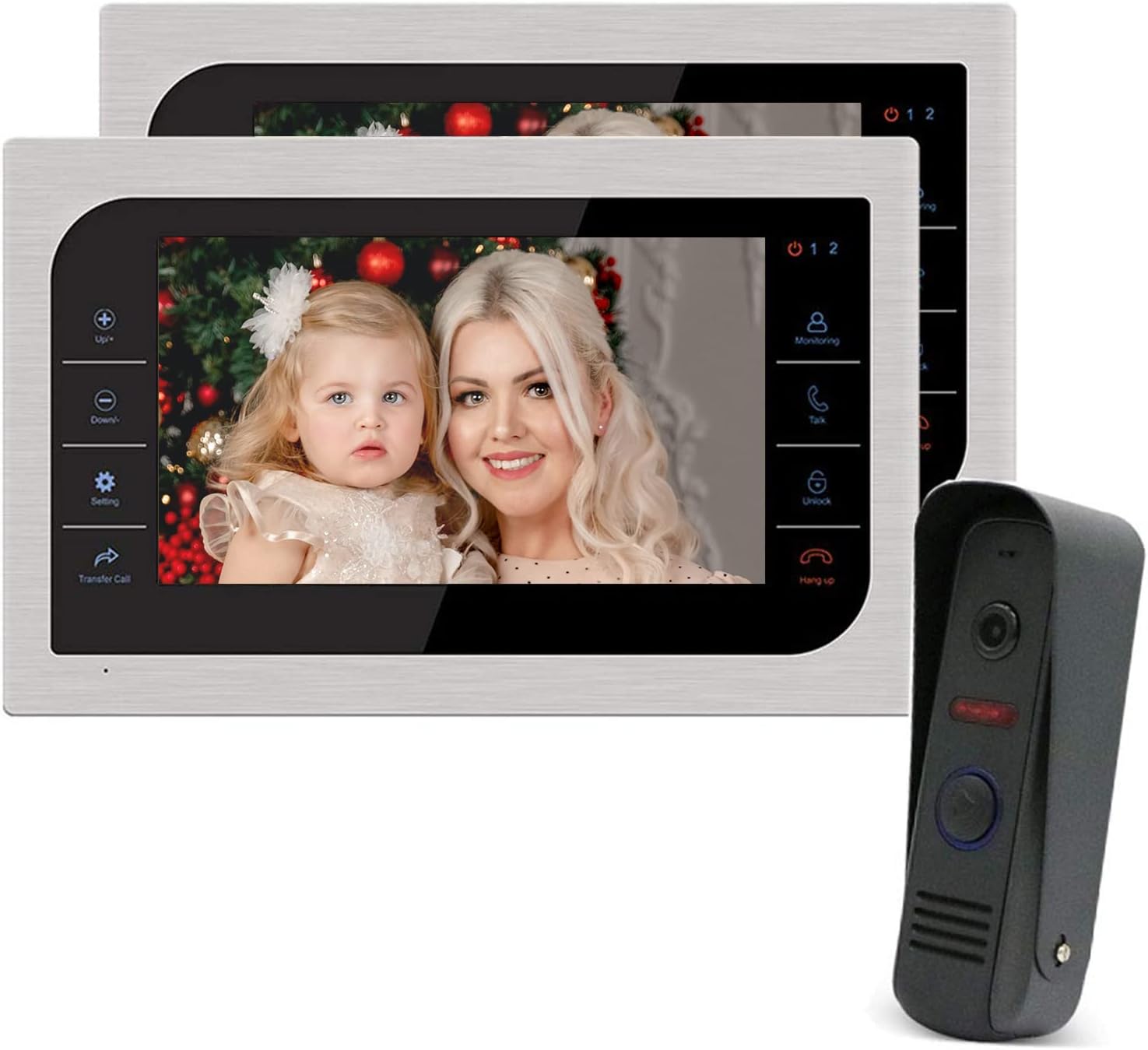
Figure 1.1: JeaTone 10-inch Wired Video Intercom System components.
2. Package Contents
Verify that all items listed below are included in your package. If any items are missing or damaged, please contact customer support.
- Indoor Monitor (x2)
- Outdoor Call Panel (x1)
- Rain Cover (x1)
- Mounting Plate (x1)
- Monitor Mounting Plate (x1)
- Monitor User Manual (x1)
- Call Panel User Manual (x1)
- Power Adapter (x1)
- Monitor Screw Bag (x1)
- Call Panel Screw Bag (x1)
- Guarantee Card (x2)
- 20cm 7Pin Connector (x1)
- 20cm 10Pin Connector (x1)

Figure 2.1: Included components in the product package.
3. Product Overview and Features
The JeaTone Video Intercom System provides a comprehensive solution for secure entry and communication. It features a 10-inch Full HD monitor and an IP65 rainproof outdoor call panel with IR night vision.
Key Features:
- 10-inch TFL LCD Monitor: Large display for clear viewing.
- 1080P FHD/2.0MP Camera: High-definition video capture for the outdoor unit.
- Dual-Way Communication: Allows conversation between indoor monitors and the outdoor panel.
- IR Night Vision: Provides clear visibility in low-light conditions.
- IP65 Rainproof Outdoor Unit: Durable and weather-resistant for outdoor installation.
- Remote Unlock: Ability to unlock an electric lock directly from the indoor monitor.
- Record/Snapshot: Supports recording video or taking snapshots (requires TF card).
- Motion Detection: Automatically records when motion is detected.
- Multi-language OSD Menu: User-friendly interface with multiple language options.
- Expandable System: Supports connection of up to 2 outdoor cameras, 4 indoor monitors, and 2 CCTV cameras.

Figure 3.1: Key features of the JeaTone Video Intercom System.

Figure 3.2: IP65 Rainproof Outdoor Unit.
4. Installation and Wiring
4.1 Safety Precautions
- Ensure power is disconnected before any wiring or installation.
- Consult a qualified electrician if you are unsure about any wiring procedures.
- Install the outdoor unit in a location protected from direct heavy rain and sunlight, if possible, even with its IP65 rating.
4.2 Mounting
Use the provided mounting plates and screws to securely attach the indoor monitor and outdoor call panel to your desired surfaces. Ensure the outdoor unit is mounted at an appropriate height for visitors to easily reach the call button and for the camera to capture faces clearly.
4.3 Wiring Diagram
The system uses a 4-wire connection for the main intercom functionality. Refer to the connection sticker on the back of the indoor monitor for precise wiring details. The outdoor camera is powered by the indoor monitor.

Figure 4.1: 4-Wire Villa Intercom System Wiring Diagram.
Key Connections:
- Indoor Monitor to Outdoor Panel: Connect using the 4-core cable.
- Power Adapter: Connect the power adapter to the indoor monitor.
- Electric Lock: Connect the electric lock to the outdoor panel using the appropriate wires (Normal Open, Common Port, Normal Closed) based on your lock type. An electric lock is not included and must be purchased separately.
- Additional Devices: The system supports additional outdoor panels, indoor monitors, and CCTV cameras. Refer to the wiring diagram for multi-device connections.
5. Operation
5.1 Receiving a Call
- When a visitor presses the call button on the outdoor panel, the indoor monitor will ring and display the visitor's image.
- Press the "Talk" button on the monitor to initiate two-way communication.
5.2 Two-Way Communication
Engage in clear audio communication with your visitor through the indoor monitor. The system supports hands-free operation.
5.3 Monitoring
You can view the outdoor area at any time by pressing the "Monitoring" button on the indoor monitor. This allows you to see who is at your door without a call being initiated.
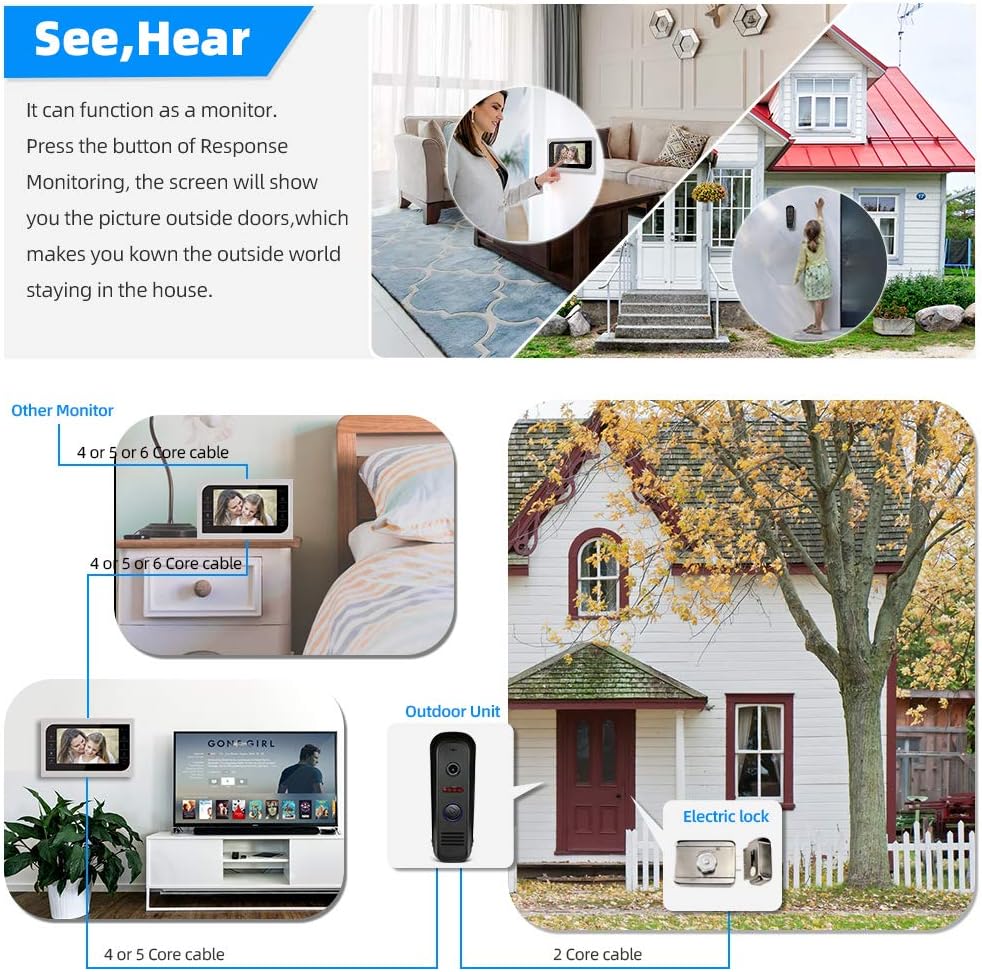
Figure 5.1: Monitoring the outdoor environment from the indoor monitor.
5.4 Remote Unlocking
If an electric lock is connected, you can unlock the door remotely from the indoor monitor by pressing the "Unlock" button. This provides convenient access for authorized visitors.
5.5 Recording and Snapshots
The system can automatically record video or take snapshots when motion is detected or when a call is received. These recordings are stored on a TF card (not included) inserted into the indoor monitor. The built-in memory can store up to 80 pictures.
5.6 IR Night Vision
The outdoor call panel is equipped with infrared LEDs, enabling clear video surveillance even in complete darkness. The system automatically switches between day and night modes.

Figure 5.2: Day and Night Vision capabilities of the outdoor unit.
5.7 Motion Detection
The outdoor unit features motion detection, which can trigger automatic recording or snapshots when movement is detected within its field of view, providing an additional layer of security.
6. Maintenance
- Cleaning: Use a soft, dry cloth to clean the monitor screen and outdoor panel. Avoid abrasive cleaners or solvents.
- Environmental Conditions: While the outdoor unit is IP65 rated, extreme temperatures or prolonged exposure to harsh weather conditions can affect its lifespan.
- Cable Inspection: Periodically check all wiring connections for any signs of wear or damage.
7. Troubleshooting
- No Power: Ensure the power adapter is securely connected to the indoor monitor and the power outlet. Check the power supply.
- No Video/Audio: Verify all wiring connections between the outdoor panel and indoor monitor are correct and secure.
- Doorbell Not Ringing: Check the outdoor call button for damage. Ensure the indoor monitor is powered on and not in 'Do Not Disturb' mode.
- Unable to Unlock: Confirm the electric lock is correctly wired and powered. Check the lock's functionality independently.
- Poor Image Quality: Clean the camera lens on the outdoor unit. Ensure adequate lighting for optimal performance.
8. Specifications

Figure 8.1: Product Dimensions.
| Feature | Detail |
|---|---|
| Brand | JeaTone |
| Model Number | 84107-84202-2 |
| Connectivity Technology | Wired |
| Power Source | DC 12 Volts |
| Video Capture Resolution | 1080P FHD / 2.0MP |
| Installation Type | Professional Hard-Wired |
| Alert Type | Motion |
| Wattage | 5 watts |
| Item Weight | 7.93 pounds |
| Package Dimensions | 18.2 x 9.2 x 4.8 inches |
| Unit Count | 2.0 Count (Monitors) |
| Number Of Pieces | 3 (2 Monitors, 1 Outdoor Unit) |
| Batteries Included? | No |
| Batteries Required? | No |
| UPC | 713902707129 |
| Date First Available | December 16, 2016 |
9. Warranty and Support
JeaTone is committed to providing premium products and good service. For specific warranty information, technical support, or service inquiries, please refer to the warranty card included in your package or contact JeaTone customer service directly. Keep your purchase receipt for warranty claims.
