
1. General Description
The DIXELL XR60CX-4N0C0 is a 110V refrigeration controller designed for precise temperature management in various refrigeration applications. It features a clear 3-digit display and a user-friendly 6-button keyboard for easy operation and configuration.
Key features include:
- Display: 3 digits with decimal point.
- Keyboard: 6 push buttons for intuitive control.
- Probe Inputs: NTC / PTC for Thermostat, Defrost, Display, and Condenser.
- Digital Inputs: Configurable for Alarm, start defrost, door switch, pressure switch.
- Relay Outputs: Compressor (20A), Defrost (8A), Fans (8A), Light/ON/OFF (8A, 16A optional).
- Data Storage: EEPROM memory for reliable data retention.
- Front Protection: IP65 with gasket for enhanced durability.

Figure 1: Front view of the DIXELL XR60CX-4N0C0 Refrigeration Controller, showing the digital display and control buttons. The display shows "-18.5 °C".
2. Installation and Mounting
The controller is housed in a self-extinguishing ABS casing, designed for panel mounting. Ensure proper ventilation around the unit for optimal performance.
2.1. Electrical Connections
Connections are made via screw-terminal blocks, suitable for wires up to 2.5mm² and 6.3mm faston connectors. Refer to the wiring diagram for correct power supply and load connections.
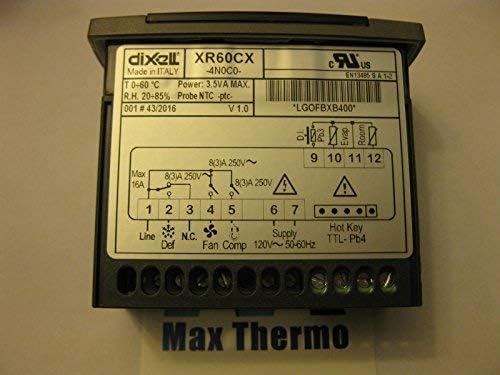
Figure 2: Rear view of the controller showing the electrical connection diagram. This diagram illustrates the terminal block connections for line, defrost, fan, compressor, and supply, along with probe inputs and Hot Key/TTL connections.
2.2. Product Identification
The product label provides essential identification details, including the model number and a unique barcode for tracking and support.

Figure 3: Close-up of the product label, displaying the model number XR60CX-4N0C0 and the barcode X0LGOFBXB400-S00. This label is typically found on the packaging or side of the unit.
3. Operating Instructions
3.1. Front Panel Commands
The controller features a 6-button keyboard for navigating menus and adjusting settings. Common buttons include SET, Up/Down arrows, and Power.
3.2. Main Functions
The XR60CX-4N0C0 manages various refrigeration functions, including temperature control, defrost cycles, and fan operation. It supports NTC/PTC probes for accurate temperature measurement.
3.3. Max & Min Temperature Memorization
The controller can record and display the maximum and minimum temperatures reached, aiding in monitoring system performance.
4. Specifications
| Feature | Detail |
|---|---|
| Brand | Xiltek (Manufacturer: DIXELL Italy) |
| Model | XR60CX-4N0C0 |
| Voltage | 110 Volts |
| Display Type | Red LED (13mm high) with icons |
| Operating Temperature | 0°C to 60°C (32°F to 140°F) |
| Storage Temperature | -30°C to 85°C (22°F to 185°F) |
| Relative Humidity | 20% to 85% (non-condensing) |
| Resolution | 0.1°C or 1°F |
| Front Protection | IP65 with gasket |
| Housing | Self-extinguishing ABS |
| Connection | Screw-terminal block <2.5mm² and 6.3mm faston |
5. Maintenance
Regular maintenance ensures the longevity and optimal performance of your DIXELL XR60CX-4N0C0 controller. Keep the front panel clean using a soft, damp cloth. Avoid abrasive cleaners or solvents. Periodically check electrical connections for tightness and signs of wear.
Ensure that the ventilation openings are not obstructed to prevent overheating. If the unit is exposed to dusty environments, occasional cleaning of internal components by a qualified technician may be necessary.
6. Troubleshooting
This section provides general guidance for common issues. For detailed troubleshooting, refer to the complete product manual or contact technical support.
- Display Not Working: Check power supply connections. Ensure the unit is receiving the correct voltage (110V).
- Incorrect Temperature Reading: Verify that the temperature probes are correctly connected and are not damaged. Check probe type settings in the controller parameters.
- Relay Outputs Not Activating: Check the controller's set points and differential settings. Ensure the loads (compressor, fan, defrost) are correctly wired and functional.
- Alarm Indication: Identify the specific alarm code displayed. Refer to the full manual for a list of alarm codes and their corresponding solutions. Common alarms relate to probe errors, high/low temperature limits, or door open conditions.
7. Warranty and Support
For warranty information, please refer to the documentation provided with your purchase or contact the seller directly. Xiltek, as the brand, and DIXELL Italy, as the manufacturer, stand behind the quality of this product.
For technical assistance, spare parts, or further inquiries, please contact your authorized distributor or the manufacturer's support channels. When contacting support, please have your model number (XR60CX-4N0C0) and the barcode/serial number (e.g., X0LGOFBXB400-S00) ready for quicker service.