
1. Introduction
Welcome to the instruction manual for Mario Kart 8 Deluxe on Nintendo Switch. This document provides essential information for setting up, operating, and understanding the various features of the game. Mario Kart 8 Deluxe offers an enhanced racing experience with a wide roster of characters, karts, and tracks, including all content from the original Wii U version and new additions.

Image: The official game cover for Mario Kart 8 Deluxe.
2. Setup
2.1. Installing the Game
To begin playing Mario Kart 8 Deluxe, ensure your Nintendo Switch console is powered on and updated to the latest system software.
- For Physical Game Card: Insert the Mario Kart 8 Deluxe game card into the game card slot on your Nintendo Switch console. The game icon will appear on the HOME Menu. Select the icon to start the game.
- For Digital Download: If you purchased the digital version, ensure it is downloaded and installed from the Nintendo eShop. Once installed, the game icon will appear on the HOME Menu. Select the icon to start the game.
2.2. Controller Setup
Mario Kart 8 Deluxe supports various controller configurations. Ensure your Joy-Con controllers or Nintendo Switch Pro Controller are paired with your console.
- Joy-Con Controllers: Attach Joy-Con controllers to the console or use them wirelessly. For multiplayer, each player can use a single Joy-Con controller held horizontally.
- Nintendo Switch Pro Controller: Pair the Pro Controller wirelessly via the HOME Menu's 'Controllers' section.
3. Operating the Game
3.1. Main Menu Navigation
Upon launching the game, you will be presented with the main menu. Use the left stick or directional buttons to navigate and the A button to confirm selections.
3.2. Game Modes
Mario Kart 8 Deluxe features several game modes:
- Grand Prix: Compete in cups consisting of four races against computer-controlled opponents. Earn points based on your finishing position to win trophies.
- Versus Race: Customize your own races, choosing tracks, rules, and items. Play against friends locally or online.
- Battle Mode: Engage in various battle types, such as Balloon Battle and Renegade Roundup, where the objective is to attack opponents or achieve specific goals.
- Online Play: Race against players worldwide or with friends over the internet.
- Time Trials: Race against the clock to set the fastest lap times on any track.
3.3. Basic Controls
Familiarize yourself with the fundamental controls for racing:
- Accelerate: A button or Right Stick Up
- Brake/Reverse: B button or Left Stick Down
- Steer: Left Stick or Motion Controls (optional)
- Use Item: L button or ZL button
- Drift: R button or ZR button (hold while turning for a mini-turbo boost)
- Look Behind: X button
3.4. Character and Kart Customization
Before each race, you can select your character, kart body, tires, and glider. Different combinations affect your kart's speed, acceleration, weight, handling, and traction. Experiment to find your preferred setup.

Image: Bowser Jr. and Mario engaged in a race.
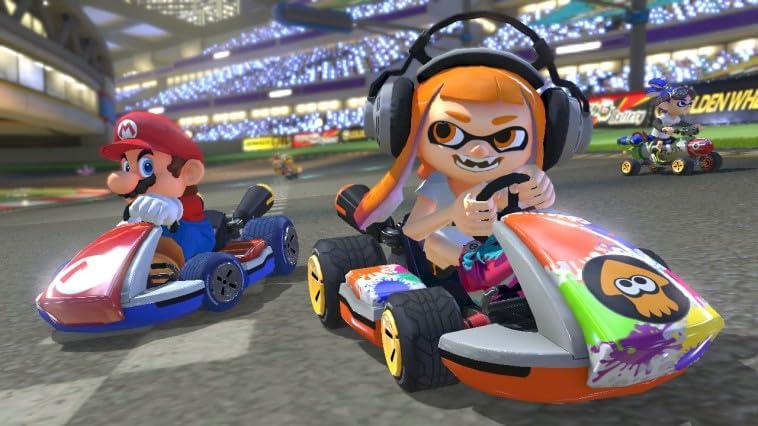
Image: Inkling Girl and Mario racing, showcasing character diversity.
3.5. Items and Power-ups
Collect item boxes during races to receive power-ups that can help you gain an advantage or hinder opponents. Common items include:
- Green Shell: Fires straight ahead.
- Red Shell: Homing missile that targets the racer in front.
- Banana Peel: Can be dropped behind or thrown forward to make opponents spin out.
- Mushroom: Provides a temporary speed boost.
- Star: Grants temporary invincibility and speed.
- Bullet Bill: Transforms you into a Bullet Bill, automatically driving you forward at high speed.
- Crazy Eight: Gives you eight different items to use sequentially.

Image: An Inkling using a special ability, demonstrating item usage.
4. Gameplay Features
4.1. Anti-Gravity
Certain sections of tracks feature anti-gravity zones, allowing karts to drive on walls and ceilings. During anti-gravity, bumping into other racers or specific track elements provides a speed boost.
4.2. Smart Steering and Auto-Accelerate
Mario Kart 8 Deluxe includes optional assist features to help new or less experienced players:
- Smart Steering: Prevents your kart from falling off the track. This can be toggled on/off before a race.
- Auto-Accelerate: Automatically accelerates your kart, allowing you to focus solely on steering and item usage. This can also be toggled on/off.
4.3. Battle Mode Enhancements
The Battle Mode in Mario Kart 8 Deluxe features dedicated battle arenas and new game types, providing a more robust competitive experience.

Image: Bowser and Link competing in Battle Mode.
4.4. Booster Course Pass
The Booster Course Pass, available separately, adds additional cups and tracks to the game, expanding the racing content significantly. Ensure your game is updated to access this content if purchased.
5. Maintenance
Proper care ensures optimal performance and longevity of your game and console.
- Game Card Care (if applicable): Keep the game card clean and free from dust or debris. Store it in its case when not in use. Avoid touching the metal connectors.
- Console Software Updates: Regularly check for and install system software updates for your Nintendo Switch console. These updates often include performance improvements and bug fixes that can affect game stability.
- Game Software Updates: Ensure Mario Kart 8 Deluxe is updated to its latest version. Game updates often add new features, fix bugs, and improve overall gameplay.
- Saving Game Data: The game automatically saves your progress. Ensure you do not power off the console during a save operation to prevent data corruption.
6. Troubleshooting
If you encounter issues while playing Mario Kart 8 Deluxe, consider the following steps:
- Game Not Starting:
- Ensure the game card is inserted correctly or the digital game is fully installed.
- Restart your Nintendo Switch console.
- Check for any pending system or game software updates.
- Controller Issues:
- Verify that your controllers are properly paired and charged.
- Recalibrate the control sticks and motion controls via the console's System Settings.
- Online Connectivity Problems:
- Check your internet connection and router.
- Ensure your Nintendo Switch Online membership is active.
- Restart your console and router.
- Error Messages: Note down any error codes or messages that appear and refer to the official Nintendo Support website for specific solutions.
7. Specifications
| Feature | Detail |
|---|---|
| Platform | Nintendo Switch |
| Game Title | Mario Kart 8 Deluxe |
| Model Number | 2520347 |
| ASIN | B01N223WHL |
| Release Date | 28 April 2017 |
| Age Rating | 3 years and up |
| Game Language Options | Multiple, including French |
| Product Dimensions (Packaging) | 17 x 10.5 x 11 cm; 1 grams |
8. Warranty and Support
For detailed warranty information, product support, or technical assistance, please refer to the official Nintendo website or contact Nintendo customer support directly.
- Official Nintendo Support: Visit Nintendo Support for FAQs, troubleshooting guides, and contact information.
- Product Registration: Register your game or console on the Nintendo website to receive updates and support.
Always ensure you are consulting official Nintendo resources for the most accurate and up-to-date information regarding your product.