
1. Introduction
This manual provides comprehensive instructions for the installation, operation, and maintenance of your Fermax 3412 Loft Duox Color Monitor. Please read this manual carefully before attempting to install or operate the device to ensure proper function and safety. The Fermax 3412 is designed for use within a Duox digital two-wire video intercom system, offering clear audio and color video communication.
2. Safety Information
- Electrical Safety: Installation must be performed by qualified personnel in accordance with local electrical codes. Disconnect power before performing any wiring or maintenance.
- Environment: Do not expose the monitor to extreme temperatures, humidity, or direct sunlight. Avoid installing in areas with excessive dust or corrosive substances.
- Cleaning: Use a soft, dry cloth for cleaning. Do not use abrasive cleaners or solvents.
- Modifications: Do not attempt to modify or repair the unit yourself. Refer all servicing to authorized Fermax service centers.
3. Package Contents
Please check the package for the following items:
- Fermax 3412 Loft Duox Color Monitor
- Mounting bracket
- Screws and wall plugs
- Instruction Manual (this document)
If any items are missing or damaged, please contact your supplier immediately.
4. Installation and Setup
The Fermax 3412 monitor is designed for surface mounting. Ensure the installation location is suitable and provides easy access for wiring.
4.1. Mounting the Monitor
- Choose a suitable wall location, typically at eye level, free from obstructions.
- Use the mounting bracket as a template to mark the drilling points on the wall.
- Drill holes and insert the wall plugs.
- Secure the mounting bracket to the wall using the provided screws.
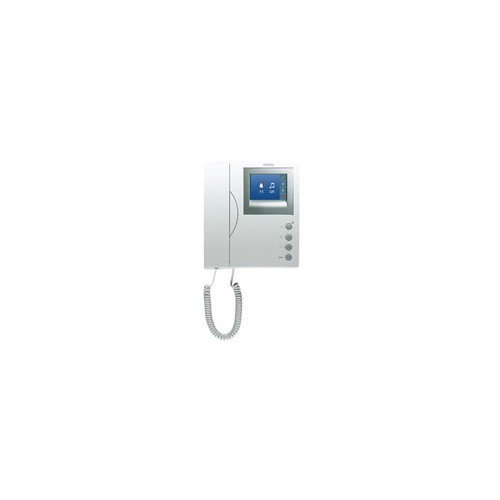
Figure 1: Fermax 3412 Loft Duox Color Monitor. This image shows the front view of the monitor, highlighting its sleek design and color display.
4.2. Wiring Connections
The Fermax 3412 monitor connects to the Duox system using a two-wire non-polarized connection. Refer to the system's main installation diagram for specific wiring details. Ensure all connections are secure and correctly terminated.
- Connect the two Duox bus wires to the designated terminals on the monitor. Polarity is not critical for Duox systems.
- If additional functions (e.g., auxiliary buttons) are used, connect their respective wires as per the system's wiring diagram.
Note: A detailed wiring diagram specific to your Duox installation should be consulted. This manual provides general guidance.
4.3. Initial Power-Up
Once all wiring is complete and secure, restore power to the Duox system. The monitor should power on and display a standby screen or system status. Follow the system's programming instructions to register the monitor if required.
5. Operating Instructions
The Fermax 3412 monitor provides intuitive controls for managing your intercom system.
5.1. Answering a Call
When a visitor calls from the outdoor panel, the monitor will ring and display the visitor's image. Press the Answer button (typically marked with a telephone icon) to establish communication.
5.2. Opening the Door
During a call, or when the monitor is active, press the Door Release button (typically marked with a key icon) to unlock the main entrance.
5.3. Communication
Speak clearly into the monitor's microphone. The built-in speaker will transmit the visitor's voice. Communication is typically hands-free.
5.4. Adjusting Settings
The monitor features controls for adjusting various settings:
- Volume: Use the Volume Up/Down buttons to adjust the ringtone and communication volume.
- Brightness/Color: Access the monitor's menu (if available, consult system documentation) to adjust screen brightness and color saturation for optimal viewing.
6. Maintenance
Regular maintenance ensures the longevity and optimal performance of your Fermax 3412 monitor.
- Cleaning: Gently wipe the screen and casing with a soft, dry, lint-free cloth. Do not use liquid cleaners, sprays, or abrasive materials, as these can damage the surface or internal components.
- Inspection: Periodically check the monitor and its connections for any signs of damage or loose wiring. If any issues are found, contact a qualified technician.
- Environmental Conditions: Ensure the monitor remains within its specified operating temperature and humidity ranges to prevent malfunction.
7. Troubleshooting
If you encounter issues with your Fermax 3412 monitor, refer to the following common problems and solutions:
| Problem | Possible Cause | Solution |
|---|---|---|
| No image on screen | No power; loose wiring; outdoor panel issue. | Check power supply; verify Duox bus connections; ensure outdoor panel is functioning. |
| No sound during call | Volume too low; faulty wiring; microphone/speaker issue. | Adjust volume settings; check wiring connections; contact support if issue persists. |
| Door not opening | Faulty wiring to door opener; door opener malfunction; system programming error. | Verify door release wiring; test door opener independently; consult system installer. |
| Monitor not responding | System power cycle needed; internal fault. | Disconnect and reconnect power to the entire Duox system; if problem persists, contact technical support. |
If the problem persists after attempting these solutions, please contact Fermax technical support or your installer.
8. Specifications
- Model: Fermax 3412 Loft Duox Color Monitor
- System: Duox (2-wire non-polarized)
- Dimensions (Package): 27.2 x 24.2 x 6.9 cm
- Weight (Product): 950 g
- Power Supply: Provided by Duox bus (specific voltage details available in system documentation)
- Screen: Color display
- Operating Temperature: Consult Fermax technical documentation for specific range.
9. Warranty and Support
The Fermax 3412 Loft Duox Color Monitor comes with a standard manufacturer's warranty. Please refer to the warranty card included with your product or visit the official Fermax website for detailed warranty terms and conditions.
For technical support, troubleshooting assistance, or service inquiries, please contact your local Fermax distributor or visit the Fermax official website:
- Website: www.fermax.com
- Customer Service: Refer to the contact section on the Fermax website for regional support numbers.