
1. Introduction
The BLANCO Flexon II is a high-quality waste separation system designed for integration into kitchen under-cabinets with existing pull-out drawers. This system offers a practical and hygienic solution for waste management, featuring durable materials and a thoughtful design for ease of use and cleaning. This manual provides essential information for the proper installation, operation, and maintenance of your Flexon II 60/2 system.

Image 1.1: The BLANCO Flexon II 60/2 waste separation system, featuring two bins and a top cover.
2. Package Contents
Upon unpacking, please verify that all components are present:
- Complete BLANCO Flexon II system frame
- 1 x 30-liter waste bin (black plastic)
- 1 x 19-liter waste bin (black plastic)
- Sturdy cover/shelf (powder-coated metal)
- Mounting hardware
3. Specifications
| Feature | Detail |
|---|---|
| Model Number | 521471 |
| Product Dimensions (L x W x H) | 57 x 41.2 x 41.2 cm |
| Weight | 6.05 kg |
| Bin Capacities | 1 x 30 Liter, 1 x 19 Liter |
| Minimum Cabinet Width | 60 cm |
| Minimum Installation Depth | 400 mm |
| Material | Anodized Aluminum (frame), Plastic (bins), Powder-coated Metal (cover) |
| Opening Mechanism | Pull-out (for existing drawers) |

Image 3.1: Visual representation of the 30-liter and 19-liter bin capacities.

Image 3.2: Indication of the minimum cabinet width requirement, which is 600mm.
4. Setup and Installation
The BLANCO Flexon II system is designed for quick and easy installation into existing kitchen pull-out drawers. The frame is simply placed into the drawer and then secured.
4.1. Pre-installation Checks
- Ensure your under-cabinet drawer has a minimum width of 60 cm.
- Verify the available installation depth is at least 400 mm.
- Confirm all package contents are present and undamaged.
4.2. Installation Steps
- Open the kitchen under-cabinet drawer where the system will be installed.
- Place the anodized aluminum frame of the Flexon II system into the drawer. Ensure it sits flush and is properly aligned.
- Using the provided mounting hardware, fix the frame securely to the bottom of the drawer. Refer to the detailed diagram for screw placement.
- Insert the 30-liter and 19-liter waste bins into their designated compartments within the frame.
- Place the powder-coated metal cover on top of the bins. This cover also serves as a convenient shelf.

Image 4.1: Detailed installation diagram showing dimensions (562/568mm width, 400mm depth, 355mm height, max 250mm bin height) and placement within a cabinet drawer.
For a visual guide, please refer to the installation video available on the manufacturer's official website.
5. Operating Instructions
The BLANCO Flexon II system is designed for intuitive daily use.
5.1. Waste Separation
- Utilize the two distinct bins (30L and 19L) for efficient waste separation according to your local recycling guidelines (e.g., organic waste, plastics, general waste).
- The bins feature a smart funnel rim that helps prevent waste from sticking to the edges and ensures a clean transfer into the bin.
- Each bin is equipped with an integrated handle, allowing for easy securing of waste bags and convenient removal of the bins for emptying.
5.2. Using the Cover/Shelf
The sturdy powder-coated metal cover serves a dual purpose:
- It acts as a lid for the waste bins, helping to contain odors.
- It provides an additional storage surface within your drawer, ideal for items such as a dustpan, cleaning supplies, or other kitchen accessories.

Image 5.1: The Flexon II system integrated into a kitchen drawer, demonstrating its capacity for organized waste and storage.
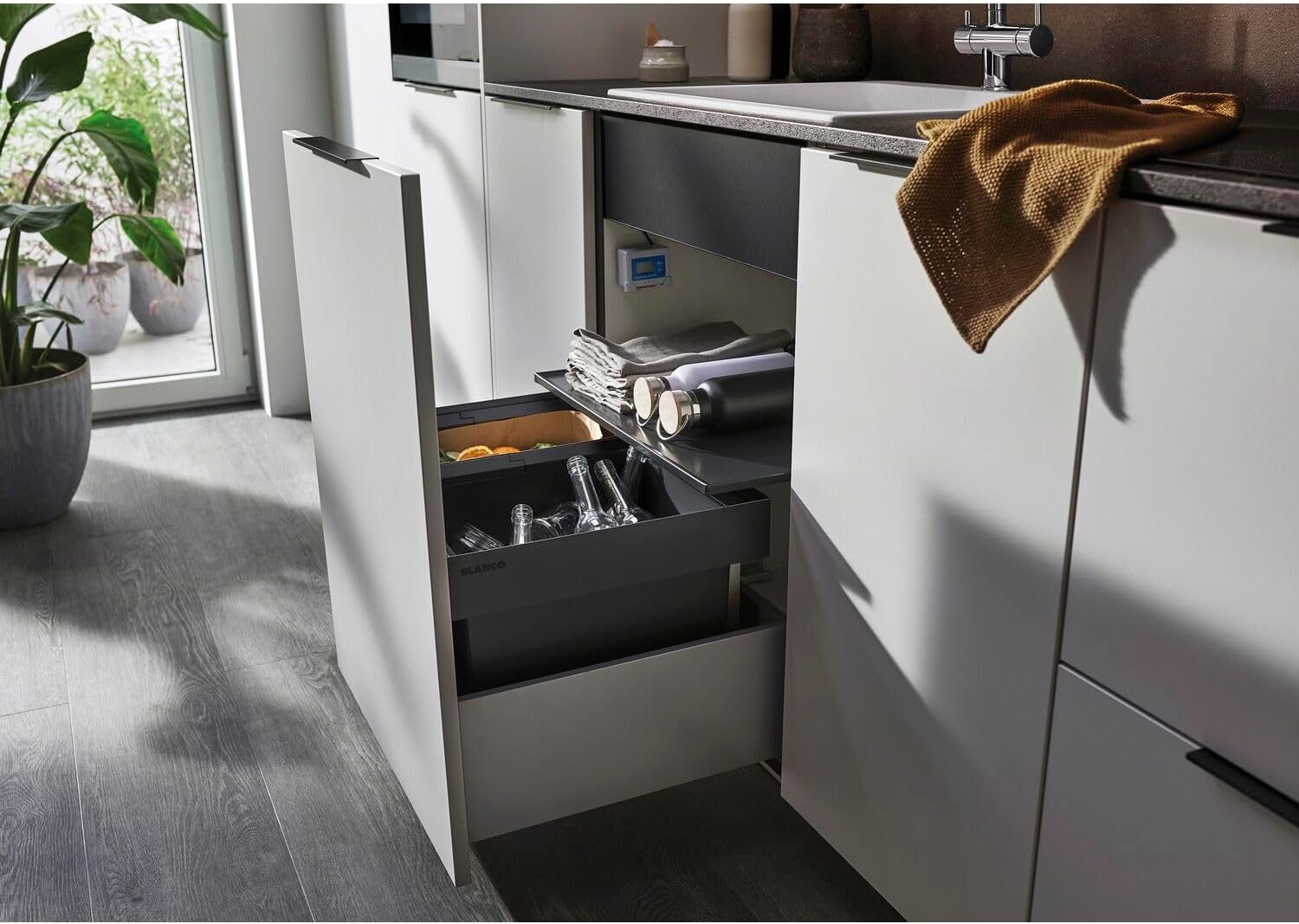
Image 5.2: The system's top cover being used as a practical shelf for storing kitchen items.

Image 5.3: An overhead view of the Flexon II bins, illustrating their use for separating different waste types.
6. Maintenance and Cleaning
The BLANCO Flexon II system is designed with maintenance-friendly materials for easy cleaning and optimal hygiene.
6.1. Daily Cleaning
- Wipe down the exterior surfaces of the frame and bins with a damp cloth and mild detergent as needed.
- Empty waste bins regularly to prevent odor buildup.
6.2. Deep Cleaning
- Remove the waste bins from the frame.
- Wash the plastic bins with warm soapy water. A soft brush can be used for stubborn residues. Rinse thoroughly and allow to air dry completely before reinserting.
- Clean the metal cover and aluminum frame with a damp cloth and a non-abrasive cleaner. Avoid harsh chemicals or abrasive sponges that could damage the finish.
- Ensure all components are dry before reassembling to prevent moisture accumulation.
The system's design with smooth edges and free-hanging bins facilitates thorough cleaning.
7. Troubleshooting
This section addresses common issues you might encounter with your BLANCO Flexon II system.
7.1. Bins Not Sliding Smoothly
- Check for Obstructions: Ensure no debris or waste is caught beneath or around the bins or the drawer runners.
- Verify Installation: Confirm the frame is securely and levelly installed in the drawer. Loose screws or an uneven installation can affect movement.
7.2. Odor Issues
- Regular Emptying: Empty waste bins frequently, especially for organic waste.
- Thorough Cleaning: Perform deep cleaning of the bins and frame as described in the Maintenance section.
- Use Waste Bags: Always use appropriate waste bags and ensure they are properly sealed when full.
- Cover Placement: Ensure the metal cover is correctly placed over the bins to help contain odors.
7.3. Damage to Components
- If any part of the system is damaged, contact BLANCO customer support or your retailer for replacement parts or assistance. Do not attempt to force damaged components.
8. Warranty and Support
For information regarding the product warranty, please refer to the documentation included with your purchase or visit the official BLANCO website. For technical support, spare parts, or any other inquiries, please contact BLANCO customer service directly or consult your retailer.
Manufacturer: Blanco
Model Number: 521471


