
Introduction
This manual provides essential instructions for the setup, operation, and maintenance of your RM-Series RMC12248 Replacement TV Remote Control. Please read this guide thoroughly before using the device to ensure optimal performance and longevity.
The RM-Series RMC12248 is designed as a direct replacement for your original RMC12248 remote control, offering full functionality without the need for complex programming.
Product Overview
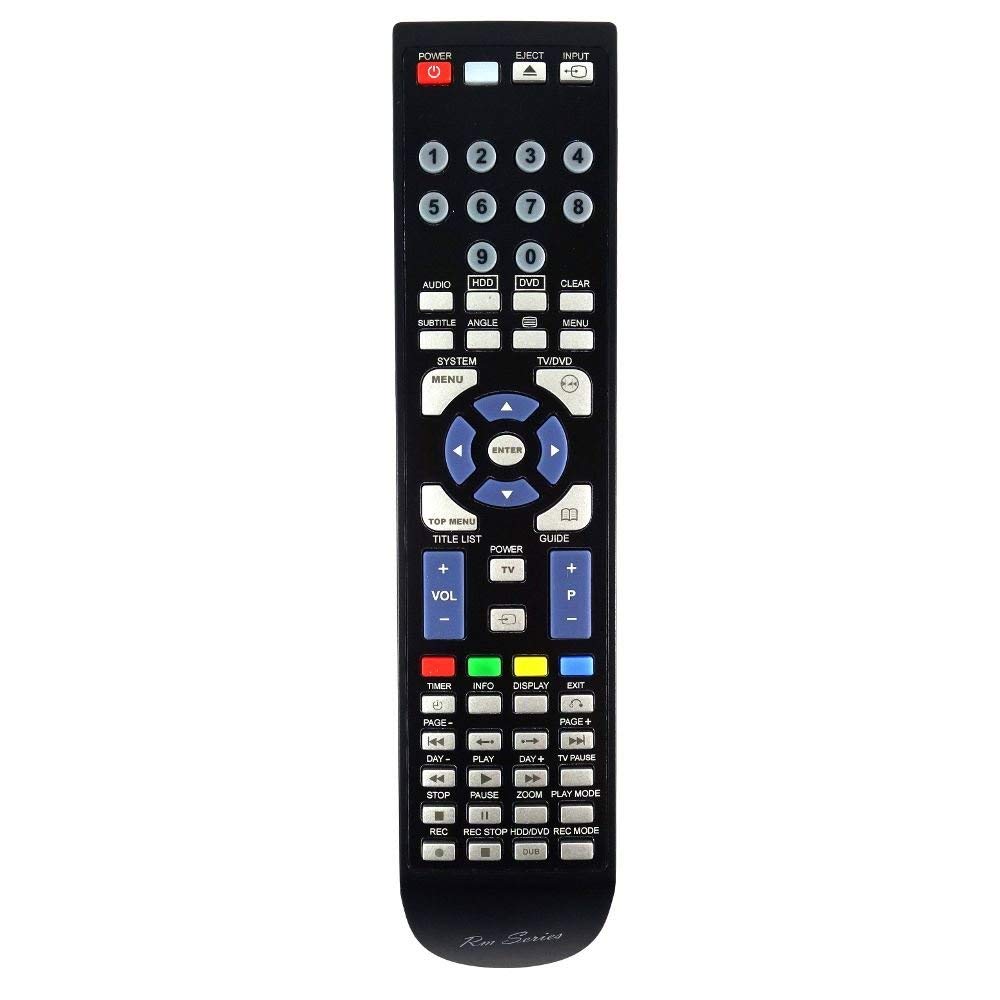
Image: The RM-Series RMC12248 replacement TV remote control, showing its ergonomic design and button layout. This remote is designed to replicate the functionality of the original RMC12248 model.
Setup
1. Battery Installation
The RM-Series RMC12248 remote control requires two AAA batteries (not included) for operation. Follow these steps to install them:
- Locate the battery compartment on the back of the remote control.
- Slide the battery cover downwards or press the latch and lift to open.
- Insert two AAA batteries, ensuring the positive (+) and negative (-) terminals align correctly with the markings inside the compartment.
- Replace the battery cover by sliding it back into place until it clicks securely.
2. Initial Use
This replacement remote control is pre-programmed and requires no additional setup or coding. Once batteries are installed, it is ready for immediate use with compatible televisions that originally used the RMC12248 remote.
Important: Ensure your original remote control was an RMC12248 for guaranteed compatibility.
Operating Instructions
The RM-Series RMC12248 remote control features a standard layout for television functions. Point the remote directly at your television's infrared receiver for best performance.
- Power Button: Turns the television on or off.
- Channel Buttons (CH+/CH-): Changes the television channel up or down.
- Volume Buttons (VOL+/VOL-): Increases or decreases the television volume.
- Mute Button: Silences the television audio.
- Number Buttons (0-9): Directly selects television channels.
- Menu Button: Accesses the television's main menu.
- Navigation Buttons (Arrow Keys): Navigates through menus and options.
- OK/Enter Button: Confirms selections in menus.
- Source/Input Button: Changes the video input source (e.g., HDMI1, AV).
- Other Function Buttons: Depending on your television model, other buttons may control specific features like Smart TV functions, EPG (Electronic Program Guide), or media playback.
For detailed information on specific button functions, refer to your television's original user manual.
Maintenance
Battery Replacement
Replace batteries when the remote control's response becomes sluggish or stops working. Always replace both batteries at the same time with new AAA batteries. Do not mix old and new batteries, or different types of batteries.
Cleaning
To clean the remote control, gently wipe its surface with a soft, dry cloth. For stubborn dirt, slightly dampen the cloth with water. Avoid using harsh chemicals, abrasive cleaners, or excessive moisture, as these can damage the remote's electronics or finish.
Storage
If the remote control will not be used for an extended period, remove the batteries to prevent leakage, which can cause damage to the device.
Troubleshooting
| Problem | Possible Cause | Solution |
|---|---|---|
| Remote control is not working. |
|
|
| Buttons are unresponsive or sticky. |
|
|
| Short operating range. |
|
|
Specifications
- Model: RMC12248
- Brand: RM-Series
- Compatibility: Designed for televisions originally using RMC12248 remote controls
- Connectivity Technology: Infrared (IR)
- Special Features: Ergonomic design
- Number of Buttons: Approximately 50
- Maximum Operating Range: Up to 10 meters (33 feet)
- Power Source: 2 x AAA Batteries (not included)
Support and Warranty
For further assistance or if you encounter issues not covered in this manual, please contact your retailer or the RM-Series customer support. Please have your product model number (RMC12248) available when contacting support.
Information regarding warranty coverage is typically provided at the point of purchase or can be found on the manufacturer's official website. Please retain your proof of purchase for warranty claims.

