
YORK P031-01972-000
Contents
YORK Furnace Control Circuit Board Instruction Manual
Model: P031-01972-000
Introduction
This manual provides essential information for the safe and effective installation, operation, and maintenance of your new YORK Furnace Control Circuit Board, model P031-01972-000. This board is a replacement component designed to manage the various functions of a compatible furnace system. Please read this manual thoroughly before attempting any installation or service.
Safety Information
WARNING: Improper installation, adjustment, alteration, service, or maintenance can cause property damage, injury, or death. Read these instructions thoroughly before installing or servicing this equipment.
- Always disconnect all electrical power to the furnace unit before installing or servicing the control board. Failure to do so can result in electrical shock, personal injury, or death.
- Installation and servicing should be performed by a qualified HVAC technician.
- Ensure all wiring connections are secure and comply with local and national electrical codes.
- Do not bypass any safety devices.
- Handle the circuit board by its edges to avoid damaging components due to static electricity.
Setup and Installation
This section outlines the general steps for replacing an existing furnace control board. Specific wiring diagrams for your furnace model should be consulted in conjunction with these instructions.
- Power Disconnection: Turn off all power to the furnace at the main electrical panel. Verify power is off using a voltage meter.
- Access Panel Removal: Remove the furnace access panel to expose the existing control board.
- Document Wiring: Before disconnecting any wires, take clear photographs of all connections on the old board. Label each wire and its corresponding terminal for accurate re-connection.
- Disconnect Wires: Carefully disconnect all wires and harnesses from the old control board. Note the location of the fuse and remove it.
- Remove Old Board: Unscrew or unclip the old control board from its mounting points.
- Install New Board: Position the new YORK P031-01972-000 control board in the furnace. Secure it using the existing mounting points. In some cases, minor adjustments to mounting holes may be necessary due to slight variations in board layout.
- Connect Wiring: Refer to your documented photographs and labels to re-connect all wires and harnesses to the new board. Ensure all connections are firm and correctly seated. Pay close attention to the multi-plug wiring harnesses, ensuring they are oriented correctly (squared on one side, rounded on the other).
- Install Fuse: Insert the appropriate fuse into the designated fuse holder on the new board.
- Verify Connections: Double-check all wiring connections against your documentation and the furnace's wiring diagram.
- Replace Access Panel: Securely re-install the furnace access panel.
- Restore Power: Turn on the power to the furnace at the main electrical panel.
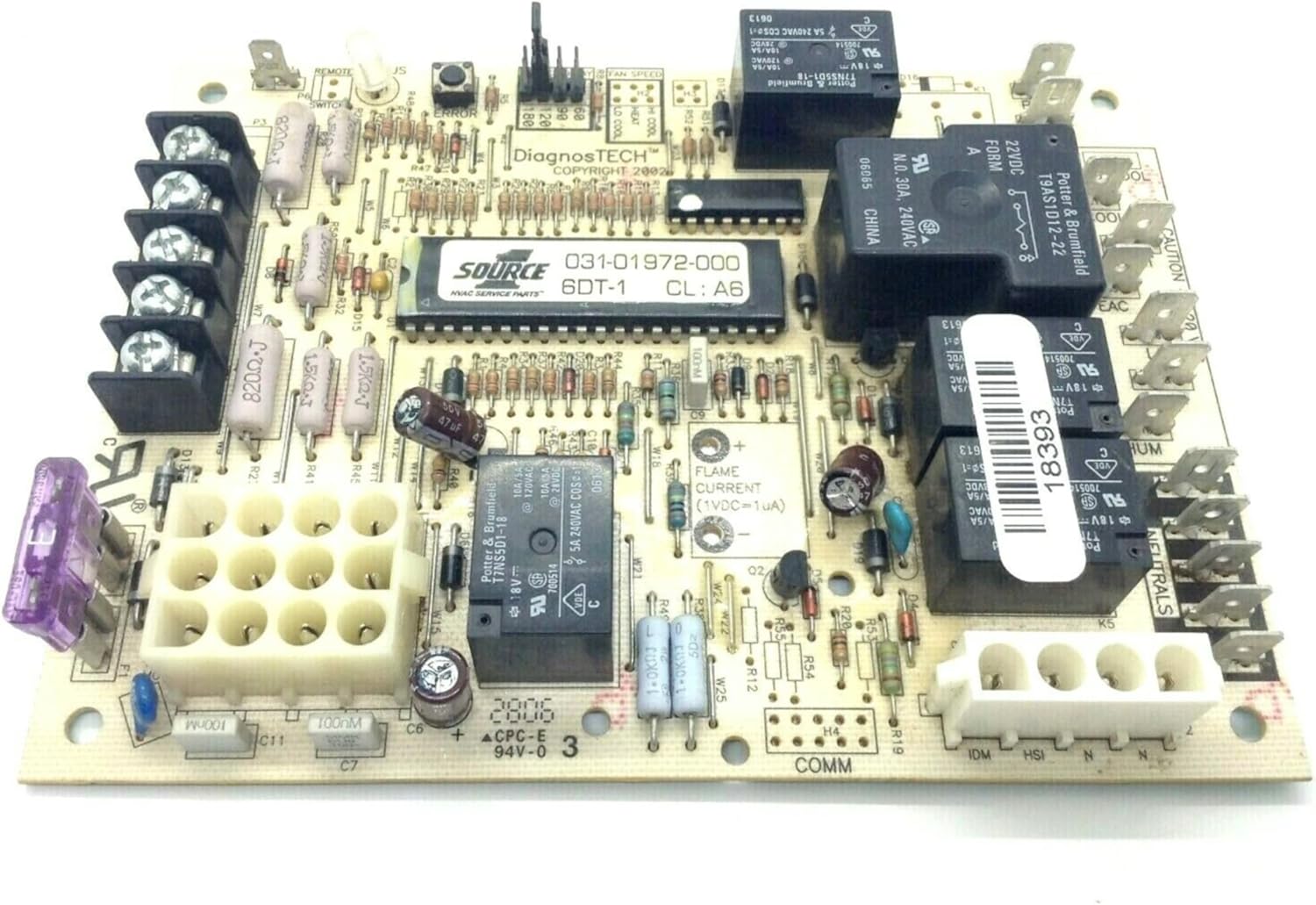
Figure 1: Overview of the YORK Furnace Control Circuit Board (Model P031-01972-000). This image shows the various terminals, relays, and components, including the main chip labeled "SOURCE 031-01972-000" and a barcode sticker with "18393". Note the screw terminals for wiring connections on the left and right, and the multi-pin connectors at the bottom.
Operating Instructions
Once the control board is correctly installed and power is restored, the furnace system should initiate its normal startup sequence. The control board manages the ignition, flame sensing, blower operation, and safety shutdowns.
- Set your thermostat to the desired heating or cooling mode and temperature.
- The control board will receive the call for heat or cool and begin the appropriate sequence of operations.
- Observe the furnace's operation to ensure it cycles on and off correctly and maintains the set temperature.
- Refer to your furnace's specific user manual for detailed operational sequences and thermostat settings.
Maintenance
The YORK Furnace Control Circuit Board is designed for long-term reliability and typically requires minimal direct maintenance. However, regular maintenance of the overall furnace system is crucial for the longevity of all components, including the control board.
- Annual Inspection: Have a qualified HVAC technician perform an annual inspection and tune-up of your furnace. This includes checking electrical connections, cleaning components, and verifying proper operation.
- Air Filter Replacement: Regularly replace or clean your furnace's air filter as recommended by the furnace manufacturer. A dirty filter can restrict airflow, causing the furnace to overwork and potentially stress electrical components.
- Keep Area Clear: Ensure the area around the furnace is clear of obstructions and combustible materials to allow for proper ventilation and prevent overheating.
Troubleshooting
If your furnace is not operating correctly after installing the new control board, consider the following common issues. Always disconnect power before inspecting any internal components.
| Problem | Possible Cause | Solution |
|---|---|---|
| Furnace does not start or no power. |
|
|
| Furnace cycles on and off rapidly (short cycling). |
|
|
| Blower motor not operating. |
|
|
If troubleshooting steps do not resolve the issue, or if you are unsure about any procedure, contact a qualified HVAC professional for assistance.
Specifications
| Feature | Detail |
|---|---|
| Brand | YORK |
| Model Number | P031-01972-000 |
| Part Number | 8039966 |
| Item Weight | 14.1 ounces (approx. 400 grams) |
| Product Dimensions | 8 x 6 x 10 inches (approx. 20.3 x 15.2 x 25.4 cm) |
| Material | Copper (components) |
| Indoor/Outdoor Usage | Indoor |
| Control Method | App (likely refers to system integration, not direct board control) |
Warranty Information
This YORK Furnace Control Circuit Board is covered by a manufacturer's warranty against defects in materials and workmanship. The specific terms and duration of the warranty may vary. Please retain your proof of purchase for warranty claims. For detailed warranty information, refer to the documentation provided with your purchase or contact the seller.
Support
For technical assistance, troubleshooting beyond the scope of this manual, or to inquire about replacement parts, please contact your authorized YORK service provider or the retailer from whom you purchased this product. When contacting support, please have your product model number (P031-01972-000) and proof of purchase readily available.
Documents and downloads
Ask a question about this manual
Ask about setup, troubleshooting, compatibility, parts, safety, or missing instructions. Manuals+ will review the question and use this page’s manual context to help answer it.