
1. Introduction
The Fujifilm GFX 50S is a medium format mirrorless digital camera featuring a 43.8mm x 32.9mm (G Format) 51.4MP CMOS sensor. This camera is designed to deliver exceptional image quality, leveraging over 80 years of Fujifilm's image design technology. Its compact and lightweight magnesium alloy body ensures high rigidity and excellent operability. The GFX 50S is ideal for photographers requiring superior image quality, particularly in commercial and studio portrait photography, while maintaining the renowned color reproduction of the X series.
2. What's in the Box
Upon unboxing your Fujifilm GFX 50S, please ensure all the following items are present:
- Camera Body
- Viewfinder
- Battery
- Charger
- Strap
- Manual
- U.S.A. Warranty
3. Setup
3.1. Attaching the Viewfinder
The Fujifilm GFX 50S features a detachable 3.69M-dot organic EL electronic viewfinder. To attach, align the viewfinder with the hot shoe mount on the camera body and slide it securely into place until it clicks. To detach, press the release button (if present) and slide the viewfinder off.
3.2. Battery Installation
Insert the provided battery into the battery compartment located at the bottom of the camera. Ensure it clicks into place. Charge the battery fully using the supplied charger before first use.
3.3. Memory Card Insertion
The camera supports SD flash memory cards. Open the memory card slot cover, typically on the side of the camera. Insert the SD card with the label facing the correct direction (usually towards the front of the camera) until it clicks into place. Close the cover securely.
3.4. Initial Power On and Settings
Turn the camera on using the power switch. Follow the on-screen prompts to set the date, time, and language. These initial settings are crucial for proper file management and camera operation.
4. Operating the Camera
4.1. Controls Overview
The GFX 50S features intuitive controls for quick adjustments:
- ISO Dial: Located on the top plate, allows direct adjustment of ISO sensitivity (ISO 100-12800, extendable to 102400).
- Shutter Speed Dial: Also on the top plate, controls shutter speed (Max 1/4000s, Min 1/4000s).
- Aperture Ring: On compatible GF lenses, allows direct control of aperture.
- Touchscreen LCD: The 3.2-inch, 2.36M-dot tilting touchscreen LCD provides intuitive menu navigation and image review.

4.2. Shooting Modes
Select your desired shooting mode based on your photographic needs:
- Program AE: Camera sets both aperture and shutter speed.
- Aperture Priority AE: You set the aperture, camera sets shutter speed.
- Shutter Speed Priority AE: You set the shutter speed, camera sets aperture.
- Manual Exposure: You set both aperture and shutter speed.
4.3. Focusing
The GFX 50S utilizes a Hybrid Auto Focus system with Contrast Detection, offering 117 autofocus points. The primary focus mode is Single-Servo AF (AF-S) for precise focusing on static subjects.
4.4. Image and Video Capture
The camera supports JPEG and RAW image formats, with JPEG quality levels including Basic, Fine, and Normal. For video, it records in MP4 format at FHD 1080p resolution.
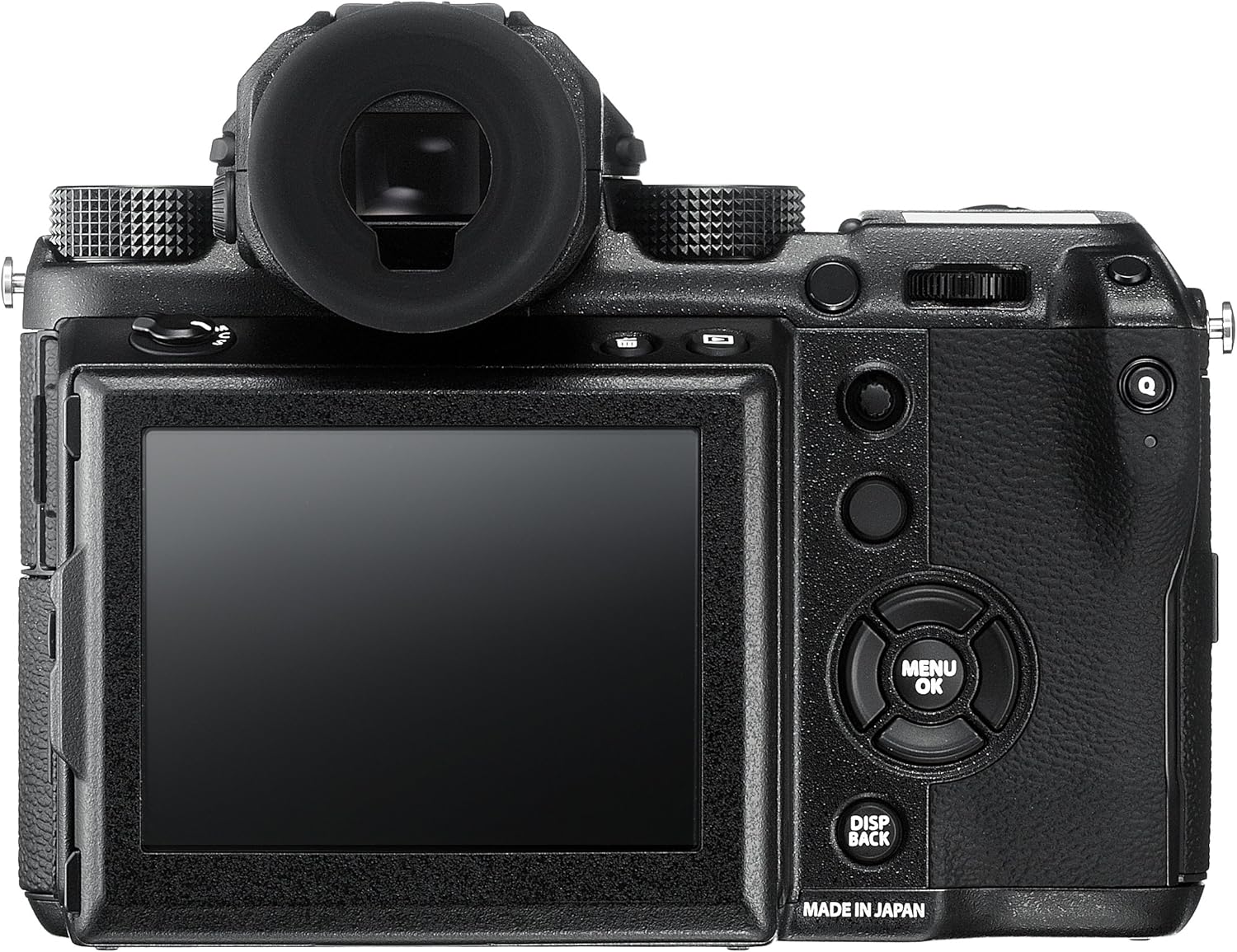
4.5. Connectivity
The GFX 50S offers multiple connectivity options:
- Wi-Fi: For wireless image transfer and remote camera control.
- USB 3.0: For high-speed data transfer to a computer.
- HDMI (Type D Micro HDMI): For video output to external displays.
- 3.5mm Audio: For external microphone input.
5. Maintenance
5.1. Cleaning the Camera and Lens
Regularly clean the camera body with a soft, dry cloth. For the lens, use a lens brush or air blower to remove dust, followed by a microfiber lens cloth and specialized lens cleaning solution if necessary. Avoid touching the sensor directly. If sensor cleaning is required, use a sensor cleaning kit or consult a professional.
5.2. Battery Care
Always use genuine Fujifilm batteries and chargers. Store batteries in a cool, dry place. Avoid exposing batteries to extreme temperatures. If the camera will not be used for an extended period, remove the battery.
5.3. Storage
Store the camera in a dry, well-ventilated area away from direct sunlight and extreme temperatures. The operating temperature range is -10°C to +40°C (14°F to 104°F). Use a desiccant to prevent mold growth if storing in humid conditions.
6. Troubleshooting
6.1. Camera Not Powering On
- Ensure the battery is fully charged and correctly inserted.
- Check if the battery contacts are clean.
- Try using a different, fully charged battery if available.
6.2. Focus Issues
- Verify that the lens is clean and free from smudges.
- Ensure sufficient light for the autofocus system to operate effectively.
- Check the selected autofocus mode and point.
6.3. Image Quality Concerns
- Ensure the correct ISO, aperture, and shutter speed settings for the lighting conditions.
- Check for dust on the sensor or lens.
- Review the selected film simulation mode.
7. Specifications
| Feature | Detail |
|---|---|
| Model Name | Fujifilm GFX 50S |
| Photo Sensor Resolution | 51.4 MP |
| Photo Sensor Size | Medium Format (>35mm) |
| Photo Sensor Technology | CMOS |
| Compatible Mountings | Fujifilm G |
| Image Stabilization | Digital |
| ISO Range | ISO200-12800, extendable to 102400 |
| Maximum Shutter Speed | 1/4000 Seconds |
| Minimum Shutter Speed | 1/4000 Seconds |
| Autofocus Points | 117 |
| Display Type | Tilting Touchscreen LCD |
| Screen Size | 3.2 Inches |
| Video Resolution | FHD 1080p |
| Supported File Format | JPEG, RAW, MP4 |
| Flash Memory Type | SD |
| Wireless Technology | Wi-Fi |
| Connectivity Technology | 3.5mm audio, HDMI, USB 3.0 |
| Item Weight | 0.83 Kilograms |
| Operating Temperature | -10°C - +40°C (14°F - 104°F) |
8. Warranty and Support
Your Fujifilm GFX 50S camera comes with a U.S.A. Warranty. For detailed warranty information, please refer to the warranty card included in your product packaging or visit the official Fujifilm support website. For technical support, troubleshooting assistance, or service inquiries, please contact Fujifilm customer service.
You can find additional resources and contact information on the Official Fujifilm Store.


