
BORA PM-8000
BORA Portamate PM-8000 Miter Saw Stand Work Station User Manual
Model: PM-8000 | Brand: BORA
Introduction
This manual provides comprehensive instructions for the safe and efficient operation, assembly, and maintenance of your BORA Portamate PM-8000 Miter Saw Stand Work Station. This versatile workstation is designed to securely mount your miter saw and other power tools, offering an expandable and portable work surface for various projects. Please read this manual thoroughly before initial use and retain it for future reference.
Safety Information
Always prioritize safety when operating power tools and equipment. Failure to follow safety guidelines can result in serious injury or property damage.
- Read and understand all instructions before assembly and operation.
- Wear appropriate personal protective equipment (PPE), including safety glasses, hearing protection, and gloves.
- Ensure the workstation is placed on a stable, level surface before use.
- Do not exceed the maximum load capacity of 400 pounds.
- Keep children and bystanders away from the work area.
- Always disconnect power tools from their power source before making adjustments or performing maintenance on the workstation.
- Inspect the workstation for damage or loose components before each use.
Proposition 65 Warning: This product may contain chemicals known to the State of California to cause cancer and birth defects or other reproductive harm.
Components List
The BORA Portamate PM-8000 Miter Saw Stand Work Station includes the following main components:
- Miter Saw Workstation Frame
- (2) 10-inch Wheels
- 2 Side Extension Tables
- Mounting Hardware (for assembly and tool attachment)
Setup
Follow these steps for initial assembly and setup of your workstation.
1. Unpacking and Initial Assembly
Carefully remove all components from the packaging. Refer to the included assembly diagram for detailed steps. Attach the 10-inch wheels to the designated axle points on the frame. Ensure all bolts and fasteners are securely tightened.

Figure 1: The BORA Portamate PM-8000 Miter Saw Stand Work Station in its fully extended configuration.
2. Attaching Your Miter Saw
The workstation features adjustable mounting rails designed to accommodate a wide range of miter saws and other power tools. Position your miter saw on the central platform and align it with the mounting holes. Secure the saw using appropriate bolts and washers (not included with the stand, typically provided with your miter saw or purchased separately). Ensure the saw is firmly attached and does not wobble.

Figure 2: A miter saw securely mounted on the workstation, demonstrating the expansive 7 feet of working surface when extensions are deployed.
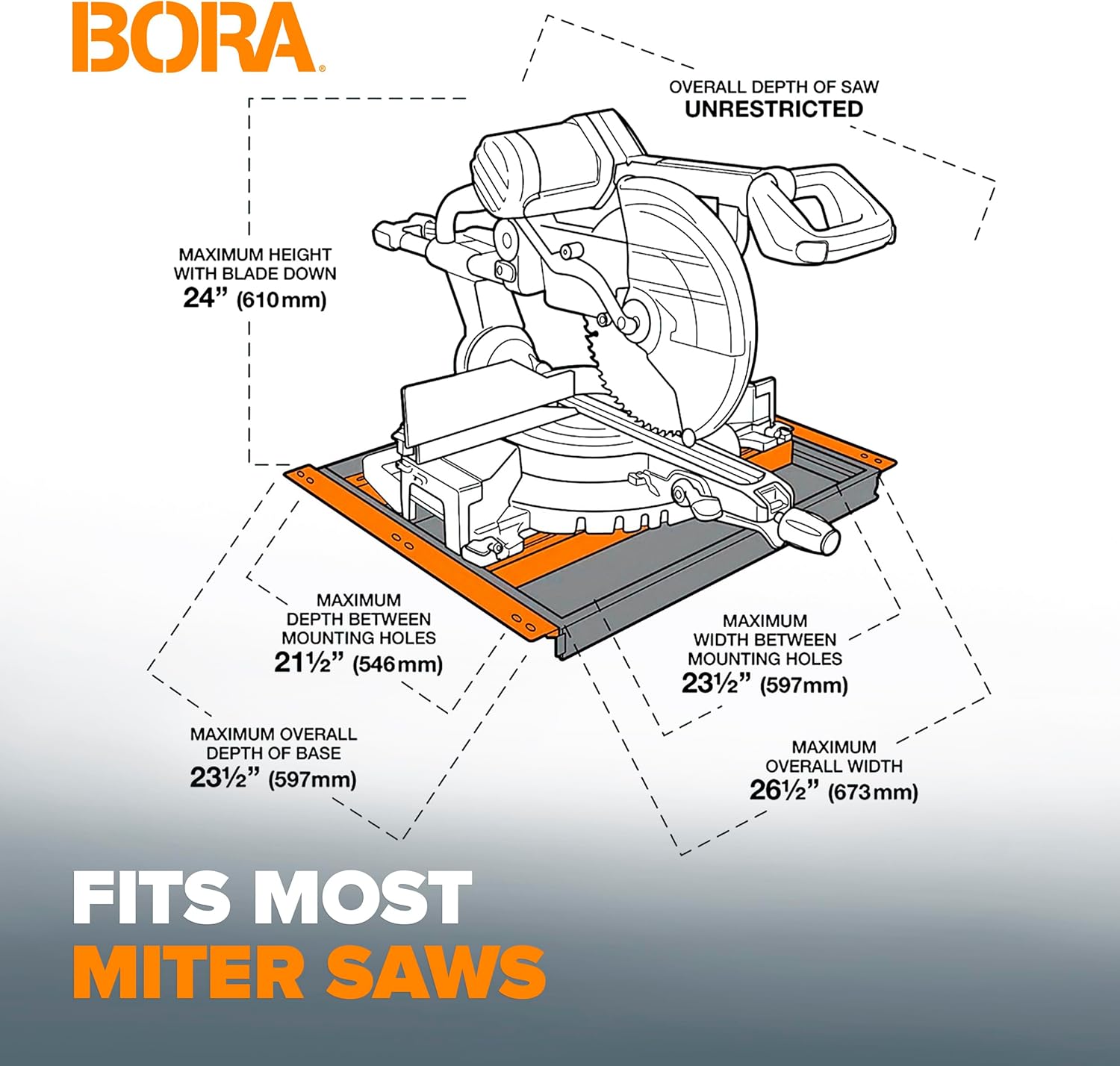
Figure 3: Detailed diagram illustrating the maximum dimensions for miter saws compatible with the PM-8000 workstation, including maximum height with blade down, depth, and width between mounting holes.
3. Deploying Side Extension Tables
The two side extension tables can be folded out and locked into place to expand your work surface from 30 inches to 60 or 90 inches. The middle sections of these wings are adjustable to align perfectly with your miter saw's height, providing seamless material support.
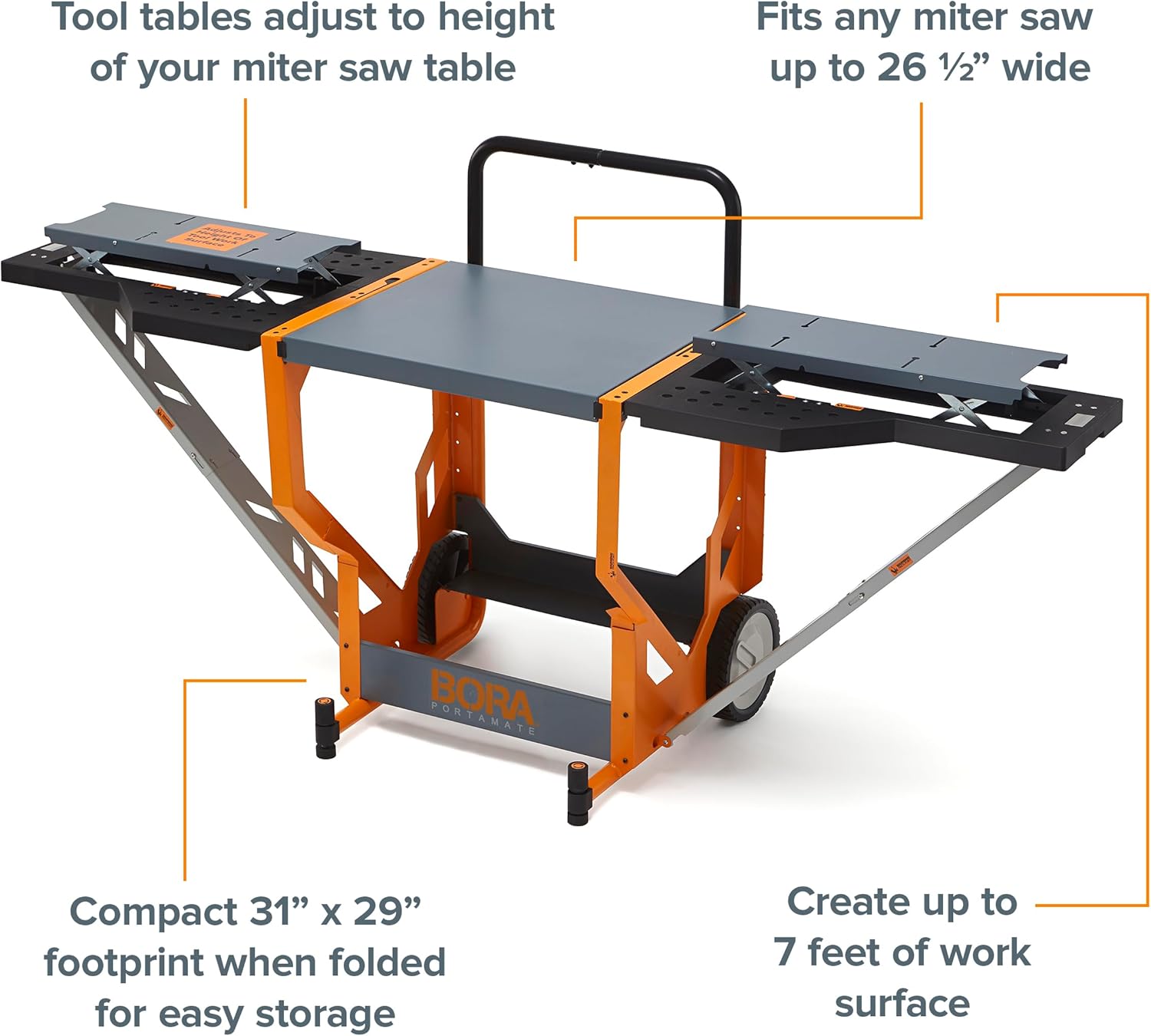
Figure 4: The workstation with its side extension tables deployed, highlighting the adjustable height feature of the tool tables and the compact 31" x 29" footprint when folded.
4. Instant Setup and Transport
The PM-8000 is designed for quick deployment and easy transport. With its 10-inch locking wheels and convenient handle, you can effortlessly move the workstation around your shop or job site. The unique design allows for instant setup from a compact storage position to a fully functional workstation.

Figure 5: A visual sequence demonstrating the rapid transformation of the workstation from its compact, stored position to a fully extended and operational setup.
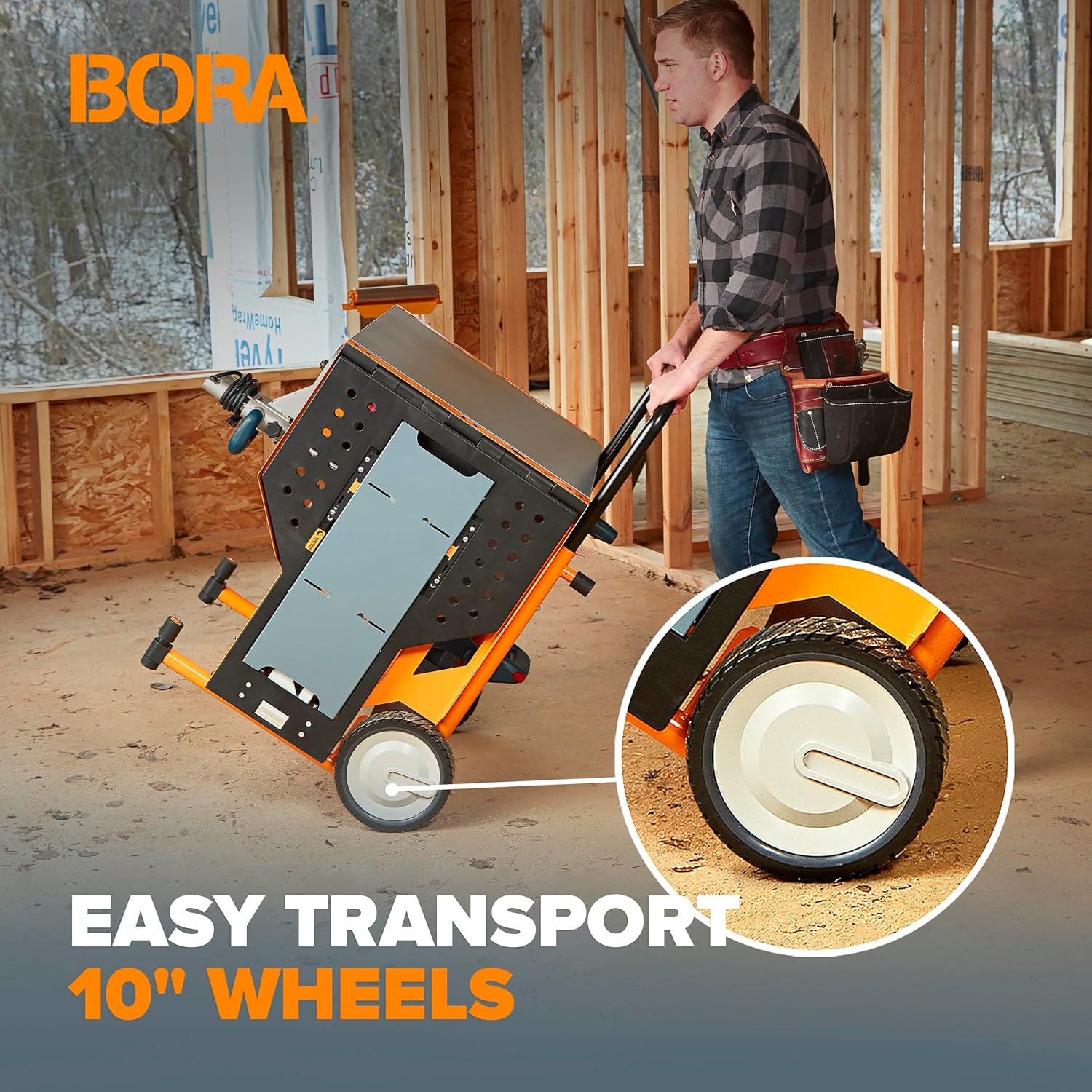
Figure 6: A worker easily transporting the workstation across a job site, showcasing the utility of the integrated 10-inch wheels for mobility.
Operating Instructions
Once assembled and your miter saw is mounted, the PM-8000 is ready for use.
Using the Workstation with a Miter Saw
- Extend the side tables to the desired length (60 or 90 inches) by unfolding them until they lock into place.
- Adjust the height of the middle sections of the extension tables to match the height of your miter saw's cutting surface. This ensures stable support for long workpieces.
- Utilize the ¾-inch dog holes on the work surface for pegs or clamps to help secure your material during cutting operations.
Converting to a General Workbench
When not using the workstation for cutting, the center portion can be flipped over and locked, providing a clear, stable work area. Your miter saw remains attached, stored upside down and out of the way, allowing the workstation to function as a versatile workbench for various DIY projects.

Figure 7: A user operating a miter saw on the workstation, demonstrating the rotating top feature that allows the saw to be stored underneath, converting the unit into a flat workbench.
Maintenance
Regular maintenance will ensure the longevity and optimal performance of your BORA Portamate PM-8000.
- Cleaning: Wipe down all surfaces with a damp cloth after each use to remove sawdust and debris. Avoid using harsh chemicals that could damage the finish.
- Inspection: Periodically check all fasteners, bolts, and joints for tightness. Re-tighten as necessary. Inspect the wheels for wear and ensure they roll smoothly.
- Lubrication: Apply a light lubricant to moving parts, such as the folding mechanisms and wheel axles, as needed to ensure smooth operation.
- Storage: When not in use, fold the workstation into its compact form and store it in a dry, protected area to prevent rust and damage.
Troubleshooting
If you encounter issues with your PM-8000 workstation, refer to the following common problems and solutions:
| Problem | Possible Cause | Solution |
|---|---|---|
| Workstation feels unstable or wobbly. | Loose fasteners; uneven surface. | Check and tighten all bolts and screws. Ensure the workstation is on a flat, level surface. |
| Side extension tables do not lock securely. | Debris in locking mechanism; bent components. | Clear any obstructions from the locking mechanism. Inspect for damage and contact support if components are bent. |
| Wheels do not roll smoothly. | Dirt/debris in axles; lack of lubrication. | Clean wheels and axles. Apply a light lubricant to the axle points. |
| Miter saw not securely mounted. | Incorrect mounting hardware; loose bolts. | Ensure correct size and type of mounting hardware is used. Tighten all mounting bolts firmly. |
Specifications
| Feature | Detail |
|---|---|
| Model Number | PM-8000 |
| Brand | BORA |
| Material | Stainless Steel |
| Finish Type | Stainless-Steel |
| Color | Orange/Black |
| Item Weight | 90 pounds |
| Load Capacity | 400 pounds |
| Item Dimensions (L x W x H) | 29 x 31 x 34 inches (compact) |
| Extended Work Surface Length | Up to 90 inches (7 feet) |
| Wheel Size | 10 inches |
| Assembly Required | Yes |
| Base Type | Casters |
| UPC | 814000014222 |
Warranty Information
The BORA Portamate PM-8000 Miter Saw Stand Work Station comes with a 1-year limited warranty from the date of purchase. This warranty covers defects in materials and workmanship under normal use. It does not cover damage resulting from misuse, abuse, accidents, unauthorized repairs, or normal wear and tear. Please retain your proof of purchase for warranty claims.
Customer Support
For technical assistance, warranty claims, or any questions regarding your BORA Portamate PM-8000 Miter Saw Stand Work Station, please contact the manufacturer:
Affinity Tool Works
Email: info@affinitytool
Please have your model number (PM-8000) and date of purchase available when contacting support.
Related documentsPM-8000


Ask a question about this manual
Ask about setup, troubleshooting, compatibility, parts, safety, or missing instructions. Manuals+ will review the question and use this page’s manual context to help answer it.