
DSLRKIT A009
User Manual
DSLRKIT Tripod Mount Ring A009 for Tamron SP 70-200MM F/2.8 VC USD
1. Introduction
This manual provides detailed instructions for the proper use, installation, and maintenance of the DSLRKIT Tripod Mount Ring A009. This accessory is specifically designed to provide stable support for your Tamron SP 70-200MM F/2.8 DI VC USD (A009) telephoto lens when mounted on a tripod or monopod. It helps to balance the weight of the lens, reducing strain on your camera's lens mount and improving overall stability during photography.
The tripod mount ring is constructed from high-quality anodized aluminum alloy, ensuring durability and a precise fit. Its robust design is intended for professional and enthusiast photographers who require reliable support for their heavy telephoto lenses.
2. Product Overview
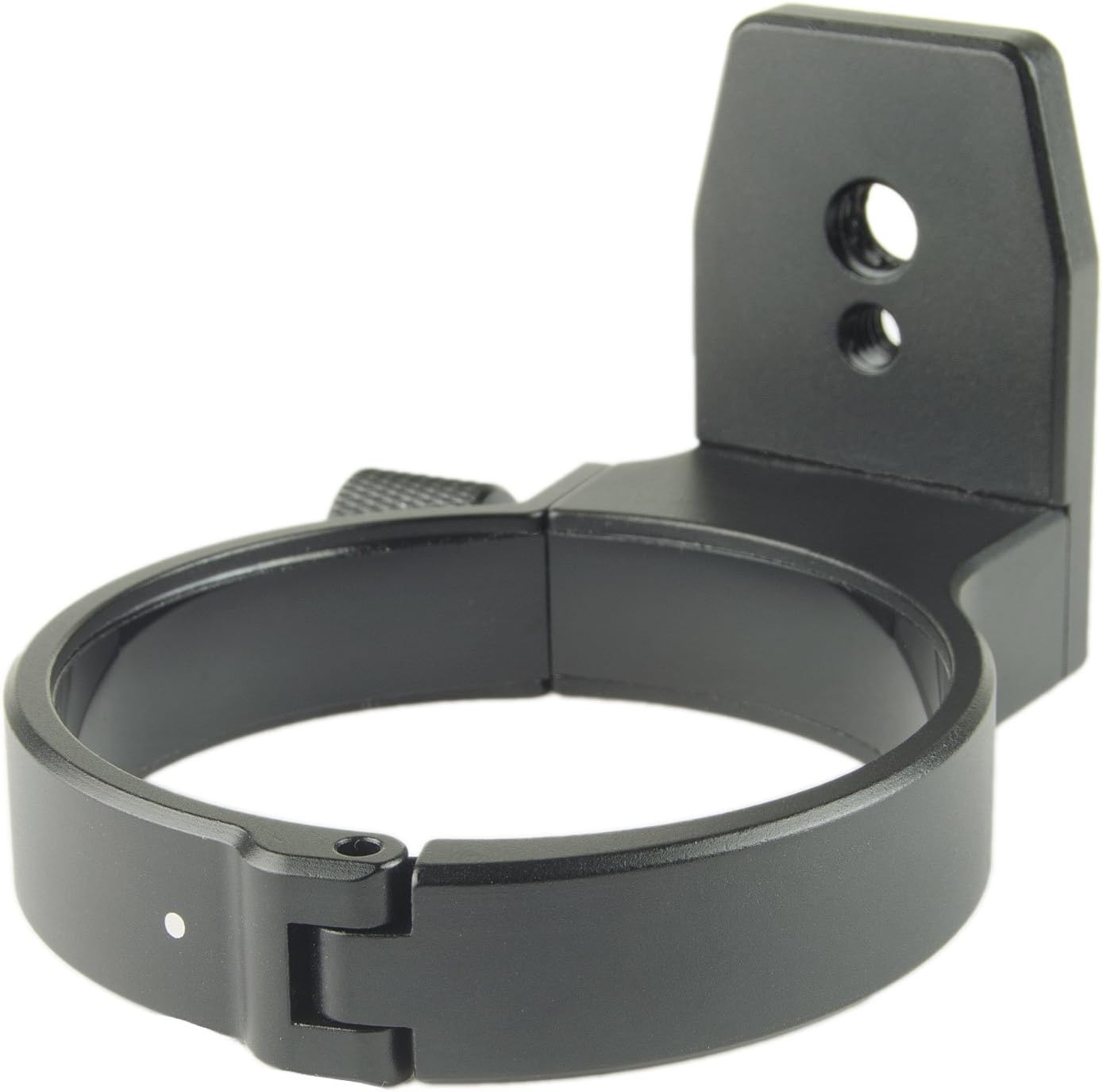
The DSLRKIT Tripod Mount Ring A009 is a precision-engineered accessory. Key features include:
- Compatibility: Specifically designed for the Tamron SP 70-200MM F/2.8 DI VC USD (A009) lens.
- Material: Made from high-quality anodized aluminum alloy for strength and corrosion resistance.
- Dimensions: Inner diameter of 72.8mm, width of 18mm, and thickness of 4.5mm.
- Mounting Points: Features 1/4" and 3/8" UNC (Unified National Coarse Thread) mounting holes for versatile tripod and monopod attachment.
- Color: Black finish to match most camera equipment.


3. Setup and Installation
Follow these steps to properly attach the tripod mount ring to your Tamron SP 70-200MM F/2.8 DI VC USD (A009) lens:
- Prepare the Lens: Ensure your Tamron SP 70-200MM F/2.8 DI VC USD (A009) lens is clean and free of debris. It is recommended to detach the lens from the camera body before installation for easier handling and to prevent accidental damage.
- Open the Ring: Loosen the tightening knob on the tripod mount ring by turning it counter-clockwise until the ring opens sufficiently to fit around the lens barrel.
- Position the Ring: Carefully place the open ring around the designated area on your Tamron lens barrel. This area is typically a smooth, cylindrical section near the lens mount, designed for tripod collar attachment. Ensure the ring is seated correctly and evenly.
- Close and Tighten: Close the ring around the lens barrel. Gently turn the tightening knob clockwise until the ring is securely fastened around the lens. Do not overtighten, as this could damage the lens or the ring. The ring should be snug enough to prevent rotation or movement of the lens within the collar, but not so tight as to cause deformation.
- Attach to Tripod/Monopod: Once the ring is securely attached to the lens, you can mount the assembly onto a tripod or monopod using the 1/4" or 3/8" UNC threaded holes on the base of the tripod mount ring. Use the appropriate screw on your tripod head to secure the ring.

4. Operating Instructions
The primary function of the tripod mount ring is to provide a stable and balanced platform for your telephoto lens. Once installed, the ring allows for smooth rotation of the lens and camera assembly, enabling quick switching between horizontal and vertical orientations without adjusting the tripod head.
- Balancing the Setup: When the lens and camera are mounted on a tripod via the tripod mount ring, the center of gravity shifts to the lens. This ring helps to balance the entire setup, preventing the camera from tipping forward and reducing stress on the camera's lens mount.
- Rotating for Orientation: To change the camera's orientation from landscape to portrait (or vice-versa), slightly loosen the tightening knob on the tripod mount ring. Rotate the camera and lens assembly within the ring to the desired orientation. Once positioned, retighten the knob to secure the camera in place. This allows for quick and precise adjustments without needing to re-level your tripod.
- Stability: Always ensure the tripod mount ring is securely tightened before leaving your equipment unattended. A properly secured ring will provide maximum stability and prevent accidental movement or drops.
5. Maintenance and Care
Proper maintenance will ensure the longevity and optimal performance of your DSLRKIT Tripod Mount Ring A009.
- Cleaning: Use a soft, dry cloth to wipe down the surface of the tripod mount ring. For stubborn dirt, a slightly damp cloth can be used, followed by immediate drying. Avoid using harsh chemicals, solvents, or abrasive materials, as these can damage the anodized finish.
- Storage: When not in use, store the tripod mount ring in a clean, dry environment, away from extreme temperatures and humidity. If detached from the lens, consider storing it in a protective pouch to prevent scratches.
- Inspection: Periodically inspect the tightening knob and hinge mechanism for any signs of wear or damage. Ensure the threads on the mounting holes are clean and free of obstruction.
- Avoid Overtightening: Consistently overtightening the knob can strip the threads or deform the ring. Tighten only until the lens is secure and does not rotate freely.
6. Troubleshooting
| Problem | Possible Cause | Solution |
|---|---|---|
| Ring does not fit the lens. | Incorrect lens model or ring not fully opened. | Ensure your lens is the Tamron SP 70-200MM F/2.8 DI VC USD (A009). Fully loosen the tightening knob and open the ring. |
| Lens rotates freely within the ring after tightening. | Ring not tightened sufficiently or incorrect positioning. | Ensure the ring is positioned on the correct part of the lens barrel and tighten the knob firmly but without excessive force. |
| Difficulty attaching to tripod. | Incorrect screw size or obstructed threads. | Verify your tripod screw is 1/4" or 3/8" UNC. Clean the threads on the ring's base if obstructed. |
7. Specifications
| Feature | Detail |
|---|---|
| Model | A009 |
| Compatibility | Tamron SP 70-200MM F/2.8 DI VC USD (A009) |
| Inner Diameter | 72.8mm |
| Ring Width | 18mm |
| Ring Thickness | 4.5mm |
| Mounting Threads | 1/4" and 3/8" UNC |
| Material | Anodized Aluminum Alloy |
| Color | Black |
| Item Weight | 5 ounces (approx. 141.7 grams) |
| Package Dimensions | 4.88 x 3.78 x 2.28 inches |
8. Warranty Information
DSLRKIT products are manufactured to high-quality standards. For specific warranty details, including duration and coverage, please refer to the documentation provided with your purchase or contact DSLRKIT customer support directly. Typically, products are covered against manufacturing defects for a limited period from the date of purchase.
Please retain your proof of purchase for any warranty claims.
9. Customer Support
If you encounter any issues or have questions regarding your DSLRKIT Tripod Mount Ring A009, please contact DSLRKIT customer support. For the most up-to-date contact information, please visit the official DSLRKIT website or refer to the contact details provided with your product packaging.
You can also visit the DSLRKIT Store on Amazon for additional product information and support resources.
Ask a question about this manual
Ask about setup, troubleshooting, compatibility, parts, safety, or missing instructions. Manuals+ will review the question and use this page’s manual context to help answer it.